 ) is used.
This document provides an up-to-date view of all hardware and configuration data items collected by the Universal Discovery Scanners.
For each field, the tables show whether the data is collected in the operating system or not.
When data can be collected, a blue dot () is used.
No graphic means that the data item cannot be collected.
This data was generated automatically from the file hwdefinitions.xml.
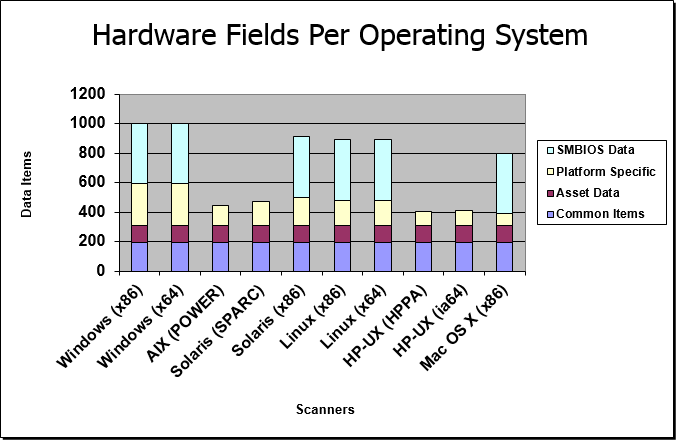
The following graphic provides an overview of the number of data fields collected by the different scanners:
To quickly navigate to an area of data, click on one of the links below.
Information that is not automatically collected by the Scanner can be entered manually as each computer is scanned. The information collected is usually referred to as asset data, and includes details about users, departments, physical assets, equipment, and any other information that is useful to record.
| Field Name / Description | Field Type | Windows (x86) | Windows (x64) | AIX (POWER) | Solaris (SPARC) | Solaris (x86) | Linux (x86) | Linux (x64) | Linux (PPC64LE) | Linux (PPC64) | HP-UX (HPPA) | HP-UX (ia64) | Mac OS X (x86) | Mac OS X (x64) |
|---|---|---|---|---|---|---|---|---|---|---|---|---|---|---|
| Device_ID | int | | | | | | | | | | | | | |
Device ID uniquely identifying the device to which the data belongs. | ||||||||||||||
| hwAssetDescription | string | | | | | | | | | | | | | |
Description line that contains a brief description of the asset. This field is typically read/only and combines information from several hardware and asset fields. It is the field that is used by the Viewer and Analysis Workbench when displaying the description of a scan in the Load dialog. | ||||||||||||||
| hwAssetTag | string | | | | | | | | | | | | | |
The Asset Tag field contains a unique identifier for the machine. It is normally populated from a sequence of hardware fields such as MAC Address, Serial Number, Dell or Compaq Asset tag, etc. | ||||||||||||||
| hwAssetEmployeeID | string | | | | | | | | | | | | | |
Employee ID as used in the organisation. | ||||||||||||||
| hwAssetUserLastName | string | | | | | | | | | | | | | |
Last name of user. | ||||||||||||||
| hwAssetUserFirstName | string | | | | | | | | | | | | | |
First name of user. | ||||||||||||||
| hwAssetUserFullName | string | | | | | | | | | | | | | |
Full name of user. | ||||||||||||||
| hwAssetUserJobTitle | string | | | | | | | | | | | | | |
Job title of user. | ||||||||||||||
| hwAssetCostCenter | string | | | | | | | | | | | | | |
Cost center description or code. | ||||||||||||||
| hwAssetBusinessUnit | string | | | | | | | | | | | | | |
Name of business unit. | ||||||||||||||
| hwAssetDivision | string | | | | | | | | | | | | | |
Division description or code. | ||||||||||||||
| hwAssetDepartment | string | | | | | | | | | | | | | |
Department description or code. | ||||||||||||||
| hwAssetSection | string | | | | | | | | | | | | | |
Section description or code. | ||||||||||||||
| hwAssetOfficeLocation | string | | | | | | | | | | | | | |
Location of office, normally a combination of country and city. | ||||||||||||||
| hwAssetBuilding | string | | | | | | | | | | | | | |
Identified the building containing the machine. | ||||||||||||||
| hwAssetFloor | string | | | | | | | | | | | | | |
The floor on which the machine is located. | ||||||||||||||
| hwAssetRoom | string | | | | | | | | | | | | | |
Description, name or number of the room containing the machine. | ||||||||||||||
| hwAssetBarCode | string | | | | | | | | | | | | | |
For machines with bar codes on them, use this field to allow the bar code to be entered or stored. | ||||||||||||||
| hwAssetTelephoneExtension | string | | | | | | | | | | | | | |
Internal telephone extension. | ||||||||||||||
| hwAssetTelephoneNumber | string | | | | | | | | | | | | | |
Full direct telephone number of user. | ||||||||||||||
| hwAssetCellphoneNumber | string | | | | | | | | | | | | | |
Cell/mobile phone number of user. | ||||||||||||||
| hwAssetPrinterDescription | string | | | | | | | | | | | | | |
Contains a description of a local printer attached to the machine, if any. | ||||||||||||||
| hwAssetPrinterAssetTag | string | | | | | | | | | | | | | |
Asset tag of a local printer attached to the machine, if any. | ||||||||||||||
| hwAssetMachineMake | string | | | | | | | | | | | | | |
Make or Manufacturer of the machine. This data is automatically collected on machines supporting SMBIOS. | ||||||||||||||
| hwAssetMachineModel | string | | | | | | | | | | | | | |
Model of the machine. This data is automatically collected on machines supporting SMBIOS. | ||||||||||||||
| hwAssetDeviceType | string | | | | | | | | | | | | | |
Device type of the machine (Server, Notebook, Tower, etc). | ||||||||||||||
| hwAssetUserField1 | string | | | | | | | | | | | | | |
User-defined field. | ||||||||||||||
| hwAssetUserField2 | string | | | | | | | | | | | | | |
User-defined field. | ||||||||||||||
| hwAssetUserField3 | string | | | | | | | | | | | | | |
User-defined field. | ||||||||||||||
| hwAssetUserField4 | string | | | | | | | | | | | | | |
User-defined field. | ||||||||||||||
| hwAssetUserField5 | string | | | | | | | | | | | | | |
User-defined field. | ||||||||||||||
| hwAssetUserField6 | string | | | | | | | | | | | | | |
User-defined field. | ||||||||||||||
| hwAssetUserField7 | string | | | | | | | | | | | | | |
User-defined field. | ||||||||||||||
| hwAssetUserField8 | string | | | | | | | | | | | | | |
User-defined field. | ||||||||||||||
| hwAssetUserField9 | string | | | | | | | | | | | | | |
User-defined field. | ||||||||||||||
| hwAssetUserField10 | string | | | | | | | | | | | | | |
User-defined field. | ||||||||||||||
| hwAssetUserField11 | string | | | | | | | | | | | | | |
User-defined field. | ||||||||||||||
| hwAssetUserField12 | string | | | | | | | | | | | | | |
User-defined field. | ||||||||||||||
| hwAssetUserField13 | string | | | | | | | | | | | | | |
User-defined field. | ||||||||||||||
| hwAssetUserField14 | string | | | | | | | | | | | | | |
User-defined field. | ||||||||||||||
| hwAssetUserField15 | string | | | | | | | | | | | | | |
User-defined field. | ||||||||||||||
| hwAssetUserField16 | string | | | | | | | | | | | | | |
User-defined field. | ||||||||||||||
| hwAssetUserField17 | string | | | | | | | | | | | | | |
User-defined field. | ||||||||||||||
| hwAssetUserField18 | string | | | | | | | | | | | | | |
User-defined field. | ||||||||||||||
| hwAssetUserField19 | string | | | | | | | | | | | | | |
User-defined field. | ||||||||||||||
| hwAssetUserField20 | string | | | | | | | | | | | | | |
User-defined field. | ||||||||||||||
| hwAssetUserField21 | string | | | | | | | | | | | | | |
User-defined field. | ||||||||||||||
| hwAssetUserField22 | string | | | | | | | | | | | | | |
User-defined field. | ||||||||||||||
| hwAssetUserField23 | string | | | | | | | | | | | | | |
User-defined field. | ||||||||||||||
| hwAssetUserField24 | string | | | | | | | | | | | | | |
User-defined field. | ||||||||||||||
| hwAssetUserField25 | string | | | | | | | | | | | | | |
User-defined field. | ||||||||||||||
| hwAssetUserField26 | string | | | | | | | | | | | | | |
User-defined field. | ||||||||||||||
| hwAssetUserField27 | string | | | | | | | | | | | | | |
User-defined field. | ||||||||||||||
| hwAssetUserField28 | string | | | | | | | | | | | | | |
User-defined field. | ||||||||||||||
| hwAssetUserField29 | string | | | | | | | | | | | | | |
User-defined field. | ||||||||||||||
| hwAssetUserField30 | string | | | | | | | | | | | | | |
User-defined field. | ||||||||||||||
| hwAssetAnalysis1 | string | |||||||||||||
Analysis field. | ||||||||||||||
| hwAssetAnalysis2 | string | |||||||||||||
Analysis field. | ||||||||||||||
| hwAssetAnalysis3 | string | |||||||||||||
Analysis field. | ||||||||||||||
| hwAssetAnalysis4 | string | |||||||||||||
Analysis field. | ||||||||||||||
| hwAssetAnalysis5 | string | |||||||||||||
Analysis field. | ||||||||||||||
| hwAssetAnalysis6 | string | |||||||||||||
Analysis field. | ||||||||||||||
| hwAssetAnalysis7 | string | |||||||||||||
Analysis field. | ||||||||||||||
| hwAssetAnalysis8 | string | |||||||||||||
Analysis field. | ||||||||||||||
| hwAssetAnalysis9 | string | |||||||||||||
Analysis field. | ||||||||||||||
| hwAssetAnalysis10 | string | |||||||||||||
Analysis field. | ||||||||||||||
| hwAssetAnalysis11 | string | |||||||||||||
Analysis field. | ||||||||||||||
| hwAssetAnalysis12 | string | |||||||||||||
Analysis field. | ||||||||||||||
| hwAssetAnalysis13 | string | |||||||||||||
Analysis field. | ||||||||||||||
| hwAssetAnalysis14 | string | |||||||||||||
Analysis field. | ||||||||||||||
| hwAssetAnalysis15 | string | |||||||||||||
Analysis field. | ||||||||||||||
| hwAssetAnalysis16 | string | |||||||||||||
Analysis field. | ||||||||||||||
| hwAssetAnalysis17 | string | |||||||||||||
Analysis field. | ||||||||||||||
| hwAssetAnalysis18 | string | |||||||||||||
Analysis field. | ||||||||||||||
| hwAssetAnalysis19 | string | |||||||||||||
Analysis field. | ||||||||||||||
| hwAssetAnalysis20 | string | |||||||||||||
Analysis field. | ||||||||||||||
| hwAssetAnalysis21 | string | |||||||||||||
Analysis field. | ||||||||||||||
| hwAssetAnalysis22 | string | |||||||||||||
Analysis field. | ||||||||||||||
| hwAssetAnalysis23 | string | |||||||||||||
Analysis field. | ||||||||||||||
| hwAssetAnalysis24 | string | |||||||||||||
Analysis field. | ||||||||||||||
| hwAssetAnalysis25 | string | |||||||||||||
Analysis field. | ||||||||||||||
| hwAssetAnalysis26 | string | |||||||||||||
Analysis field. | ||||||||||||||
| hwAssetAnalysis27 | string | |||||||||||||
Analysis field. | ||||||||||||||
| hwAssetAnalysis28 | string | |||||||||||||
Analysis field. | ||||||||||||||
| hwAssetAutomatic1 | string | | | | | | | | | | | | | |
Automatic field. Automatic fields can be automatically collected by the scanners. | ||||||||||||||
| hwAssetAutomatic2 | string | | | | | | | | | | | | | |
Automatic field. Automatic fields can be automatically collected by the scanners. | ||||||||||||||
| hwAssetAutomatic3 | string | | | | | | | | | | | | | |
Automatic field. Automatic fields can be automatically collected by the scanners. | ||||||||||||||
| hwAssetAutomatic4 | string | | | | | | | | | | | | | |
Automatic field. Automatic fields can be automatically collected by the scanners. | ||||||||||||||
| hwAssetAutomatic5 | string | | | | | | | | | | | | | |
Automatic field. Automatic fields can be automatically collected by the scanners. | ||||||||||||||
| hwAssetAutomatic6 | string | | | | | | | | | | | | | |
Automatic field. Automatic fields can be automatically collected by the scanners. | ||||||||||||||
| hwAssetAutomatic7 | string | | | | | | | | | | | | | |
Automatic field. Automatic fields can be automatically collected by the scanners. | ||||||||||||||
| hwAssetAutomatic8 | string | | | | | | | | | | | | | |
Automatic field. Automatic fields can be automatically collected by the scanners. | ||||||||||||||
| hwAssetAutomatic9 | string | | | | | | | | | | | | | |
Automatic field. Automatic fields can be automatically collected by the scanners. | ||||||||||||||
| hwAssetAutomatic10 | string | | | | | | | | | | | | | |
Automatic field. Automatic fields can be automatically collected by the scanners. | ||||||||||||||
| hwAssetAutomatic11 | string | | | | | | | | | | | | | |
Automatic field. Automatic fields can be automatically collected by the scanners. | ||||||||||||||
| hwAssetAutomatic12 | string | | | | | | | | | | | | | |
Automatic field. Automatic fields can be automatically collected by the scanners. | ||||||||||||||
| hwAssetAutomatic13 | string | | | | | | | | | | | | | |
Automatic field. Automatic fields can be automatically collected by the scanners. | ||||||||||||||
| hwAssetAutomatic14 | string | | | | | | | | | | | | | |
Automatic field. Automatic fields can be automatically collected by the scanners. | ||||||||||||||
| hwAssetAutomatic15 | string | | | | | | | | | | | | | |
Automatic field. Automatic fields can be automatically collected by the scanners. | ||||||||||||||
| hwAssetAutomatic16 | string | | | | | | | | | | | | | |
Automatic field. Automatic fields can be automatically collected by the scanners. | ||||||||||||||
| hwAssetAutomatic17 | string | | | | | | | | | | | | | |
Automatic field. Automatic fields can be automatically collected by the scanners. | ||||||||||||||
| hwAssetAutomatic18 | string | | | | | | | | | | | | | |
Automatic field. Automatic fields can be automatically collected by the scanners. | ||||||||||||||
| hwAssetAutomatic19 | string | | | | | | | | | | | | | |
Automatic field. Automatic fields can be automatically collected by the scanners. | ||||||||||||||
| hwAssetAutomatic20 | string | | | | | | | | | | | | | |
Automatic field. Automatic fields can be automatically collected by the scanners. | ||||||||||||||
| hwAssetAutomatic21 | string | | | | | | | | | | | | | |
Automatic field. Automatic fields can be automatically collected by the scanners. | ||||||||||||||
| hwAssetAutomatic22 | string | | | | | | | | | | | | | |
Automatic field. Automatic fields can be automatically collected by the scanners. | ||||||||||||||
| hwAssetAutomatic23 | string | | | | | | | | | | | | | |
Automatic field. Automatic fields can be automatically collected by the scanners. | ||||||||||||||
| hwAssetAutomatic24 | string | | | | | | | | | | | | | |
Automatic field. Automatic fields can be automatically collected by the scanners. | ||||||||||||||
| hwAssetAutomatic25 | string | | | | | | | | | | | | | |
Automatic field. Automatic fields can be automatically collected by the scanners. | ||||||||||||||
| hwAssetAutomatic26 | string | | | | | | | | | | | | | |
Automatic field. Automatic fields can be automatically collected by the scanners. | ||||||||||||||
| hwAssetAutomatic27 | string | | | | | | | | | | | | | |
Automatic field. Automatic fields can be automatically collected by the scanners. | ||||||||||||||
| hwAssetAutomatic28 | string | | | | | | | | | | | | | |
Automatic field. Automatic fields can be automatically collected by the scanners. | ||||||||||||||
| hwAssetAutomatic29 | string | | | | | | | | | | | | | |
Automatic field. Automatic fields can be automatically collected by the scanners. | ||||||||||||||
| hwAssetAutomatic30 | string | | | | | | | | | | | | | |
Automatic field. Automatic fields can be automatically collected by the scanners. | ||||||||||||||
| hwAssetAutomatic31 | string | | | | | | | | | | | | | |
Automatic field. Automatic fields can be automatically collected by the scanners. | ||||||||||||||
| hwAssetAutomatic32 | string | | | | | | | | | | | | | |
Automatic field. Automatic fields can be automatically collected by the scanners. | ||||||||||||||
| hwAssetAutomatic33 | string | | | | | | | | | | | | | |
Automatic field. Automatic fields can be automatically collected by the scanners. | ||||||||||||||
| hwAssetAutomatic34 | string | | | | | | | | | | | | | |
Automatic field. Automatic fields can be automatically collected by the scanners. | ||||||||||||||
| hwAssetAutomatic35 | string | | | | | | | | | | | | | |
Automatic field. Automatic fields can be automatically collected by the scanners. | ||||||||||||||
| hwAssetAutomatic36 | string | | | | | | | | | | | | | |
Automatic field. Automatic fields can be automatically collected by the scanners. | ||||||||||||||
| hwAssetAutomatic37 | string | | | | | | | | | | | | | |
Automatic field. Automatic fields can be automatically collected by the scanners. | ||||||||||||||
| hwAssetAutomatic38 | string | | | | | | | | | | | | | |
Automatic field. Automatic fields can be automatically collected by the scanners. | ||||||||||||||
| hwAssetAutomatic39 | string | | | | | | | | | | | | | |
Automatic field. Automatic fields can be automatically collected by the scanners. | ||||||||||||||
| hwAssetAutomatic40 | string | | | | | | | | | | | | | |
Automatic field. Automatic fields can be automatically collected by the scanners. | ||||||||||||||
| hwAssetAutomatic41 | string | | | | | | | | | | | | | |
Automatic field. Automatic fields can be automatically collected by the scanners. | ||||||||||||||
| hwAssetAutomatic42 | string | | | | | | | | | | | | | |
Automatic field. Automatic fields can be automatically collected by the scanners. | ||||||||||||||
| hwAssetAutomatic43 | string | | | | | | | | | | | | | |
Automatic field. Automatic fields can be automatically collected by the scanners. | ||||||||||||||
| hwAssetAutomatic44 | string | | | | | | | | | | | | | |
Automatic field. Automatic fields can be automatically collected by the scanners. | ||||||||||||||
| hwAssetAutomatic45 | string | | | | | | | | | | | | | |
Automatic field. Automatic fields can be automatically collected by the scanners. | ||||||||||||||
| hwAssetAutomatic46 | string | | | | | | | | | | | | | |
Automatic field. Automatic fields can be automatically collected by the scanners. | ||||||||||||||
| hwAssetAutomatic47 | string | | | | | | | | | | | | | |
Automatic field. Automatic fields can be automatically collected by the scanners. | ||||||||||||||
| hwAssetAutomatic48 | string | | | | | | | | | | | | | |
Automatic field. Automatic fields can be automatically collected by the scanners. | ||||||||||||||
| hwAssetAutomatic49 | string | | | | | | | | | | | | | |
Automatic field. Automatic fields can be automatically collected by the scanners. | ||||||||||||||
| hwAssetAutomatic50 | string | | | | | | | | | | | | | |
Automatic field. Automatic fields can be automatically collected by the scanners. | ||||||||||||||
| hwAssetAutomatic51 | string | | | | | | | | | | | | | |
Automatic field. Automatic fields can be automatically collected by the scanners. | ||||||||||||||
| hwAssetAutomatic52 | string | | | | | | | | | | | | | |
Automatic field. Automatic fields can be automatically collected by the scanners. | ||||||||||||||
| hwAssetAutomatic53 | string | | | | | | | | | | | | | |
Automatic field. Automatic fields can be automatically collected by the scanners. | ||||||||||||||
| hwAssetAutomatic54 | string | | | | | | | | | | | | | |
Automatic field. Automatic fields can be automatically collected by the scanners. | ||||||||||||||
| hwAssetAutomatic55 | string | | | | | | | | | | | | | |
Automatic field. Automatic fields can be automatically collected by the scanners. | ||||||||||||||
| hwAssetAutomatic56 | string | | | | | | | | | | | | | |
Automatic field. Automatic fields can be automatically collected by the scanners. | ||||||||||||||
Contains the name/value pairs of the custom data detected by the post-scan script.
| Field Name / Description | Field Type | Windows (x86) | Windows (x64) | AIX (POWER) | Solaris (SPARC) | Solaris (x86) | Linux (x86) | Linux (x64) | Linux (PPC64LE) | Linux (PPC64) | HP-UX (HPPA) | HP-UX (ia64) | Mac OS X (x86) | Mac OS X (x64) |
|---|---|---|---|---|---|---|---|---|---|---|---|---|---|---|
| Device_ID | int | | | | | | | | | | | | | |
Device ID uniquely identifying the device to which the data belongs. | ||||||||||||||
| hwAssetCustomData_Seq | int | | | | | | | | | | | | | |
Integer field enumerating multiple values of this kind for a single Device ID. | ||||||||||||||
| hwAssetCustomDataName | string | | | | | | | | | | | | | |
Contains the key name of the custom data detected by the post-scan script. | ||||||||||||||
| hwAssetCustomDataValue | string | | | | | | | | | | | | | |
Contains the value of the custom data detected by the post-scan script. | ||||||||||||||
This shell contains information about asset data fields. Most entries will be automatically discovered, but some entries may have been entered by a user. As such entries may require special treatment, a list of them is maintained here.
| Field Name / Description | Field Type | Windows (x86) | Windows (x64) | AIX (POWER) | Solaris (SPARC) | Solaris (x86) | Linux (x86) | Linux (x64) | Linux (PPC64LE) | Linux (PPC64) | HP-UX (HPPA) | HP-UX (ia64) | Mac OS X (x86) | Mac OS X (x64) |
|---|---|---|---|---|---|---|---|---|---|---|---|---|---|---|
| Device_ID | int | | | | | | | | | | | | | |
Device ID uniquely identifying the device to which the data belongs. | ||||||||||||||
| hwAssetDataInfo_Seq | int | | | | | | | | | | | | | |
Integer field enumerating multiple values of this kind for a single Device ID. | ||||||||||||||
| hwAssetDataId | int | | | | | | | | | | | | | |
The Id of an asset data field. | ||||||||||||||
| hwIsUserSupplied | string | | | | | | | | | | | | | |
If the associated Id was entered manually by the user, this value is true. | ||||||||||||||
The following fields describe the CPUs (Central Processing Unit) and FPUs (Floating Point Unit) that are at the heart of the system. Most modern computers have one or more CPUs. The FPU is usually built into the CPU.
Information displayed includes the CPU (model), whether it has got FPU (numeric co-processor), MMX (MultiMedia eXtensions), ISSE/SSIMD capability and reports the speed of the CPU. For newer Intel and compatible processors, the manufacturer, model, family and stepping ID are reported.
| Field Name / Description | Field Type | Windows (x86) | Windows (x64) | AIX (POWER) | Solaris (SPARC) | Solaris (x86) | Linux (x86) | Linux (x64) | Linux (PPC64LE) | Linux (PPC64) | HP-UX (HPPA) | HP-UX (ia64) | Mac OS X (x86) | Mac OS X (x64) |
|---|---|---|---|---|---|---|---|---|---|---|---|---|---|---|
| Device_ID | int | | | | | | | | | | | | | |
Device ID uniquely identifying the device to which the data belongs. | ||||||||||||||
| hwLegacyFPUType | string | | | | | | | | | |||||
Displays the type of co-processor. For example, for most modern computers the co-processor will be shown as built in. | ||||||||||||||
| hwLegacyFPUBiosFlagSet | string | | | | | | | | ||||||
If the BIOS flag is set (yes) then a co-processor is present. | ||||||||||||||
| hwLegacyWeitek | string | |||||||||||||
This field is True if a Weitek FPU is present in the system. | ||||||||||||||
| hwLegacyWeitekRealMode | string | |||||||||||||
This field is True if a Weitek is present in the system and the processor is running in Real Mode. | ||||||||||||||
| hwPhysicalCPUCount | int | | | | | | | | | | | | | |
This shows the actual number of enabled physical CPUs (sockets). On the AIX platform this value is the same as hwCPUCoreCount as the AIX scanner is not able to detect the physical packaging of CPUs (chip, multichip module, book, etc). | ||||||||||||||
| hwCPUCoreCount | int | | | | | | | | | | | | | |
Each physical CPU can have multiple CPU cores. This shows the total number of CPU cores available. | ||||||||||||||
| hwCPUCount | int | | | | | | | | | | | | | |
This shows the number of logical CPUs available, including virtual (Hyper-Threading, Simultaneous Multi-Threading, etc.) CPUs. | ||||||||||||||
This contains information about all CPUs in the machine; each field is repeated for every CPU the machine contains.
| Field Name / Description | Field Type | Windows (x86) | Windows (x64) | AIX (POWER) | Solaris (SPARC) | Solaris (x86) | Linux (x86) | Linux (x64) | Linux (PPC64LE) | Linux (PPC64) | HP-UX (HPPA) | HP-UX (ia64) | Mac OS X (x86) | Mac OS X (x64) |
|---|---|---|---|---|---|---|---|---|---|---|---|---|---|---|
| Device_ID | int | | | | | | | | | | | | | |
Device ID uniquely identifying the device to which the data belongs. | ||||||||||||||
| hwCPUs_Seq | int | | | | | | | | | | | | | |
Integer field enumerating multiple values of this kind for a single Device ID. | ||||||||||||||
| hwCPUType | string | | | | | | | | | | | | | |
This field contains an accurate type specifier for the CPU. For example, it can be 80386, 80486, Pentium, Pentium Pro, etc. | ||||||||||||||
| hwCPUIntelBrand | string | | | | | | | | ||||||
For some Intel CPUs, this field contains the brand of the CPU. | ||||||||||||||
| hwCPUDescription | string | | | | | | | | | | | | | |
This field was introduced in the Pentium 4 and is a description of the processor that is embedded inside the processor itself. | ||||||||||||||
| hwCPUSpeedMeasured | int | | | | | | | | | | | | ||
This shows the actual speed that the CPU is running at as opposed to the CPU speed that was rated by the manufacturer. | ||||||||||||||
| hwCPUSpeedRated | int | | | | | | | | | | | | | |
This shows the speed rating that the CPU manufacturer supplied as opposed to the actual CPU speed measured by the scanner. | ||||||||||||||
| hwCPUSpeedByModel | int | | ||||||||||||
This shows the speed rating of the CPU typically included in this machine model. | ||||||||||||||
| hwCPUVendor | string | | | | | | | | | | | | | |
The name of the CPU chip vendor. | ||||||||||||||
| hwCPUModel | int | | | | | | | | | | | | | |
Shows the manufacturers model for the chip. | ||||||||||||||
| hwCPUFamily | int | | | | | | | | | |||||
Shows which family of processors the CPU belongs to. | ||||||||||||||
| hwCPUStepping | int | | | | | | | | | |||||
Shows the CPU stepping level which is Intel's terminology for revisions to the chips. | ||||||||||||||
| hwCPUSpecial | string | | | | | | | | | |||||
Shows any special capabilities that the CPU may have that do not fit into any of the other categories. | ||||||||||||||
| hwCPUIntelFeatures | string | | | | | | | | ||||||
Shows any additional instruction capability that the CPU may have. For example, MMX (MultiMedia eXtensions). | ||||||||||||||
| hwCPUIntelExtendedFeatures | string | | | | | | | | ||||||
Shows extended features that the CPU may have. Applies only to Pentium 4 and later processors. | ||||||||||||||
| hwCPUSerialNo | string | | | | | | | | | | | |||
The unique identifier that is put on the CPU chip by the manufacturer. | ||||||||||||||
| hwCPUBoard | string | | | |||||||||||
The board number on which the CPU is mounted. | ||||||||||||||
| hwCPUPortId | int | | | |||||||||||
The port ID for the CPU. | ||||||||||||||
| hwCPUPhysicalId | int | | | | | |||||||||
The physical CPU ID for the CPU. | ||||||||||||||
| hwCPUMask | string | | | |||||||||||
The CPU Mask for the CPU. | ||||||||||||||
| hwCPUOverdrive | string | | | | | | | | ||||||
Shows whether the CPU is an overdrive CPU. An overdrive CPU is a processor upgrade designed to upgrade older systems with newer processors. For example, a Pentium II overdrive processor can be used to upgrade a Pentium Pro system. | ||||||||||||||
| hwCPUDual | string | | | | | | | | ||||||
Shows whether the processor is the upgrade processor in a dual processor system. | ||||||||||||||
| hwCPUActive | string | | | | | |||||||||
Shows whether the CPU in question is active. | ||||||||||||||
| hwCPUSpeed | sequence | | | | | | | | | | | | | |
Shows the speed of the CPU (expressed in MHz). The value of this field is calculated as the first non-blank value from the following fields: hwCPUSpeedRated | ||||||||||||||
| hwCPU | string | | | | | | | | | | | | | |
This shows the name of the CPU that is present in the computer. | ||||||||||||||
Contains information about the cache memory on the computer. Cache memory holds recently accessed data. It is intended to speed up subsequent access to the same data. When data is read from or written to main memory a copy is also saved in the cache, along with the associated main memory address.
| Field Name / Description | Field Type | Windows (x86) | Windows (x64) | AIX (POWER) | Solaris (SPARC) | Solaris (x86) | Linux (x86) | Linux (x64) | Linux (PPC64LE) | Linux (PPC64) | HP-UX (HPPA) | HP-UX (ia64) | Mac OS X (x86) | Mac OS X (x64) |
|---|---|---|---|---|---|---|---|---|---|---|---|---|---|---|
| Device_ID | int | | | | | | | | | | | | | |
Device ID uniquely identifying the device to which the data belongs. | ||||||||||||||
| hwCPUCacheInformation_Seq | int | | | | | | | | | | | | | |
Integer field enumerating multiple values of this kind for a single Device ID. | ||||||||||||||
| hwCPUs_Seq | int | | | | | | | | | | | | | |
Foreign key referring to parent enumeration field in table hwCPUs. This field is present because fields in this table can occur multiple times for each instance of the fields in the hwCPUs table. | ||||||||||||||
| hwCPUCacheDescription | string | | | | | | | | ||||||
Shows a short description of the cache memory. For example, Instruction TLB: 4K-Byte Pages, 4-way set associative, 32 entries. This means that the cache is Translation Look-aside Buffer (TLB). A TLB is used in conjunction with a cache whose tags are based on virtual addresses. It has been implemented as 4-way set associative cache memory. In set associative cache memory each address is mapped to a certain set of cache locations, etc. | ||||||||||||||
| hwCPUCacheLevel | string | | | | | | | | | | | | ||
Indicates whether the cache is primary (L1) or secondary (L2). Primary cache is found inside or close to the CPU. Secondary cache is usually connected to the CPU via an external bus. | ||||||||||||||
| hwCPUCacheSize | int | | | | | | | | | | | | ||
Shows the size of the cache memory (expressed in Kilobytes). | ||||||||||||||
| hwCPUCacheTraceSize | int | | | | | | | | ||||||
The size of the Trace Cache (expressed in K-uops). An microOP = 'Micro-Operation/Operand'. This is the name that Intel gives instructions, which can be directly understood by the execution units of the microprocessor. Trace cache was a new feature implemented in Pentium 4s. | ||||||||||||||
| hwCPUCacheAssociativity | string | | | | | | | | | | ||||
Shows the type of cache associativity implemented for the cache memory. Cache associativity is a measure of how many locations an item can be stored in or how many lines are in a set or row of the cache. | ||||||||||||||
| hwCPUCacheLineSize | int | | | | | | | | | | | | ||
Shows the cache line size (expressed in bytes). Cache line size is the size of the unit of transfer in and out of the cache. | ||||||||||||||
| hwCPUCacheEntries | int | | | | | | | | | | ||||
Indicates the number of entries in the cache memory. | ||||||||||||||
Displays information about the architecture of the bus used in the computer - ISA, EISA, PCI, MCA or PCMCIA. A bus is used to transfer data between a computer's components. Information is also displayed about cards that are supported by the various bus types.
| Field Name / Description | Field Type | Windows (x86) | Windows (x64) | AIX (POWER) | Solaris (SPARC) | Solaris (x86) | Linux (x86) | Linux (x64) | Linux (PPC64LE) | Linux (PPC64) | HP-UX (HPPA) | HP-UX (ia64) | Mac OS X (x86) | Mac OS X (x64) |
|---|---|---|---|---|---|---|---|---|---|---|---|---|---|---|
| Device_ID | int | | | | | | | | | | | | | |
Device ID uniquely identifying the device to which the data belongs. | ||||||||||||||
| hwSystemClockMHz | int | | | | | | | | ||||||
The system clock speed in MHz. | ||||||||||||||
| hwCardSummary | int | | | | | | | | | | | | | |
Shows the number of cards that are present in the computer. | ||||||||||||||
Displays information about the architecture of the bus used in the computer - ISA, EISA, PCI, MCA or PCMCIA.
| Field Name / Description | Field Type | Windows (x86) | Windows (x64) | AIX (POWER) | Solaris (SPARC) | Solaris (x86) | Linux (x86) | Linux (x64) | Linux (PPC64LE) | Linux (PPC64) | HP-UX (HPPA) | HP-UX (ia64) | Mac OS X (x86) | Mac OS X (x64) |
|---|---|---|---|---|---|---|---|---|---|---|---|---|---|---|
| Device_ID | int | | | | | | | | | | | | | |
Device ID uniquely identifying the device to which the data belongs. | ||||||||||||||
| hwBusesSupported_Seq | int | | | | | | | | | | | | | |
Integer field enumerating multiple values of this kind for a single Device ID. | ||||||||||||||
| hwBusName | string | | | | | | | | | | | | | |
The type of bus supported - ISA, EISA, PCI, MCA or PCMCIA. | ||||||||||||||
| hwBusVersion | string | | | |||||||||||
The version number of the bus. | ||||||||||||||
Displays information about the cards that are used in the computer.
| Field Name / Description | Field Type | Windows (x86) | Windows (x64) | AIX (POWER) | Solaris (SPARC) | Solaris (x86) | Linux (x86) | Linux (x64) | Linux (PPC64LE) | Linux (PPC64) | HP-UX (HPPA) | HP-UX (ia64) | Mac OS X (x86) | Mac OS X (x64) |
|---|---|---|---|---|---|---|---|---|---|---|---|---|---|---|
| Device_ID | int | | | | | | | | | | | | | |
Device ID uniquely identifying the device to which the data belongs. | ||||||||||||||
| hwCards_Seq | int | | | | | | | | | | | | | |
Integer field enumerating multiple values of this kind for a single Device ID. | ||||||||||||||
| hwBusesSupported_Seq | int | | | | | | | | | | | | | |
Foreign key referring to parent enumeration field in table hwBusesSupported. This field is present because fields in this table can occur multiple times for each instance of the fields in the hwBusesSupported table. | ||||||||||||||
| hwCardBus | string | | | | | | | | | | | | | |
Shows the type of the bus the card is designed for. For example, ISA, PCI, MCA, EISA, PCMCIA, etc. | ||||||||||||||
| hwCardClass | string | | | | | | | | | | | | | |
Shows the class of the card. For example, whether it is a network card, display card, system card, etc. | ||||||||||||||
| hwCardConfig | string | | | | | |||||||||
Shows the configuration of the PCI card. | ||||||||||||||
| hwCardStatus | string | | | | | |||||||||
Shows the Status flags of the PCI card. | ||||||||||||||
| hwCardVendor | string | | | | | | | | | | | | ||
Shows the name of the manufacturer of the card. | ||||||||||||||
| hwCardName | string | | | | | | | | | | | | | |
Shows the full name of the card. For example, NVidia Riva TNT2 Model 64. | ||||||||||||||
| hwCardVendorID | hex | | | | | | | | | | | | | |
This is a unique ID that is used for PCI and EISA cards. Together with the Card ID it can be used to uniquely identify a particular PCI or EISA card. | ||||||||||||||
| hwCardID | hex | | | | | | | | | | | | | |
This is a unique ID that is issued by the vendor of the card. Together with the Card Vendor ID it can be used to uniquely identify a particular PCI or EISA card. | ||||||||||||||
| hwCardRevision | int | | | | | | | | | | | |||
Shows the card revision. Revision numbers reflect minor changes to the card's functionality, such as bug fixes or minor updates. | ||||||||||||||
| hwCardSpeedMHz | int | | | | | |||||||||
The speed of the card in MHz. | ||||||||||||||
| hwCardDriver | string | | | |||||||||||
The driver file used to operate the card. | ||||||||||||||
| hwCardHardwareID | string | | | |||||||||||
The hardwar id of the card. | ||||||||||||||
BIOS stands for Basic Input/Output System. The system BIOS is the lowest-level software in the computer, it acting as an interface between the hardware (especially the chipset and processor) and the operating system. The BIOS is also responsible for allowing you to control your computer's hardware settings, for booting up the machine when you turn on the power or hit the reset button, and various other system functions.
| Field Name / Description | Field Type | Windows (x86) | Windows (x64) | AIX (POWER) | Solaris (SPARC) | Solaris (x86) | Linux (x86) | Linux (x64) | Linux (PPC64LE) | Linux (PPC64) | HP-UX (HPPA) | HP-UX (ia64) | Mac OS X (x86) | Mac OS X (x64) |
|---|---|---|---|---|---|---|---|---|---|---|---|---|---|---|
| Device_ID | int | | | | | | | | | | | | | |
Device ID uniquely identifying the device to which the data belongs. | ||||||||||||||
| hwBiosSource | string | | | | | | | | | | | | ||
Shows the version of the BIOS source code. | ||||||||||||||
| hwBiosRomDate | string | | | | | | | | ||||||
Contains a string with the date of the BIOS release as extracted from the System BIOS ROM. | ||||||||||||||
| hwBiosDate | date | | | | | | | | ||||||
This is a date field containing the BIOS release date as extracted from the System BIOS ROM. | ||||||||||||||
| hwBiosRevision | int | | | |||||||||||
Shows the BIOS revision. This is a legacy field that new BIOS implementations may not use. | ||||||||||||||
| hwBiosMachineId | string | | | | ||||||||||
Shows the Machine ID that identifies the particular model of the computer. This is a legacy field that new BIOS implementation may not update. | ||||||||||||||
| hwSMBiosVersion | string | | | | | | | | ||||||
Shows the version of the SMBIOS (Systems Management BIOS) that is supported. | ||||||||||||||
| hwSMBiosStructTableAddr | hex | | | | | | | | ||||||
Shows the 32-bit physical address of the SMBIOS Structure Table. If this value is greater than 1MB the scanner may not always be able to collect the SMBIOS data. | ||||||||||||||
| hwPlugAndPlayVersion | string | | | | | | | | ||||||
Shows the version of Plug and Play that is supported. | ||||||||||||||
| hwBiosCompaqAssetTag | string | | | |||||||||||
Compaq Asset Tag - extracted from Compaq BIOS. | ||||||||||||||
| hwBiosAssetTag | string | | | | | | | |||||||
If supported by the BIOS implementation, provides an asset tag that uniquely identifies the computer. It may have the corresponding asset label attached to the system block. | ||||||||||||||
| hwBiosVersion | string | | | |||||||||||
Shows the version of the BIOS. | ||||||||||||||
| hwBiosBootPromVersion | string | | | | | |||||||||
Shows the version of the Boot PROM. | ||||||||||||||
| hwBiosSerialNumber | string | | | | | | | | | | ||||
The system serial number. | ||||||||||||||
| hwBiosMachineModel | string | | | | | | | | | | ||||
The machine model identifier. | ||||||||||||||
| hwBiosArchitecture | string | | | | | | | | | | ||||
Shows the machine architecture, such as sun4u, SP2, etc. | ||||||||||||||
| hwBiosManufacturer | string | | | | | | | | ||||||
Shows the machine architecture, such as sun4u, SP2, etc. | ||||||||||||||
| hwACPISupported | string | | | | | | | | ||||||
Shows whether or not ACPI is supported. ACPI is the Advanced Computer Power Interface that allows the operating system to control the amount of power given to each device attached to the computer. | ||||||||||||||
| hwACPIVersion | string | | | | | | | | ||||||
This shows the version of ACPI supported by the BIOS. | ||||||||||||||
| hwAmtProvisioningState | string | | | |||||||||||
The provisioning state of iAMT (Intel Active Management Technology). | ||||||||||||||
| hwAmtVersion | string | | | |||||||||||
The version of the iAMT (Intel Active Management Technology). | ||||||||||||||
Contains a list of BIOS extensions installed on the machine.
| Field Name / Description | Field Type | Windows (x86) | Windows (x64) | AIX (POWER) | Solaris (SPARC) | Solaris (x86) | Linux (x86) | Linux (x64) | Linux (PPC64LE) | Linux (PPC64) | HP-UX (HPPA) | HP-UX (ia64) | Mac OS X (x86) | Mac OS X (x64) |
|---|---|---|---|---|---|---|---|---|---|---|---|---|---|---|
| Device_ID | int | | | |||||||||||
Device ID uniquely identifying the device to which the data belongs. | ||||||||||||||
| hwBiosMachineExtensions_Seq | int | | | |||||||||||
Integer field enumerating multiple values of this kind for a single Device ID. | ||||||||||||||
| hwBiosExtension | string | | | |||||||||||
The names of BIOS extension card, if any are present. | ||||||||||||||
Contains a list of possible description strings extracted from the machine's BIOS.
| Field Name / Description | Field Type | Windows (x86) | Windows (x64) | AIX (POWER) | Solaris (SPARC) | Solaris (x86) | Linux (x86) | Linux (x64) | Linux (PPC64LE) | Linux (PPC64) | HP-UX (HPPA) | HP-UX (ia64) | Mac OS X (x86) | Mac OS X (x64) |
|---|---|---|---|---|---|---|---|---|---|---|---|---|---|---|
| Device_ID | int | | | | | |||||||||
Device ID uniquely identifying the device to which the data belongs. | ||||||||||||||
| hwBiosMachineDescriptions_Seq | int | | | | | |||||||||
Integer field enumerating multiple values of this kind for a single Device ID. | ||||||||||||||
| hwBiosMachineDescription | string | | | | | |||||||||
Provides a brief description of the computer based on the BIOS of that computer. | ||||||||||||||
Contains information about the total amount of memory installed on the computer. This includes the amount of conventional and extended memory, the amounts of memory available via the XMS, EMM and DPMI specifications and the version of the driver and specification where relevant. Information about the size and location of any swap files used for virtual memory is also displayed.
| Field Name / Description | Field Type | Windows (x86) | Windows (x64) | AIX (POWER) | Solaris (SPARC) | Solaris (x86) | Linux (x86) | Linux (x64) | Linux (PPC64LE) | Linux (PPC64) | HP-UX (HPPA) | HP-UX (ia64) | Mac OS X (x86) | Mac OS X (x64) |
|---|---|---|---|---|---|---|---|---|---|---|---|---|---|---|
| Device_ID | int | | | | | | | | | | | | | |
Device ID uniquely identifying the device to which the data belongs. | ||||||||||||||
| hwMemConventional | int | | | |||||||||||
The size of the conventional memory. | ||||||||||||||
| hwMemXMSDriver | string | |||||||||||||
Shows the version and revision of the XMS driver if one is installed. | ||||||||||||||
| hwMemXMS | int | |||||||||||||
The size of the XMS (Extended Memory Specification) memory. This is memory that is above the standard 1MB DOS main memory. It is available only in computers with Intel 80286 or later processors. | ||||||||||||||
| hwMemEMMDriver | string | |||||||||||||
Shows the version of the Extended Memory Manager driver if one is installed. Windows 3.0 and all later versions of Windows contain an extended memory manager that enables programs to use extended memory without interfering with one another. In addition, Windows can simulate expanded memory for those programs that need it. | ||||||||||||||
| hwMemEMM | int | |||||||||||||
Shows the amount of memory that is being managed by the EMM. Windows 3.0 and all later versions of Windows contain an extended memory manager that enables programs to use extended memory without interfering with one another. In addition, Windows can simulate expanded memory for those programs that need it. | ||||||||||||||
| hwMemDPMIDriver | string | |||||||||||||
The version of the DPMI used. DPMI (DOS Protected Mode Interface) is a interface standard. It allows DOS applications to access the extended memory of 80286 (or later) based computers. | ||||||||||||||
| hwMemFreeDOSMemory | int | |||||||||||||
The size of the largest free DOS memory block, which is available to run DOS programs. | ||||||||||||||
| hwMemExtended | int | | | |||||||||||
Shows the amount in KB of extended memory (memory above 1MB). | ||||||||||||||
| hwMemCMOSTotal | int | | | |||||||||||
Shows the total amount of memory as reported in CMOS. The total memory is equal to the extended memory plus the conventional memory. | ||||||||||||||
| hwMemCMOSConventional | int | | | |||||||||||
Shows the amount of conventional memory as reported in CMOS. | ||||||||||||||
| hwMemTotalMB | int | | | | | | | | | | | | | |
The amount of memory (expressed in MB) which is available. | ||||||||||||||
Contains information about the configuration of memory slots in the machine. Used for UNIX machines only.
| Field Name / Description | Field Type | Windows (x86) | Windows (x64) | AIX (POWER) | Solaris (SPARC) | Solaris (x86) | Linux (x86) | Linux (x64) | Linux (PPC64LE) | Linux (PPC64) | HP-UX (HPPA) | HP-UX (ia64) | Mac OS X (x86) | Mac OS X (x64) |
|---|---|---|---|---|---|---|---|---|---|---|---|---|---|---|
| Device_ID | int | | | | | | | |||||||
Device ID uniquely identifying the device to which the data belongs. | ||||||||||||||
| hwMemoryConfig_Seq | int | | | | | | | |||||||
Integer field enumerating multiple values of this kind for a single Device ID. | ||||||||||||||
| hwMemoryBank | string | | | | | | | |||||||
The name of the memory bank. | ||||||||||||||
| hwMemoryPortId | int | | | |||||||||||
Memory port id. | ||||||||||||||
| hwMemoryLogicalBankNum | int | | | |||||||||||
Logical bank number of the memory. | ||||||||||||||
| hwMemoryLogicalBankSizeMB | int | | | |||||||||||
Logical size of the bank of memory in MB. | ||||||||||||||
| hwMemoryDIMMSizeMB | int | | | | | | | |||||||
Size of physical memory modules (DIMMs) in the bank. | ||||||||||||||
| hwMemoryInterleaveFactor | string | | | |||||||||||
Memory interleave factor. | ||||||||||||||
| hwMemoryInterleaveSegment | string | | | |||||||||||
Memory interleave segment. | ||||||||||||||
Swap files (also known as paging files) allow a computer to run programs and load data files that are larger than the amount of physical memory. The operating system achieves this by using a portion of the disk as memory - these portions are called swap files.
Virtual memory is not supported by DOS, but is supported by most other operating systems (including Unix and OS/2).
| Field Name / Description | Field Type | Windows (x86) | Windows (x64) | AIX (POWER) | Solaris (SPARC) | Solaris (x86) | Linux (x86) | Linux (x64) | Linux (PPC64LE) | Linux (PPC64) | HP-UX (HPPA) | HP-UX (ia64) | Mac OS X (x86) | Mac OS X (x64) |
|---|---|---|---|---|---|---|---|---|---|---|---|---|---|---|
| Device_ID | int | | | | | | | |||||||
Device ID uniquely identifying the device to which the data belongs. | ||||||||||||||
| hwSwapFiles_Seq | int | | | | | | | |||||||
Integer field enumerating multiple values of this kind for a single Device ID. | ||||||||||||||
| hwMemSwapFileName | string | | | | | | | | | | | | | |
This is the location of the hidden swap file on disk. For example, C:\Pagefile.sys. | ||||||||||||||
| hwMemSwapFileSize | int | | | | | | | | | | | | | |
This is the size of the hidden swap file in megabytes. | ||||||||||||||
Displays detailed information about the current operating environment. Information includes the operating system and service pack level, DOS version, operating system base directory, currently logged on user name and a list of all environment variables and Windows installed applications defined.
| Field Name / Description | Field Type | Windows (x86) | Windows (x64) | AIX (POWER) | Solaris (SPARC) | Solaris (x86) | Linux (x86) | Linux (x64) | Linux (PPC64LE) | Linux (PPC64) | HP-UX (HPPA) | HP-UX (ia64) | Mac OS X (x86) | Mac OS X (x64) |
|---|---|---|---|---|---|---|---|---|---|---|---|---|---|---|
| Device_ID | int | | | | | | | | | | | | | |
Device ID uniquely identifying the device to which the data belongs. | ||||||||||||||
| hwDOSVersion | string | | | |||||||||||
This is the version of DOS that is running on the computer. For example, if the computer is running Windows 95, version 7.0 will be reported. | ||||||||||||||
| hwDOSLocation | string | |||||||||||||
This shows whether DOS is installed to the High Memory area (HMA), ROM or to Normal RAM. | ||||||||||||||
| hwDOSOEM | string | |||||||||||||
This is the Original Equipment Manufacturer (OEM) that the DOS installation belongs to. | ||||||||||||||
| hwOSHostOsCategory | string | | | | | | | | | | | | | |
This is the type of the operating system on the host machine. For example, it can be DOS, Unix, MAC OS, Microsoft Windows, etc. | ||||||||||||||
| hwOSHostDosType | string | |||||||||||||
This is the type of the DOS operating system on the host machine. For example, it can be MS-DOS, PC-DOS, DR DOS, etc. | ||||||||||||||
| hwOSHostOs2Type | string | |||||||||||||
This is the type of the OS/2 operating system on the host machine. For example, it can be OS/2 Warp, OS/2 Warp Server, Warp Server for e-business, etc. | ||||||||||||||
| hwOSHostWindowsName | string | | | |||||||||||
This is the type of the Windows operating system on the host machine. For example, it can be Windows, Windows for Workgroups, Window 95, Windows 2000, etc. It also shows any service packs if applicable. | ||||||||||||||
| hwOSHostWin16Mode | string | |||||||||||||
Shows the mode that Windows 3.x is running in. For example, Enhanced Mode, Standard Mode or /386. | ||||||||||||||
| hwOSHostWindowsNTMode | string | | | |||||||||||
Shows the type of Windows NT/2000/XP operating system the computer is running. For example, Workstation, Professional, Server, etc. | ||||||||||||||
| hwOSHostMacOsType | string | | | |||||||||||
This is the type of the MAC operating system on the host machine. For example, it can be MAC OS Classic, MAC OS X, etc. | ||||||||||||||
| hwOSHostWindowsNTServerFlags | string | | | |||||||||||
Indicates which type of Windows NT/2000/2003 Server is being run. For example, Terminal Server, Enterprise Server, Datacenter Server, etc. | ||||||||||||||
| hwOSHostEdition | string | | | | | | | |||||||
Indicates which edition of the operating system is used. | ||||||||||||||
| hwOSHostUnixType | string | | | | | | | | | | | | ||
This is the type of the Unix operating system on the host machine. For example, it can be Solaris, Linux, HP-UX, etc. | ||||||||||||||
| hwOSHostLinuxType | string | | | | | |||||||||
This is the type of the Linux operating system on the host machine. For example, it can be Red Hat Enterprise Server, SUSE LINUX Enterprise Server, etc. | ||||||||||||||
| hwOSHostAixType | string | | ||||||||||||
This is the type of the Aix operating system on the host machine. For example, it can be Express, Standard, or Enterprise. | ||||||||||||||
| hwOSHostHPUXType | string | | | |||||||||||
This is the type of the HPUX operating system on the host machine. | ||||||||||||||
| hwOSHostVersion | string | | | | | | | | | | | | | |
This shows the version number of the Host operating System. | ||||||||||||||
| hwOSArchitecture | string | | | | | | | | | | | | | |
This shows the architecture of the Host operating System. | ||||||||||||||
| hwOSInternalVersion | string | | | | | | | | | |||||
This shows the version number of the Host operating System as the OS identifies itself. This number is often different from the version used to market the product. For Linux this field contains kernel version. | ||||||||||||||
| hwPlatform | string | | | | | | | | | | | | | |
This shows the specific model of the hardware platform, for example, SUNW,Sun_4_75, SUNW,SPARCsystem-600, or i86pc. | ||||||||||||||
| hwOSBaseDir | string | | | | | | | | ||||||
This shows the path to the operating system base directory. That is, where the Operating system has been installed. | ||||||||||||||
| hwOSServiceLevel | string | | | | | | | | | | | | ||
This shows the service pack release that has been applied to the host operating system. For example, Service Pack 1. | ||||||||||||||
| hwOSDetailedServiceLevel | string | | | | ||||||||||
This shows the detailed service pack release that has been applied to the host operating system. | ||||||||||||||
| hwOSBuildLevel | int | | | | | | | | | | | |||
This shows the build number of the host operating system. The build level allows you to pinpoint which version and build of the software you are running. | ||||||||||||||
| hwSC2CBind | string | | | | | | | | | | | | ||
Shows whether C language binding is supported. | ||||||||||||||
| hwSC2CDev | string | | | | | | | | | | | | ||
Shows whether C language development is supported. | ||||||||||||||
| hwSC2CharTerm | string | | | | ||||||||||
Shows whether at least one terminal is supported. | ||||||||||||||
| hwSC2FortDev | string | | | | | | | | | | | | ||
Shows whether FORTRAN development utilities option is supported. | ||||||||||||||
| hwSC2FortRun | string | | | | | | | | | | | | ||
Shows whether FORTRAN run-time utilities option is supported. | ||||||||||||||
| hwSC2Localedef | string | | | | | | | | | | | | ||
Shows whether creation of locales by the localedef utility is supported. | ||||||||||||||
| hwSC2SwDev | string | | | | | | | | | | | | ||
Shows whether software development is supported. | ||||||||||||||
| hwSC2Upe | string | | | | | | | | | | | | ||
Shows whether User Portability Utilities option is supported. | ||||||||||||||
| hwSCAsynchronousIO | string | | | | | | | | | | ||||
Shows whether Asynchronous I/O is supported. | ||||||||||||||
| hwSCFSync | string | | | | | | | | | | ||||
Shows whether synchronization file is supported. | ||||||||||||||
| hwSCJobControl | string | | | | | | | | | | | | ||
Shows whether job control is supported. | ||||||||||||||
| hwSCMappedFiles | string | | | | | | | | | | ||||
Shows whether memory mapped files is supported. | ||||||||||||||
| hwSCMemLock | string | | | | | | | | | | ||||
Shows whether process memory locking is supported. | ||||||||||||||
| hwSCMemLockRange | string | | | | | | | | | | ||||
Shows whether range memory locking is supported. | ||||||||||||||
| hwSCMemProtection | string | | | | | | | | | | ||||
Shows whether memory protection is supported. | ||||||||||||||
| hwSCMessagePassing | string | | | | | | | | | | ||||
Shows whether message passing is supported. | ||||||||||||||
| hwSCPrioritizedIO | string | | | | | | | | | | ||||
Shows whether Prioritized I/O is supported. | ||||||||||||||
| hwSCPrioritySchedul | string | | | | | | | | | | ||||
Shows whether process scheduling is supported. | ||||||||||||||
| hwSCRealtimeSignals | string | | | | | | | | | | ||||
Shows whether realtime signals are supported. | ||||||||||||||
| hwSCSemaphores | string | | | | | | | | | | ||||
Shows whether Semaphores are supported. | ||||||||||||||
| hwSCSharedMemObj | string | | | | | | | | | | ||||
Shows whether shared memory objects are supported. | ||||||||||||||
| hwSCSynchronizedIO | string | | | | | | | | | | ||||
Shows whether synchronized I/O is supported. | ||||||||||||||
| hwSCThrAttrStackAddr | string | | | | | | | | ||||||
Shows whether thread stack address attribute option is supported. | ||||||||||||||
| hwSCThrAttrStackSize | string | | | | | | | | ||||||
Shows whether thread stack size attribute option is supported. | ||||||||||||||
| hwSCThrPrioSchedul | string | | | | | | | | ||||||
Shows whether thread execution scheduling option is supported. | ||||||||||||||
| hwSCThrProcShared | string | | | | | | | | ||||||
Shows whether process-shared synchronization option is supported. | ||||||||||||||
| hwSCThrSafeFunc | string | | | | | | | |||||||
Shows whether thread-safe functions option is supported. | ||||||||||||||
| hwSCThreads | string | | | | | | | | ||||||
Shows whether Threads option is supported. | ||||||||||||||
| hwSCXbs5Ilp32Off32 | string | | ||||||||||||
Shows whether X/Open ILP32 w/32-bit offset build environment is supported. | ||||||||||||||
| hwSCXbs5Ilp32OffBig | string | | ||||||||||||
Shows whether X/Open ILP32 w/64-bit offset build environment is supported. | ||||||||||||||
| hwSCXbs5Ilp32Off64 | string | | ||||||||||||
Shows whether X/Open LP64 64-bit offset build environment is supported. | ||||||||||||||
| hwSCXOpenCrypt | string | | | | | | | | | | ||||
Shows whether X/Open encryption feature group is supported. | ||||||||||||||
| hwSCXOpenEnhI18n | string | | | | | | | | | | ||||
Shows whether X/Open enhanced internationalization feature group is supported. | ||||||||||||||
| hwSCXOpenLegacy | string | | ||||||||||||
Shows whether X/Open legacy feature group is supported. | ||||||||||||||
| hwSCXOpenRealtime | string | | ||||||||||||
Shows whether X/Open POSIX realtime feature group is supported. | ||||||||||||||
| hwSCXOpenRtThreads | string | | ||||||||||||
Shows whether X/Open POSIX realtime threads feature group is supported. | ||||||||||||||
| hwSCXOpenShm | string | | | | | | | | | | ||||
Shows whether X/Open Shared Memory feature group is supported. | ||||||||||||||
| hwSCSysAcct | string | | | | ||||||||||
Shows whether system accounting is supported. | ||||||||||||||
| hwSCFileSystemDrivers | string | | | |||||||||||
Indicates the existing file system drivers. | ||||||||||||||
| hwSCDrivers | string | | | |||||||||||
Indicates the existing local drivers. For example, CD drives, tape drives, etc. | ||||||||||||||
| hwSCLocaleIPCFeatures | string | | | |||||||||||
Local Inter Process Communication (IPC) features. | ||||||||||||||
| hwSCNFSFeatures | string | | | |||||||||||
Local Network File System features. | ||||||||||||||
| hwSCAIOLisIOMax | int | | | | | | | | | | ||||
Integer value indicating max number of I/O operations in a list I/O call supported. | ||||||||||||||
| hwSCAIOMax | int | | | | | | | | | | ||||
Integer value indicating max number of asynchronous I/O operations supported. | ||||||||||||||
| hwSCAIOPrioDelta | int | | | | | | | |||||||
Integer value indicating max amount by which a process can decrease its asynchronous I/O priority level from its own scheduling priority. | ||||||||||||||
| hwSCArgMax | int | | | | | | | | | | | | ||
Integer value indicating max size of argv[] plus envp[]. | ||||||||||||||
| hwSCAtExitMax | int | | | | ||||||||||
Integer value indicating max number of functions that may be registered with atexit(). | ||||||||||||||
| hwSCAvphysPages | int | | | | | | | | ||||||
Number of physical memory pages not currently in use by system. | ||||||||||||||
| hwSCBcBaseMax | int | | | | | | | | | | | | ||
Max obase values allowed by the bc utility. | ||||||||||||||
| hwSCBcDimMAx | int | | | | | | | | | | ||||
Max number of elements permitted in array by bc. | ||||||||||||||
| hwSCBcScaleMax | int | | | | | | | | | | | | ||
Max scale value allowed by bc. | ||||||||||||||
| hwSCBcStringMax | int | | | | | | | | | | | | ||
Max length of string constant allowed by bc. | ||||||||||||||
| hwSCChildMax | int | | | | | | | | | | | | ||
Max processes allowed to a UID. | ||||||||||||||
| hwSCCollWeightsMax | int | | | | | | | | | | | | ||
Max number of weights that can be assigned to entry of the LC_COLLATE order keyword in locale definition file. | ||||||||||||||
| hwSCDelayTimerMax | int | | | | | | | | | | ||||
Max number of timer expiration overruns. | ||||||||||||||
| hwSCExprNestMax | int | | | | | | | | | | ||||
Max number of expressions that can be listed within parentheses by the expr utility. | ||||||||||||||
| hwSCGetGrRSizeMax | int | | | | | | | | ||||||
Max size of group entry buffer. | ||||||||||||||
| hwSCGetPwRSizeMax | int | | | | | | | | | | ||||
Max size of password entry buffer. | ||||||||||||||
| hwSCLineMax | int | | | | | | | | | | | | ||
Max length of input line. | ||||||||||||||
| hwLoginNameMax | int | | | | | | | | ||||||
Max length of login name. | ||||||||||||||
| hwSCMqOpenMax | int | | | | | | | | | | ||||
Max number of open message queues a process may hold. | ||||||||||||||
| hwSCMqPrioMax | int | | | | | | | | | | ||||
Max number of message priorities supported. | ||||||||||||||
| hwSCNGroupsMax | int | | | | | | ||||||||
Max simultaneous groups to which one may belong. | ||||||||||||||
| hwSCNProcessesConf | int | | | | | | | | ||||||
Number of processors configured. | ||||||||||||||
| hwSCNProcessorsOnln | int | | | | | | | | ||||||
Number of processors online. | ||||||||||||||
| hwSCOpenMax | int | | | | | | | | | | | | ||
Max open files per process. | ||||||||||||||
| hwSCPageSize | int | | | | | | | | | | | | ||
System memory page size. | ||||||||||||||
| hwSCPassMax | int | | | | ||||||||||
Max number of significant bytes in a password. | ||||||||||||||
| hwSCPhysPages | int | | | | | | | |||||||
Total number of pages of physical memory in system. | ||||||||||||||
| hwSCReDupMax | int | | | | | | | | | | | | ||
Max number of repeated. | ||||||||||||||
| hwSCRTSigMax | int | | | | | | | | | | ||||
Max number of realtime signals reserved for application use. | ||||||||||||||
| hwSCSemNSemsMax | int | | | | | | | | | | ||||
Max number of semaphores that a process may have. | ||||||||||||||
| hwSCSemValueMax | int | | | | | | | | | | ||||
Max value a semaphore may have. | ||||||||||||||
| hwSCSigQueueMax | int | | | | | | | | | | ||||
Max number of queued signals a process may send and have pending at receiver(s) at a time. | ||||||||||||||
| hwSCStreamMAx | int | | | | | | | | | | ||||
Number of streams one processed can have open at a time. | ||||||||||||||
| hwSCThreadDestruct | int | | | | | | | | ||||||
Number attempts made to destroy thread-specific data on thread exit. | ||||||||||||||
| hwSCThreadKeysMax | int | | | | | | | | ||||||
Max number of data keys per process. | ||||||||||||||
| hwSCThreadStackMin | int | | | | | | | | ||||||
Min byte size of thread stack storage. | ||||||||||||||
| hwSCThreadStackMax | int | | | | | | | | ||||||
Max byte size of thread stack storage. | ||||||||||||||
| hwSCPThreadMax | int | | | | ||||||||||
Max number of threads per process. | ||||||||||||||
| hwSCTimerMax | int | | | | | | | | | | ||||
Max number of timers per process. | ||||||||||||||
| hwSCTtyNameMax | int | | | | | | | | ||||||
Max length of tty device name. | ||||||||||||||
| hwSCTZNameMax | int | | | | | | | | | | | | ||
Max number of bytes supported for name of a time zone. | ||||||||||||||
| hwSCXopenVersion | int | | | | | | | | | | ||||
Integer value indicating version of X/Open Portability Guide to which implementation conforms. | ||||||||||||||
| hwSCNBSDMax | int | | | |||||||||||
Max number of BSD (Berkeley Software Distribution) pty's. Pty's are pseudo terminal identifiers. When the system is started up, there are only so many pty's that are available. As people execute Xterminals and other programs, they get used up like any other resource. | ||||||||||||||
| hwSCNProcessesMax | int | | | |||||||||||
Max number of concurrent processes allowed in the system. | ||||||||||||||
| hwSCNUsersMax | int | | | |||||||||||
Max number of users the system can support at any one time. | ||||||||||||||
| hwSCQuotasTableSize | int | | | |||||||||||
Size of the Quota table. A quota is the resource limit assigned to a user. This quota cannot be exceeded. | ||||||||||||||
| hwSCInodeTableSize | int | | | |||||||||||
Size of the Inode table. An inode contains all the information about a file except its name. An inode is created for every 2k of storage available in the file system. | ||||||||||||||
| hwSCDNLookupCacheSize | int | | | |||||||||||
Size of the directory name lookup cache. This cache stores the directory lookup information for files whose paths are sufficiently short (30 characters or less). This prevents the need to perform directory lookups at run-time. In Solaris 7 and 8 the file length restriction has been removed. | ||||||||||||||
| hwSCCalloutTableSize | int | | | |||||||||||
Size of the Callout. A "callout" is a visual device for associating annotations with an image, program listing, or similar figure. Each location is identified with a mark, and the annotation is identified with the same mark. | ||||||||||||||
| hwSCGPrioMax | int | | | |||||||||||
Max of the global priority in system class. Each user has a priority. This integer represents the maximum priority that they can have. | ||||||||||||||
| hwSCNSPushesMax | int | | | |||||||||||
Max number of stream pushes allowed. | ||||||||||||||
| hwSCXOpenXcuVer | int | | | | | | | | ||||||
Integer value indicating version of XCU specification to which implementation conforms. | ||||||||||||||
| hwPOSIXLocale | string | | | | | | | | | | | | ||
The POSIX locale of the system, if available. | ||||||||||||||
| hwLocaleName | string | | | |||||||||||
This is the locale (location) that is set on the computer. A corresponding country code is shown in the Country Code field. | ||||||||||||||
| hwLocaleCodePage | int | | | | | | | | | | | | | |
This identifies the currently active code page on the computer. | ||||||||||||||
| hwLocaleCodeSet | string | | | | | | | | | | | | ||
This identifies the currently active code set on the computer. | ||||||||||||||
| hwLocalePrimaryID | int | | | |||||||||||
This is the identifier for the Primary Language that is used on the computer. | ||||||||||||||
| hwLocaleSubID | int | | | |||||||||||
If a sub identifier exists for the language then it is shown here. For example, there are many variations of English used (UK English, US English, etc.). Each of these variants have a further identifier to distinguish them from one another. | ||||||||||||||
| hwLocaleCountryCode | int | | | |||||||||||
This is the unique country identifier. | ||||||||||||||
| hwLocaleFeatures | string | | | |||||||||||
Indicates whether the locale is Middle East (reads from right to left) or Far East (is multibyte enabled). | ||||||||||||||
| hwWebBrowser | string | | | |||||||||||
Shows the fully qualified file name of the default Web Browser program. | ||||||||||||||
| hwWebBrowserParameters | string | | | |||||||||||
Shows the command line parameters that are used to run the default browser. For example, the -nohome parameter. | ||||||||||||||
| hwWebBrowserDescription | string | | | |||||||||||
This is the name of the default Web Browser. For example, Internet Explorer. | ||||||||||||||
| hwWebBrowserVersion | string | | | |||||||||||
This is the version of the default Web Browser. | ||||||||||||||
| hwMailClient | string | | | |||||||||||
Shows the fully qualified file name of the default Mail Client program. | ||||||||||||||
| hwMailClientParameters | string | | | |||||||||||
Shows the command line parameters that are used to run the default Mail Client. | ||||||||||||||
| hwMailClientDescription | string | | | |||||||||||
This is the name of the default Mail Client program. For example, Outlook Express. | ||||||||||||||
| hwMailClientVersion | string | | | |||||||||||
This is the version of the default Mail Client program. | ||||||||||||||
| hwScreenSaverProgram | string | | | |||||||||||
Shows the fully qualified file name of the screen saver program. | ||||||||||||||
| hwScreenSaverName | string | | | |||||||||||
This is the name of the Screen Saver. For example, Mystify or Beziers. | ||||||||||||||
| hwWallPaperName | string | | | |||||||||||
Shows the fully qualified file name of the wallpaper that has been used to decorate the desktop. | ||||||||||||||
| hwActiveShell | string | | | |||||||||||
This shows the fully qualified file name to the active shell (desktop user interface). | ||||||||||||||
| hwActiveShellDescription | string | | | |||||||||||
This shows the name of the active shell (desktop user interface). For example, Windows Explorer, which is the user interface shell that is used by default in Windows 95 and later Windows. | ||||||||||||||
| hwActiveShellVersion | string | | | |||||||||||
This shows the version of the active shell (desktop user interface). | ||||||||||||||
| hwOSProgramFilesDir | string | | | |||||||||||
Shows the full path of the Program Files directory. | ||||||||||||||
| hwOSCurrentUserDesktopDir | string | | | |||||||||||
Shows the full path of current user's Desktop directory. | ||||||||||||||
| hwOSAllUsersDesktopDir | string | | | |||||||||||
Shows the full path of the Desktop directory shared by all users. | ||||||||||||||
| hwOSCurrentUserStartMenuDir | string | | | |||||||||||
Shows the full path of current user's Start Menu directory. | ||||||||||||||
| hwOSAllUsersStartMenuDir | string | | | |||||||||||
Shows the full path of the Start Menu directory shared by all users. | ||||||||||||||
| hwOSRecycleBin | string | | | |||||||||||
Shows the full path of the Recycle Bin directory. | ||||||||||||||
| hwOSAdminTools | string | | | |||||||||||
Shows the full path of the directory containing Administrative Tools for the current user. | ||||||||||||||
| hwOSAllUsersAdminTools | string | | | |||||||||||
Shows the full path of the directory containing Administrative Tools shared by all users. | ||||||||||||||
| hwOSAppData | string | | | |||||||||||
Shows the full path of the directory containing Application specific data for the current user. | ||||||||||||||
| hwOSAllUsersAppData | string | | | |||||||||||
Shows the full path of the directory containing Application specific data shared by all users. | ||||||||||||||
| hwOSDocuments | string | | | |||||||||||
Shows the full path of current user's Documents directory. | ||||||||||||||
| hwOSAllUsersDocuments | string | | | |||||||||||
Shows the full path of the Documents directory shared by all users. | ||||||||||||||
| hwOSControlPanel | string | | | |||||||||||
Shows the full path of the Control Panel directory. | ||||||||||||||
| hwOSCookies | string | | | |||||||||||
Shows the full path of the directory containing browser cookies. | ||||||||||||||
| hwOSFonts | string | | | |||||||||||
Shows the full path of the directory containing installed fonts. | ||||||||||||||
| hwOSDefaultUserName | string | | | |||||||||||
In Windows, this is the name of the user the running copy of Windows is registered to. The name of the registered user is usually entered during the installation of Windows. | ||||||||||||||
| hwOSDefaultOrganisationName | string | | | |||||||||||
In Windows, this is the name of the organization the running copy of Windows is registered to. The name of the registered organization is usually entered during the installation of Windows. | ||||||||||||||
| hwOSCurrentUserPrivilege | string | | | |||||||||||
Shows the administrator privileges of the current user. | ||||||||||||||
| hwOSClusterState | string | | | |||||||||||
The state of the Cluster Service on this machine. | ||||||||||||||
| hwOSClusterName | string | | | |||||||||||
This is the name of the cluster that this machine belongs to. | ||||||||||||||
| hwOSClusterDescription | string | | | |||||||||||
The description of the cluster. | ||||||||||||||
| hwOSClusterVendor | string | | | |||||||||||
Contains the vendor identifier information for the Cluster service installed on the local node. | ||||||||||||||
| hwOSClusterFlags | string | | | |||||||||||
Flags describing the cluster configuration. | ||||||||||||||
| hwOSMIFPath | string | | | |||||||||||
For machines using Microsoft SMS, this is the path where SMS looks for the MIF file containing an inventory of the machine. | ||||||||||||||
| hwOSSMSID1 | string | | | |||||||||||
For machines using Microsoft SMS v1.x, this is the SMS Unique ID assigned to the machine. | ||||||||||||||
| hwOSSMSID2 | string | | | |||||||||||
For machines using Microsoft SMS v2 or above, this is the SMS Unique ID assigned to the machine. | ||||||||||||||
| hwOSSMSSystemType | string | | | |||||||||||
For machines using Microsoft SMS, this is system type as reported by SMS. | ||||||||||||||
| hwOSSMSSystemRole | string | | | |||||||||||
For machines using Microsoft SMS, this is system role as reported by SMS. | ||||||||||||||
| hwOSContainer | string | | | | | | ||||||||
Contains the name of the current container or partition. | ||||||||||||||
| hwOSLocale | string | |||||||||||||
Obsolete. | ||||||||||||||
| hwLANDeskGUID | string | | | | | | | | | | | | | |
For machines using LANDesk, this is the Device ID assigned to the machine. | ||||||||||||||
| hwOSTimeZone | string | | | | | | | | | | | | | |
This is a Time Zone identifier identifying the currently used Time Zone. | ||||||||||||||
| hwOSTimeZoneBias | int | | | | | | | | | | | | | |
Specifies the current bias, in minutes, for local time translation on this computer. The bias is the difference, in minutes, between Coordinated Universal Time (UTC) and local time. | ||||||||||||||
| hwOSDMILayerVersion | string | |||||||||||||
Obsolete. | ||||||||||||||
| hwOSInstallDate | string | | | | | | | | ||||||
This shows the OS Install Date. | ||||||||||||||
| hwOSWindowsSerial | string | | | |||||||||||
This shows the Product Id or Windows Serial Number if Windows is installed on the machine. | ||||||||||||||
| hwOSDaylightSavings | string | | | | | | | | | | | | | |
This field shows whether the daylight saving is in effect or not. | ||||||||||||||
| hwHostOS | string | | | | | | | | | | | | | |
This shows the name of the host operating system. | ||||||||||||||
This shows information about the containers hosted by the operating system. Containers (called zones in Solaris or partitions on HP-UX and AIX) provide virtualized OS services which look like different OS instances to the programs running inside them.
| Field Name / Description | Field Type | Windows (x86) | Windows (x64) | AIX (POWER) | Solaris (SPARC) | Solaris (x86) | Linux (x86) | Linux (x64) | Linux (PPC64LE) | Linux (PPC64) | HP-UX (HPPA) | HP-UX (ia64) | Mac OS X (x86) | Mac OS X (x64) |
|---|---|---|---|---|---|---|---|---|---|---|---|---|---|---|
| Device_ID | int | | | | | | ||||||||
Device ID uniquely identifying the device to which the data belongs. | ||||||||||||||
| hwOSContainers_Seq | int | | | | | | ||||||||
Integer field enumerating multiple values of this kind for a single Device ID. | ||||||||||||||
| hwOSContainerType | string | | | | | | ||||||||
This is the type of the container. | ||||||||||||||
| hwOSContainerName | string | | | | | | ||||||||
This is the name of the container or partition. | ||||||||||||||
| hwOSContainerRole | string | | | | | |||||||||
This is the domain type of the container or partition. | ||||||||||||||
| hwOSContainerID | string | | | | | | ||||||||
This is the unique ID of the container or partition. | ||||||||||||||
| hwOSContainerHostID | string | | | |||||||||||
This is the machine ID related to the container or partition. | ||||||||||||||
| hwOSContainerRoot | string | | | |||||||||||
This is the path for the container's root file system. | ||||||||||||||
| hwOSContainerFlags | string | | | |||||||||||
Flags describing the container configuration. | ||||||||||||||
| hwOSContainerStatus | string | | | | | | ||||||||
Status describing whether the container or partition is running. | ||||||||||||||
If the scanner is run in an emulated PC, either remotely or locally, data about the virtual environment can be found here.
| Field Name / Description | Field Type | Windows (x86) | Windows (x64) | AIX (POWER) | Solaris (SPARC) | Solaris (x86) | Linux (x86) | Linux (x64) | Linux (PPC64LE) | Linux (PPC64) | HP-UX (HPPA) | HP-UX (ia64) | Mac OS X (x86) | Mac OS X (x64) |
|---|---|---|---|---|---|---|---|---|---|---|---|---|---|---|
| Device_ID | int | | | | | | | | | | | | | |
Device ID uniquely identifying the device to which the data belongs. | ||||||||||||||
| hwVirtualMachine_Seq | int | | | | | | | | | | | | | |
Integer field enumerating multiple values of this kind for a single Device ID. | ||||||||||||||
| hwVirtualMachineType | string | | | | | | | | | | | | | |
Contains the type of virtual environment detected. | ||||||||||||||
| hwVirtualMachineDesc | string | | | | | | | | | | | | | |
Describes the virtual environment. | ||||||||||||||
Contains information about the environment variables used. An environment variable is a text string which symbolises information about the environment. For example, the computer name, a path or a file name. This symbolic name can then be used by the operating system.
| Field Name / Description | Field Type | Windows (x86) | Windows (x64) | AIX (POWER) | Solaris (SPARC) | Solaris (x86) | Linux (x86) | Linux (x64) | Linux (PPC64LE) | Linux (PPC64) | HP-UX (HPPA) | HP-UX (ia64) | Mac OS X (x86) | Mac OS X (x64) |
|---|---|---|---|---|---|---|---|---|---|---|---|---|---|---|
| Device_ID | int | | | | | | | | | | | | | |
Device ID uniquely identifying the device to which the data belongs. | ||||||||||||||
| hwOSEnvironment_Seq | int | | | | | | | | | | | | | |
Integer field enumerating multiple values of this kind for a single Device ID. | ||||||||||||||
| hwOSEnvironmentName | string | | | | | | | | | | | | | |
Specifies the name of the environment variable, for example, PATH or PROMPT. | ||||||||||||||
| hwOSEnvironmentValue | string | | | | | | | | | | | | | |
This is the value of the environment variable. For example, the environment variable COMPUTERNAME may have the value JohnDoe (which is the computer name). Another example is an environment variable called ALLUSERSPROFILE which may have the value of C:\Documents and Settings\All Users. | ||||||||||||||
This shows the ISO/IEC 19770-2 software identification tags that contain identification and management information about a software product.
| Field Name / Description | Field Type | Windows (x86) | Windows (x64) | AIX (POWER) | Solaris (SPARC) | Solaris (x86) | Linux (x86) | Linux (x64) | Linux (PPC64LE) | Linux (PPC64) | HP-UX (HPPA) | HP-UX (ia64) | Mac OS X (x86) | Mac OS X (x64) |
|---|---|---|---|---|---|---|---|---|---|---|---|---|---|---|
| Device_ID | int | | | | | | | | | | | | | |
Device ID uniquely identifying the device to which the data belongs. | ||||||||||||||
| hwOSSoftwareIdTags_Seq | int | | | | | | | | | | | | | |
Integer field enumerating multiple values of this kind for a single Device ID. | ||||||||||||||
| hwOSSoftwareIdTagEntitlementRequiredIndicator | string | | | | | | | | | | | | | |
This field indicates if a software entitlement must match up against this product in order for a software reconciliation to be considered successful. | ||||||||||||||
| hwOSSoftwareIdTagProductTitle | string | | | | | | | | | | | | | |
This is the name of the product as assigned by the software creator. | ||||||||||||||
| hwOSSoftwareIdTagProductVersionName | string | | | | | | | | | | | | | |
This is the textual name of the version. | ||||||||||||||
| hwOSSoftwareIdTagProductVersionNumber | string | | | | | | | | | | | | | |
This is the numeric version identifier. | ||||||||||||||
| hwOSSoftwareIdTagSoftwareCreatorName | string | | | | | | | | | | | | | |
This is the software creator that produced the software package. | ||||||||||||||
| hwOSSoftwareIdTagSoftwareCreatorRegid | string | | | | | | | | | | | | | |
This is the domain of the software creator. | ||||||||||||||
| hwOSSoftwareIdTagSoftwareLicensorName | string | | | | | | | | | | | | | |
This is the software licensor that owns the copyright for the software package. | ||||||||||||||
| hwOSSoftwareIdTagSoftwareLicensorDomain | string | | | | | | | | | | | | | |
This is the domain of the software licensor. | ||||||||||||||
| hwOSSoftwareIdTagSoftwareIdCreatorDomain | string | | | | | | | | | | | | | |
This is the domain name of the tag provider. | ||||||||||||||
| hwOSSoftwareIdTagSoftwareUniqueId | string | | | | | | | | | | | | | |
This is the unique ID that identifies the specific version of a specific product. | ||||||||||||||
| hwOSSoftwareIdTagTagCreatorName | string | | | | | | | | | | | | | |
This shows the creator that produced the Software Id Tag for the software package. | ||||||||||||||
| hwOSSoftwareIdTagTagCreatorDomain | string | | | | | | | | | | | | | |
This is the domain of the tag creator. | ||||||||||||||
| hwOSSoftwareIdTagSerialNumber | string | | | | | | | | | | | | | |
This field contains the unique number assigned for identification of a particular title and purchase. | ||||||||||||||
| hwOSSoftwareIdTagTagFilePath | string | | | | | | | | | | | | | |
This shows the full file name of the Software Id Tag file. | ||||||||||||||
| hwOSSoftwareIdTagTagFileLocationType | string | | | | | | | | | | | | | |
This shows the location type of the Software Id Tag file (e.g. global location, installation location, other location). | ||||||||||||||
This contains information about processes running on the machine.
| Field Name / Description | Field Type | Windows (x86) | Windows (x64) | AIX (POWER) | Solaris (SPARC) | Solaris (x86) | Linux (x86) | Linux (x64) | Linux (PPC64LE) | Linux (PPC64) | HP-UX (HPPA) | HP-UX (ia64) | Mac OS X (x86) | Mac OS X (x64) |
|---|---|---|---|---|---|---|---|---|---|---|---|---|---|---|
| Device_ID | int | | | | | | | | | | | | | |
Device ID uniquely identifying the device to which the data belongs. | ||||||||||||||
| hwRunningProcess_Seq | int | | | | | | | | | | | | | |
Integer field enumerating multiple values of this kind for a single Device ID. | ||||||||||||||
| hwRunningProcessPID | int | | | | | | | | | | | | | |
The process id of software running on the machine. | ||||||||||||||
| hwRunningProcessParentPID | int | | | | | | | | | | | | | |
The parent process id of software running on the machine. | ||||||||||||||
| hwRunningProcessName | string | | | | | | | | | | | | | |
The name of process running on the machine. | ||||||||||||||
| hwRunningProcessUser | string | | | | | | | | | | | | | |
The user name under which the process runs. | ||||||||||||||
| hwRunningProcessGroup | string | | | | | | | | | | | | | |
The associated group under which the process runs. | ||||||||||||||
| hwRunningProcessPath | string | | | | | | | | | | | | | |
The fully path of the running Process. | ||||||||||||||
| hwRunningProcessCmdLine | string | | | | | | | | | | | | | |
The command line of the running Process. | ||||||||||||||
This contains information about services (typically unattended background processes) running on the machine.
Other kinds of services typically enable a service on the machine, such as network access, plug and play, policy management, etc.
| Field Name / Description | Field Type | Windows (x86) | Windows (x64) | AIX (POWER) | Solaris (SPARC) | Solaris (x86) | Linux (x86) | Linux (x64) | Linux (PPC64LE) | Linux (PPC64) | HP-UX (HPPA) | HP-UX (ia64) | Mac OS X (x86) | Mac OS X (x64) |
|---|---|---|---|---|---|---|---|---|---|---|---|---|---|---|
| Device_ID | int | | | | | | | |||||||
Device ID uniquely identifying the device to which the data belongs. | ||||||||||||||
| hwOSServices_Seq | int | | | | | | | |||||||
Integer field enumerating multiple values of this kind for a single Device ID. | ||||||||||||||
| hwOSServiceName | string | | | | | | | |||||||
The name of the service as used by the operating system. | ||||||||||||||
| hwOSServiceDisplayName | string | | | |||||||||||
The name of the service as displayed by the operating system. | ||||||||||||||
| hwOSServiceDescription | string | | | |||||||||||
A more complete description of the service. | ||||||||||||||
| hwOSServiceFileName | string | | | | | | | |||||||
The fully qualified path of the primary executable file running the service. | ||||||||||||||
| hwOSServiceUser | string | | | |||||||||||
The user name under which the service runs. | ||||||||||||||
| hwOSServiceType | string | | | |||||||||||
This identifies the type of the service. Kernel drivers provide access to devices or low-level services, and file system drivers enable file system support in the OS. | ||||||||||||||
| hwOSServiceStartup | string | | | |||||||||||
This identifies the startup option for a service. Automatic services are started when the machine is booted, whereas Manual services must be started manually. Disabled services cannot be started. | ||||||||||||||
| hwOSServiceStatus | string | | | | | | | |||||||
This describes the state of the services at scan time. A stopped service is not in use, does not consume resources and does not provide a service to the OS or user. | ||||||||||||||
This contains information about shortcuts to programs contained on the desktop, start menu, etc.
| Field Name / Description | Field Type | Windows (x86) | Windows (x64) | AIX (POWER) | Solaris (SPARC) | Solaris (x86) | Linux (x86) | Linux (x64) | Linux (PPC64LE) | Linux (PPC64) | HP-UX (HPPA) | HP-UX (ia64) | Mac OS X (x86) | Mac OS X (x64) |
|---|---|---|---|---|---|---|---|---|---|---|---|---|---|---|
| Device_ID | int | | | |||||||||||
Device ID uniquely identifying the device to which the data belongs. | ||||||||||||||
| hwOSProgramShortcuts_Seq | int | | | |||||||||||
Integer field enumerating multiple values of this kind for a single Device ID. | ||||||||||||||
| hwOSShortcutPath | string | | | |||||||||||
Path of the file containing the shortcut. | ||||||||||||||
| hwOSShortcutFilename | string | | | |||||||||||
Filename of the file containing the shortcut. | ||||||||||||||
| hwOSShortcutLocation | string | | | |||||||||||
Location of Shortcut. | ||||||||||||||
| hwOSShortcutNetworkShare | string | | | |||||||||||
Reserved. | ||||||||||||||
| hwOSShortcutBasePath | string | | | |||||||||||
This is the first part of the path defining where a shortcut points to. It is combined with the contents of the hwOSShortcutRemainingPath to form the complete shortcut destination. | ||||||||||||||
| hwOSShortcutRemainingPath | string | | | |||||||||||
This is the second part of the path defining where a shortcut points to. It is combined with the contents of the hwOSShortcutBasePath to form the complete shortcut destination. | ||||||||||||||
| hwOSShortcutWorkingDirectory | string | | | |||||||||||
The working directory of the application. When the application starts, this is the default directory. | ||||||||||||||
| hwOSShortcutCommandLine | string | | | |||||||||||
Command line arguments passed to the program when it starts, if any. | ||||||||||||||
| hwOSShortcutDescription | string | | | |||||||||||
The description of a shortcut. | ||||||||||||||
| hwOSShortcutWindowType | string | | | |||||||||||
Window type used by the operating system when the program starts. | ||||||||||||||
| hwOSShortcutVolumeType | string | | | |||||||||||
Volume type of shortcut. | ||||||||||||||
This shows information about device drivers
| Field Name / Description | Field Type | Windows (x86) | Windows (x64) | AIX (POWER) | Solaris (SPARC) | Solaris (x86) | Linux (x86) | Linux (x64) | Linux (PPC64LE) | Linux (PPC64) | HP-UX (HPPA) | HP-UX (ia64) | Mac OS X (x86) | Mac OS X (x64) |
|---|---|---|---|---|---|---|---|---|---|---|---|---|---|---|
| Device_ID | int | | | |||||||||||
Device ID uniquely identifying the device to which the data belongs. | ||||||||||||||
| hwOSDeviceDriverData_Seq | int | | | |||||||||||
Integer field enumerating multiple values of this kind for a single Device ID. | ||||||||||||||
| hwOSDeviceDriverDataCompatID | string | | | |||||||||||
This shows CompatID. Compatibility identifier for the driver. | ||||||||||||||
| hwOSDeviceDriverDataDescription | string | | | |||||||||||
This shows Description. | ||||||||||||||
| hwOSDeviceDriverDataDeviceClass | string | | | |||||||||||
This shows DeviceClass. Device class of the driver. | ||||||||||||||
| hwOSDeviceDriverDataDeviceID | string | | | |||||||||||
This shows DeviceID. Device identifier of the device. | ||||||||||||||
| hwOSDeviceDriverDataDeviceName | string | | | |||||||||||
This shows DeviceName. Name of the device. | ||||||||||||||
| hwOSDeviceDriverDataDevLoader | string | | | |||||||||||
This shows DevLoader. Device loader for the device. | ||||||||||||||
| hwOSDeviceDriverDataDriverDate | string | | | |||||||||||
This shows DriverDate. Build date of the driver (from the manufacturer). | ||||||||||||||
| hwOSDeviceDriverDataDriverName | string | | | |||||||||||
This shows DriverName. Name of the driver. | ||||||||||||||
| hwOSDeviceDriverDataDriverProviderName | string | | | |||||||||||
This shows DriverProviderName. Provider of the driver. | ||||||||||||||
| hwOSDeviceDriverDataDriverVersion | string | | | |||||||||||
This shows DriverVersion. Version of the driver. | ||||||||||||||
| hwOSDeviceDriverDataFriendlyName | string | | | |||||||||||
This shows FriendlyName. Friendly name of the driver. | ||||||||||||||
| hwOSDeviceDriverDataHardWareID | string | | | |||||||||||
This shows HardWareID. Hardware identifier for the driver. | ||||||||||||||
| hwOSDeviceDriverDataInfName | string | | | |||||||||||
This shows InfName. Name of the .inf file that installed the device. | ||||||||||||||
| hwOSDeviceDriverDataInstallDate | string | | | |||||||||||
This shows InstallDate. Date the driver was installed. | ||||||||||||||
| hwOSDeviceDriverDataIsSigned | string | | | |||||||||||
This shows IsSigned. If TRUE, the driver is signed. | ||||||||||||||
| hwOSDeviceDriverDataLocation | string | | | |||||||||||
This shows Location. Location of the driver. | ||||||||||||||
| hwOSDeviceDriverDataManufacturer | string | | | |||||||||||
This shows Manufacturer. Manufacturer of the driver. | ||||||||||||||
| hwOSDeviceDriverDataName | string | | | |||||||||||
This shows Name. | ||||||||||||||
| hwOSDeviceDriverDataPDO | string | | | |||||||||||
This shows PDO. Physical device object (PDO). PDOs represent individual devices on a bus. Other drivers for the device attach on top of the PDO. It is always at the bottom of the device stack. | ||||||||||||||
| hwOSDeviceDriverDataSigner | string | | | |||||||||||
This shows Signer. Signer of driver, if it is signed. | ||||||||||||||
This shows information about software features for applications installed using the MSI installer. The data comes from the Win32_SoftwareFeature WMI class. Please note that this class is populated by the WMI MSI provider. For Windows Server 2003 it is an optional component that is not installed by default.
| Field Name / Description | Field Type | Windows (x86) | Windows (x64) | AIX (POWER) | Solaris (SPARC) | Solaris (x86) | Linux (x86) | Linux (x64) | Linux (PPC64LE) | Linux (PPC64) | HP-UX (HPPA) | HP-UX (ia64) | Mac OS X (x86) | Mac OS X (x64) |
|---|---|---|---|---|---|---|---|---|---|---|---|---|---|---|
| Device_ID | int | | | |||||||||||
Device ID uniquely identifying the device to which the data belongs. | ||||||||||||||
| hwOSWMISoftwareFeatures_Seq | int | | | |||||||||||
Integer field enumerating multiple values of this kind for a single Device ID. | ||||||||||||||
| hwOSWMISoftwareFeatureVendor | string | | | |||||||||||
This shows the vendor/publisher the software feature belongs to. | ||||||||||||||
| hwOSWMISoftwareFeatureNormalizedVendor | string | |||||||||||||
This field is populated in the database with a normalised vendor/publisher (if found), otherwise the non-normalized content of hwOSWMISoftwareFeatureVendor is stored. This field is not detected by the scanners, but is derived from hwOSWMISoftwareFeatureVendor during database import. | ||||||||||||||
| hwOSWMISoftwareFeatureProductName | string | | | |||||||||||
This is the name of the product the software feature belongs to. | ||||||||||||||
| hwOSWMISoftwareFeatureVersion | string | | | |||||||||||
This shows the version of the product this software feature belongs to. | ||||||||||||||
| hwOSWMISoftwareFeatureName | string | | | |||||||||||
This is the software feature name. | ||||||||||||||
| hwOSWMISoftwareFeatureCaption | string | | | |||||||||||
This is the short description of the software feature. | ||||||||||||||
| hwOSWMISoftwareFeatureDescription | string | | | |||||||||||
This is the description of the software feature. | ||||||||||||||
| hwOSWMISoftwareFeatureAccesses | int | | | |||||||||||
This shows the number of times the software feature has been used. | ||||||||||||||
| hwOSWMISoftwareFeatureLastUse | date | | | |||||||||||
This contains the date/time when the software feature was last used. | ||||||||||||||
| hwOSWMISoftwareFeatureIdentifyingNumber | string | | | |||||||||||
This is the software feature identification, such as a serial number or a feature GUID. | ||||||||||||||
| hwOSWMISoftwareFeatureAttributes | string | | | |||||||||||
This contains the remote execution option. | ||||||||||||||
| hwOSWMISoftwareFeatureInstallState | string | | | |||||||||||
Shows the install state of the software feature. | ||||||||||||||
This shows information about the applications that were installed and properly registered with the operating system. Information includes the application name, publisher, version and product ID as well as the directory to which the application was installed.
| Field Name / Description | Field Type | Windows (x86) | Windows (x64) | AIX (POWER) | Solaris (SPARC) | Solaris (x86) | Linux (x86) | Linux (x64) | Linux (PPC64LE) | Linux (PPC64) | HP-UX (HPPA) | HP-UX (ia64) | Mac OS X (x86) | Mac OS X (x64) |
|---|---|---|---|---|---|---|---|---|---|---|---|---|---|---|
| Device_ID | int | | | | | |||||||||
Device ID uniquely identifying the device to which the data belongs. | ||||||||||||||
| hwOSInstalledApps_Seq | int | | | | | |||||||||
Integer field enumerating multiple values of this kind for a single Device ID. | ||||||||||||||
| hwOSInstalledAppName | string | | | | | | | | | | | | | |
This is the name of the installed application. | ||||||||||||||
| hwOSInstalledAppDescription | string | | | | | | | | | | | | | |
This is the description of the installed application. | ||||||||||||||
| hwOSInstalledAppHiddenDescription | string | | | | | |||||||||
This is the description of the installed application. Applications that have this entry do now show up in the Add/Remove programs lists. | ||||||||||||||
| hwOSInstalledAppPublisher | string | | | | | | | | | | | | | |
This is the software publisher of the installed application. | ||||||||||||||
| hwOSInstalledAppNormalizedPublisher | string | |||||||||||||
This field is populated in the database with a normalised publisher (if found), otherwise the non-normalized content of hwOSInstalledAppPublisher is stored. This field is not detected by the scanners, but is derived from hwOSInstalledAppPublisher during database import. | ||||||||||||||
| hwOSInstalledAppInstallDir | string | | | | | | | | | | | | | |
This is the directory to which the application was installed. | ||||||||||||||
| hwOSInstalledAppInstallDate | string | | | |||||||||||
This is the date on which the application was installed. | ||||||||||||||
| hwOSInstalledAppVersion | string | | | | | | | | | | | | | |
This is the version identifier of the installed application. | ||||||||||||||
| hwOSInstalledAppRelease | string | | | | | | ||||||||
This is the release number of the installed application. | ||||||||||||||
| hwOSInstalledAppProductID | string | | | |||||||||||
Shows the Product ID of the application installed. | ||||||||||||||
| hwOSInstalledAppProductCode | string | | | |||||||||||
Shows the Product Code of the application installed. For Windows MSI packages it is a valid 38 characters long GUID. | ||||||||||||||
| hwOSInstalledAppSize | int | | | | | | | | | | ||||
Shows the size of the application installed in kilobytes (KB). | ||||||||||||||
| hwOSInstalledAppExeCount | int | | | |||||||||||
Shows the number of times the application has been executed in the last 30 days. | ||||||||||||||
| hwOSInstalledAppLastExecuted | date | | | |||||||||||
The date and time the application was last executed. | ||||||||||||||
| hwOSInstalledAppPatchAppliedTo | int | | | | | | | | | | | | | |
Show the target application ID of the patch. | ||||||||||||||
| hwOSInstalledAppComments | string | | | |||||||||||
Shows the Comments of the application installed. | ||||||||||||||
| hwOSInstalledAppPackageType | string | | | | | | | | | | | | | |
Package type (e.g. RPM, BFF) | ||||||||||||||
| hwOSInstalledAppSource | string | | | | ||||||||||
Shows whether the application was installed from an App Store. | ||||||||||||||
Contains information about applications that are started automatically when the user logs into the computer (also known as startup applications). Information inclues the name and path to the startup application file and any parameters that were used to run the application.
| Field Name / Description | Field Type | Windows (x86) | Windows (x64) | AIX (POWER) | Solaris (SPARC) | Solaris (x86) | Linux (x86) | Linux (x64) | Linux (PPC64LE) | Linux (PPC64) | HP-UX (HPPA) | HP-UX (ia64) | Mac OS X (x86) | Mac OS X (x64) |
|---|---|---|---|---|---|---|---|---|---|---|---|---|---|---|
| Device_ID | int | | | |||||||||||
Device ID uniquely identifying the device to which the data belongs. | ||||||||||||||
| hwOSStartupApps_Seq | int | | | |||||||||||
Integer field enumerating multiple values of this kind for a single Device ID. | ||||||||||||||
| hwStartupAppsName | string | | | |||||||||||
Shows the name and path to the application that is started automatically when the user logs in. | ||||||||||||||
| hwStartupAppsParams | string | | | |||||||||||
Shows the command line parameters that are used to run the startup application. | ||||||||||||||
Contains a list of partition properties.
| Field Name / Description | Field Type | Windows (x86) | Windows (x64) | AIX (POWER) | Solaris (SPARC) | Solaris (x86) | Linux (x86) | Linux (x64) | Linux (PPC64LE) | Linux (PPC64) | HP-UX (HPPA) | HP-UX (ia64) | Mac OS X (x86) | Mac OS X (x64) |
|---|---|---|---|---|---|---|---|---|---|---|---|---|---|---|
| Device_ID | int | | | | | | ||||||||
Device ID uniquely identifying the device to which the data belongs. | ||||||||||||||
| hwOSContainerProperties_Seq | int | | | | | | ||||||||
Integer field enumerating multiple values of this kind for a single Device ID. | ||||||||||||||
| hwOSContainers_Seq | int | | | | | | ||||||||
Foreign key referring to parent enumeration field in table hwOSContainers. This field is present because fields in this table can occur multiple times for each instance of the fields in the hwOSContainers table. | ||||||||||||||
| hwOSContainerPropertyName | string | | | | | | ||||||||
Active property name for partition. | ||||||||||||||
| hwOSContainerPropertyValue | string | | | | | | ||||||||
Active property value for partition. | ||||||||||||||
Contains a list of network devices available in the container.
| Field Name / Description | Field Type | Windows (x86) | Windows (x64) | AIX (POWER) | Solaris (SPARC) | Solaris (x86) | Linux (x86) | Linux (x64) | Linux (PPC64LE) | Linux (PPC64) | HP-UX (HPPA) | HP-UX (ia64) | Mac OS X (x86) | Mac OS X (x64) |
|---|---|---|---|---|---|---|---|---|---|---|---|---|---|---|
| Device_ID | int | | | | ||||||||||
Device ID uniquely identifying the device to which the data belongs. | ||||||||||||||
| hwOSContainerNetworkDevices_Seq | int | | | | ||||||||||
Integer field enumerating multiple values of this kind for a single Device ID. | ||||||||||||||
| hwOSContainers_Seq | int | | | | ||||||||||
Foreign key referring to parent enumeration field in table hwOSContainers. This field is present because fields in this table can occur multiple times for each instance of the fields in the hwOSContainers table. | ||||||||||||||
| hwOSContainerNetworkDevice | string | | | | ||||||||||
Shows the physical devices presented in the container. | ||||||||||||||
| hwOSContainerNetworkDeviceAddress | string | | | | ||||||||||
Shows the IP address used by this device. | ||||||||||||||
| hwOSContainerNetworkDeviceSubnetMask | string | | | | ||||||||||
Shows the subnet mask used by this device. | ||||||||||||||
Contains a list of directories inherited from the global container.
| Field Name / Description | Field Type | Windows (x86) | Windows (x64) | AIX (POWER) | Solaris (SPARC) | Solaris (x86) | Linux (x86) | Linux (x64) | Linux (PPC64LE) | Linux (PPC64) | HP-UX (HPPA) | HP-UX (ia64) | Mac OS X (x86) | Mac OS X (x64) |
|---|---|---|---|---|---|---|---|---|---|---|---|---|---|---|
| Device_ID | int | | | | ||||||||||
Device ID uniquely identifying the device to which the data belongs. | ||||||||||||||
| hwOSContainerDirectories_Seq | int | | | | ||||||||||
Integer field enumerating multiple values of this kind for a single Device ID. | ||||||||||||||
| hwOSContainers_Seq | int | | | | ||||||||||
Foreign key referring to parent enumeration field in table hwOSContainers. This field is present because fields in this table can occur multiple times for each instance of the fields in the hwOSContainers table. | ||||||||||||||
| hwOSContainerDirectory | string | | | | ||||||||||
Shows the directory inherited by the container from the global container. | ||||||||||||||
A list of nodes participating in the cluster.
| Field Name / Description | Field Type | Windows (x86) | Windows (x64) | AIX (POWER) | Solaris (SPARC) | Solaris (x86) | Linux (x86) | Linux (x64) | Linux (PPC64LE) | Linux (PPC64) | HP-UX (HPPA) | HP-UX (ia64) | Mac OS X (x86) | Mac OS X (x64) |
|---|---|---|---|---|---|---|---|---|---|---|---|---|---|---|
| Device_ID | int | | | |||||||||||
Device ID uniquely identifying the device to which the data belongs. | ||||||||||||||
| hwOSClusterNodes_Seq | int | | | |||||||||||
Integer field enumerating multiple values of this kind for a single Device ID. | ||||||||||||||
| hwOSClusterNodeName | string | | | |||||||||||
The name of a node participating in the cluster. | ||||||||||||||
| hwOSClusterNodeState | string | | | |||||||||||
The state of a node participating in the cluster. | ||||||||||||||
This contains information about the user profile. In Windows, a user profile contains settings for the environment that is loaded when a user logs on. It includes user-specific settings. For example, network connections, printer connections, mouse settings, etc.
| Field Name / Description | Field Type | Windows (x86) | Windows (x64) | AIX (POWER) | Solaris (SPARC) | Solaris (x86) | Linux (x86) | Linux (x64) | Linux (PPC64LE) | Linux (PPC64) | HP-UX (HPPA) | HP-UX (ia64) | Mac OS X (x86) | Mac OS X (x64) |
|---|---|---|---|---|---|---|---|---|---|---|---|---|---|---|
| Device_ID | int | | | |||||||||||
Device ID uniquely identifying the device to which the data belongs. | ||||||||||||||
| hwOSUserProfiles_Seq | int | | | |||||||||||
Integer field enumerating multiple values of this kind for a single Device ID. | ||||||||||||||
| hwOSUserProfileName | string | | | | | | | | | | | | | |
This is a unique name used to identify a user account to the operating system. | ||||||||||||||
| hwOSUserProfileLastLogon | datetime | | | | | | | | | | | | | |
Shows the date that the user last logged into the system. For profiles of domain users shows the last time the profile was modified. | ||||||||||||||
| hwOSUserProfileLogons | int | | | | | | | | | | | | | |
Shows the number of times that the user logged in successfully. | ||||||||||||||
| hwOSUserProfileUserID | int | | | | | | | | | | | | ||
Shows an unsigned integer value used to identify an user. | ||||||||||||||
| hwOSUserProfileGroupID | int | | | | | | | | | | | | ||
Shows a numeric value used to represent a specific group. | ||||||||||||||
| hwOSUserProfileHomedir | string | | | | | | | | | | | | | |
A home directory is a folder that can be accessed by the user and can contain programs and files for use by that user. A home directory can be specific to one user or can be shared by many users. Sometimes the Save and Open commands in Windows applications, use the home directory as the default location to save to or open a file from. | ||||||||||||||
| hwOSUserProfileUserName | string | | | | | | | | | | | | | |
The full user name of the user of this account. | ||||||||||||||
| hwOSUserProfileType | string | | | |||||||||||
Shows the type of permissions for the user. Permissions govern the access privelages for the user. For example, an Administrator has full access rights and control over the computer. | ||||||||||||||
| hwOSUserProfileFlags | string | | | |||||||||||
Indicates whether the profile is local or roaming. | ||||||||||||||
Provides the product's current license state on the particular system the tag is discovered on.
| Field Name / Description | Field Type | Windows (x86) | Windows (x64) | AIX (POWER) | Solaris (SPARC) | Solaris (x86) | Linux (x86) | Linux (x64) | Linux (PPC64LE) | Linux (PPC64) | HP-UX (HPPA) | HP-UX (ia64) | Mac OS X (x86) | Mac OS X (x64) |
|---|---|---|---|---|---|---|---|---|---|---|---|---|---|---|
| Device_ID | int | | | | | | | | | | | | | |
Device ID uniquely identifying the device to which the data belongs. | ||||||||||||||
| hwOSSoftwareIdTagLicenseLinkage_Seq | int | | | | | | | | | | | | | |
Integer field enumerating multiple values of this kind for a single Device ID. | ||||||||||||||
| hwOSSoftwareIdTags_Seq | int | | | | | | | | | | | | | |
Foreign key referring to parent enumeration field in table hwOSSoftwareIdTags. This field is present because fields in this table can occur multiple times for each instance of the fields in the hwOSSoftwareIdTags table. | ||||||||||||||
| hwOSSoftwareIdTagLicenseLinkageActivationStatus | string | | | | | | | | | | | | | |
Shows the activation status of the product, such as Trial, Serialized, Fully Licensed, Unlicensed, etc. | ||||||||||||||
| hwOSSoftwareIdTagLicenseLinkageChannelType | string | | | | | | | | | | | | | |
Provides information on which channel this particular software was targeted for, such as Volume, Retail, OEM, Academic, etc. | ||||||||||||||
| hwOSSoftwareIdTagLicenseLinkageChannelName | string | | | | | | | | | | | | | |
Stores the name of the channel, such as the name of a distribution or channel partner. | ||||||||||||||
| hwOSSoftwareIdTagLicenseLinkageCustomerType | string | | | | | | | | | | | | | |
This field identifies the target customer type, such as Government, Corporate, Educational, Retail, etc. | ||||||||||||||
Provides the process's current Tcp/Ip connectivity state on the machine.
| Field Name / Description | Field Type | Windows (x86) | Windows (x64) | AIX (POWER) | Solaris (SPARC) | Solaris (x86) | Linux (x86) | Linux (x64) | Linux (PPC64LE) | Linux (PPC64) | HP-UX (HPPA) | HP-UX (ia64) | Mac OS X (x86) | Mac OS X (x64) |
|---|---|---|---|---|---|---|---|---|---|---|---|---|---|---|
| Device_ID | int | | | | | | | | | | | | | |
Device ID uniquely identifying the device to which the data belongs. | ||||||||||||||
| hwTCPIPConnectivity_Seq | int | | | | | | | | | | | | | |
Integer field enumerating multiple values of this kind for a single Device ID. | ||||||||||||||
| hwRunningProcess_Seq | int | | | | | | | | | | | | | |
Foreign key referring to parent enumeration field in table hwRunningProcess. This field is present because fields in this table can occur multiple times for each instance of the fields in the hwRunningProcess table. | ||||||||||||||
| hwTCPIPConnectivityPID | int | | | | | | | | | | | | | |
This identifies the process ID of the running process. | ||||||||||||||
| hwTCPIPConnectivityProcessName | string | | | | | | | | | | | | | |
This identifies the process name of the running process. | ||||||||||||||
| hwTCPIPConnectivityLocalIP | string | | | | | | | | | | | | | |
The IP address of the local computer under which the process runs. | ||||||||||||||
| hwTCPIPConnectivityLocalPort | int | | | | | | | | | | | | | |
The port number of the local computer under which the process runs. | ||||||||||||||
| hwTCPIPConnectivityForeignIP | string | | | | | | | | | | | | | |
The IP address of the remote computer to which the socket is connected. | ||||||||||||||
| hwTCPIPConnectivityForeignPort | int | | | | | | | | | | | | | |
The port number of the remote computer to which the socket is connected. | ||||||||||||||
| hwTCPIPConnectivityStatus | string | | | | | | | | | | | | | |
This indicates the state of a TCP connection. | ||||||||||||||
| hwTCPIPConnectivityProtocol | string | | | | | | | | | | | | | |
This indicates the protocol of a connection. | ||||||||||||||
Provides details of the Video Display Adapter, which include the adapter type (EGA, XGA, VGA, etc.) and model/manufacturer. In Windows and OS/2, the current desktop resolution and number of colours are also displayed. If the video BIOS is VESA (Video Electronics Standards Association) compatible, the version of the VESA specification is also shown.
It also displays detailed information about the monitor.
| Field Name / Description | Field Type | Windows (x86) | Windows (x64) | AIX (POWER) | Solaris (SPARC) | Solaris (x86) | Linux (x86) | Linux (x64) | Linux (PPC64LE) | Linux (PPC64) | HP-UX (HPPA) | HP-UX (ia64) | Mac OS X (x86) | Mac OS X (x64) |
|---|---|---|---|---|---|---|---|---|---|---|---|---|---|---|
| Device_ID | int | | | | | | | | | | | | | |
Device ID uniquely identifying the device to which the data belongs. | ||||||||||||||
| hwDisplayVesaVersion | string | |||||||||||||
This indicates that the BIOS is VESA (Video Electronics Standards Association) compatible and the version of the VESA is shown here. | ||||||||||||||
| hwDisplayVesaOemID | string | |||||||||||||
This is the OEM identifier for the Video Display Adapter. | ||||||||||||||
| hwDisplayVesaManufacturer | string | |||||||||||||
This is the name of the manufacturer of the Video Display Adapter. | ||||||||||||||
| hwDisplayWindowsVistaReadiness | string | | | | | | | | ||||||
Windows Vista readiness-related information. | ||||||||||||||
Contains information about the monitor which includes the monitor name, vendor information, size, refresh rate, etc.
| Field Name / Description | Field Type | Windows (x86) | Windows (x64) | AIX (POWER) | Solaris (SPARC) | Solaris (x86) | Linux (x86) | Linux (x64) | Linux (PPC64LE) | Linux (PPC64) | HP-UX (HPPA) | HP-UX (ia64) | Mac OS X (x86) | Mac OS X (x64) |
|---|---|---|---|---|---|---|---|---|---|---|---|---|---|---|
| Device_ID | int | | | |||||||||||
Device ID uniquely identifying the device to which the data belongs. | ||||||||||||||
| hwDisplayMonitors_Seq | int | | | |||||||||||
Integer field enumerating multiple values of this kind for a single Device ID. | ||||||||||||||
| hwMonitorName | string | | | | | | | |||||||
The manufacturer name of the monitor. For example, Compaq P910. | ||||||||||||||
| hwMonitorVendorCode | string | | | |||||||||||
Shows the vendor code which is a unique identifier that is assigned to each monitor manufacturer. Combined with the Monitor Product ID, it allows you to identify a particular monitor. | ||||||||||||||
| hwMonitorProductID | hex | | | |||||||||||
The Monitor Product ID is a unique identifier that is assigned by the manufacturer. Combined with the Vendor code, it allows you to identify a particular monitor. | ||||||||||||||
| hwMonitorSerialNumber | string | | | |||||||||||
This is the serial number that is found on the monitor. It is usually found on a label at the back of the monitor itself. | ||||||||||||||
| hwMonitorManufactureWeek | int | | | |||||||||||
This indicates the week in which the monitor was made. For example, 14 tells us that the monitor was made in week 14 of the year. | ||||||||||||||
| hwMonitorManufactureYear | int | | | |||||||||||
This indicates the year in which the monitor was made. For example, 2001 tells us that the monitor was made in the year 2001. | ||||||||||||||
| hwMonitorSizeCmX | int | | | | ||||||||||
This indicates the horizontal length of the monitor in centimetres. | ||||||||||||||
| hwMonitorSizeCmY | int | | | | ||||||||||
This indicates the vertical height of the monitor in centimetres. | ||||||||||||||
| hwMonitorGamma | float | | | |||||||||||
This shows the gamma transfer characteristic for the monitor. Gamma represents a numerical parameter that describes the nonlinear relationship of intensity reproduction. | ||||||||||||||
| hwMonitorEDIDVersion | int | | | |||||||||||
Indicates the EDID (Extended Display Identification Data) version. EDID is a VESA standard which contains information about a monitor including vendor, serial number, factory pre-set timings, limits for frequency range. | ||||||||||||||
| hwMonitorEDIDRevision | int | | | |||||||||||
Indicates a particular revision of the EDID (Extended Display Identification Data) version. EDID is a VESA standard which contains information about a monitor including vendor, serial number, factory pre-set timings, limits for frequency range. | ||||||||||||||
| hwMonitorPixelClock | int | | | |||||||||||
Shows the Pixel Clock speed (expressed in MHz). The Pixel Clock refers to the highest signal frequency a monitor's circuit can display. The higher the pixel clock, the higher the resolution and the sharper the image will be. Pixel clock is also referred to as bandwidth. | ||||||||||||||
| hwMonitorMaxPixelClock | int | | | |||||||||||
Indicates the highest pixel clock speed that the monitor can support. The Pixel Clock refers to the highest signal frequency a monitor's circuit can display. The higher the pixel clock, the higher the resolution and the sharper the image will be. Pixel clock is also referred to as bandwidth. | ||||||||||||||
| hwMonitorMinVRefreshRate | int | | | | | | | | ||||||
Indicates the minimum vertical refresh rate (expressed in Hz) that the monitor can support. The vertical refresh rate refers to how often the vertical lines on the screen are redrawn. | ||||||||||||||
| hwMonitorMaxVRefreshRate | int | | | | | | | | ||||||
Indicates the maximum vertical refresh rate (expressed in Hz) that the monitor can support. The vertical refresh rate refers to how often the vertical lines on the screen are redrawn. | ||||||||||||||
| hwMonitorMinHRefreshRate | int | | | | | | | |||||||
Indicates the minimum horizontal refresh rate (expressed in kHz) that the monitor can support. The horizontal refresh rate refers to how often the horizontal lines on the screen are redrawn. | ||||||||||||||
| hwMonitorMaxHRefreshRate | int | | | | | | | |||||||
Indicates the maximum horizontal refresh rate (expressed in Hz) that the monitor can support. The horizontal refresh rate refers to how often the horizontal lines on the screen are redrawn. | ||||||||||||||
| hwMonitorVendorString | string | | | | | | | |||||||
This is a string of characters that indicates the manufacturer of the monitor. | ||||||||||||||
| hwMonitorInterlaced | string | | | |||||||||||
Indicates whether the monitor is using interlacing or not. In an interlaced monitor the electron beam draws every alternate line until the screen is full. It then returns to the top and fills in the remaining lines. Since it only refreshes half the lines at a time it is able to display twice as many lines per refresh cycle. This provides better resolution at the expense of the image qualify (the image will flicker more noticeably). | ||||||||||||||
| hwMonitorFeatures | string | | | |||||||||||
Indicates any special features that the monitor may have. For example, DPMS (Display Power Management Signalling). | ||||||||||||||
Contains information about the Video Display Adapter which includes the adapter type (EGA, XGA, VGA, etc.) and model/manufacturer. In Windows and OS/2, the current desktop resolution and number of colours are also displayed.
| Field Name / Description | Field Type | Windows (x86) | Windows (x64) | AIX (POWER) | Solaris (SPARC) | Solaris (x86) | Linux (x86) | Linux (x64) | Linux (PPC64LE) | Linux (PPC64) | HP-UX (HPPA) | HP-UX (ia64) | Mac OS X (x86) | Mac OS X (x64) |
|---|---|---|---|---|---|---|---|---|---|---|---|---|---|---|
| Device_ID | int | | | | | | | | | | | | | |
Device ID uniquely identifying the device to which the data belongs. | ||||||||||||||
| hwDisplayGraphicsAdapters_Seq | int | | | | | | | | | | | | | |
Integer field enumerating multiple values of this kind for a single Device ID. | ||||||||||||||
| hwDisplayAdapterType | string | | | | | | | | | | ||||
The type of Video Display Adapter. For example, CGA, MCGA, EGA, VGA, etc. | ||||||||||||||
| hwDisplayColour | string | | | |||||||||||
Indicates whether the Video Display Adapter is capable of displaying colours or not. | ||||||||||||||
| hwDisplayGraphicsAdapterName | string | | | | | | | | | | | | | |
The brand name of the Video Display Adapter. | ||||||||||||||
| hwDisplayGraphicsAdapterHardwareID | string | | | |||||||||||
The hardware id of the Video Display Adapter. | ||||||||||||||
| hwDisplayGraphicsAdapterManufacturer | string | | | | | | ||||||||
The manufacturer of the Video Display Adapter. | ||||||||||||||
| hwDisplayGraphicsAdapterMemoryMB | int | | | | | | | | | |||||
This is the number of MB of memory on graphics card. | ||||||||||||||
| hwDisplayDesktopResolutionX | int | | | | | | | | | | | | ||
Shows the width of the screen in pixels (picture elements). | ||||||||||||||
| hwDisplayDesktopResolutionY | int | | | | | | | | | | | | ||
Shows the height of the screen in pixels (picture elements). | ||||||||||||||
| hwDisplayDesktopColourDepth | int | | | | | | | | | | ||||
Shows the current colour depth, which is the number of bits for each pixel. The number of colours is 2 in a power of colour depth. For example, if the colour depth is 16, the number of colours that can be displayed is 65536. | ||||||||||||||
| hwDisplayDesktopColours | int | | | | | | | | | | ||||
Shows the number of different colours that can be displayed on screen in the current video mode. | ||||||||||||||
| hwDisplayDesktopRefreshRate | int | | | | ||||||||||
This is the number of times per second the screen is refreshed (redrawn). Higher refresh rates produce better, flicker-free picture. | ||||||||||||||
| hwDisplayDesktopResolution | string | | | | | | ||||||||
Shows the resolution (horizontal x vertical) for the desktop. The desktop is the on-screen area. The resolution represents the number of pixels (picture elements) that can be displayed on the desktop. | ||||||||||||||
Contains information about the horizontal and vertical resolutions and the refresh rates that the monitor can support.
| Field Name / Description | Field Type | Windows (x86) | Windows (x64) | AIX (POWER) | Solaris (SPARC) | Solaris (x86) | Linux (x86) | Linux (x64) | Linux (PPC64LE) | Linux (PPC64) | HP-UX (HPPA) | HP-UX (ia64) | Mac OS X (x86) | Mac OS X (x64) |
|---|---|---|---|---|---|---|---|---|---|---|---|---|---|---|
| Device_ID | int | | | | | | | | ||||||
Device ID uniquely identifying the device to which the data belongs. | ||||||||||||||
| hwDisplayMonitorSupportedModes_Seq | int | | | | | | | | ||||||
Integer field enumerating multiple values of this kind for a single Device ID. | ||||||||||||||
| hwDisplayMonitors_Seq | int | | | | | | | | ||||||
Foreign key referring to parent enumeration field in table hwDisplayMonitors. This field is present because fields in this table can occur multiple times for each instance of the fields in the hwDisplayMonitors table. | ||||||||||||||
| hwMonitorResolutionX | int | | | | | | | | ||||||
Displays the horizontal resolutions that the monitor can support. The resolution represents the number of pixels (picture elements) that can be displayed on the screen. For example, a 1280x1024 screen displays 1280 pixels on each of the horizontal lines. This means that the horizontal resolution is 1280. | ||||||||||||||
| hwMonitorResolutionY | int | | | | | | | | ||||||
Displays the vertical resolution that the monitor can support. The resolution represents the number of pixels (picture elements) that can be displayed on the screen. For example, a 1280x1024 screen displays 1280 pixels on each of the horizontal lines. This means that the vertical resolution is 1024. | ||||||||||||||
| hwMonitorRefreshRate | int | | | | | | | | ||||||
Displays the refresh rate (in Hz) that the monitor can support. The refresh rate is the number of times (per second) the screen is redrawn. Higher refresh rates produce better, flicker-free picture. | ||||||||||||||
Contains information about the current network environment, including loaded network protocols and addresses, the current domain name and machine ID, current logon name, workgroup name and a list of all shared devices.
| Field Name / Description | Field Type | Windows (x86) | Windows (x64) | AIX (POWER) | Solaris (SPARC) | Solaris (x86) | Linux (x86) | Linux (x64) | Linux (PPC64LE) | Linux (PPC64) | HP-UX (HPPA) | HP-UX (ia64) | Mac OS X (x86) | Mac OS X (x64) |
|---|---|---|---|---|---|---|---|---|---|---|---|---|---|---|
| Device_ID | int | | | | | | | | | | | | | |
Device ID uniquely identifying the device to which the data belongs. | ||||||||||||||
| hwNetworkLogonName | string | | | | | | | | | | | | | |
Displays the name that is used to logon to the network. | ||||||||||||||
| hwDomainName | string | | | | | | | | | | | | | |
The domain name of which the machine is part. A domain has a unique name and provides access to the centralised user accounts and group accounts maintained by the domain administrator. Each domain has its own security policies and security relationships with other domains. | ||||||||||||||
| hwLocalMachineID | string | | | | | | | | | | | | | |
Shows the network name of the scanned computer. | ||||||||||||||
| hwWorkgroupName | string | | | |||||||||||
Shows the workgroup name on Windows platform. | ||||||||||||||
| hwNetworkLogonDomain | string | | | |||||||||||
Shows the domain to which the Network Logon Name (stored in hwNetworkLogonName) account belongs to. | ||||||||||||||
| hwIPXInstalled | string | | | | | | | | ||||||
Shows whether or not IPX/SPX is installed on the computer. IPX/SPX is a transport protocol used in Novell Netware networks, which together corresspond to the combination of TCP and IP in the TCP/IP protocol suite. | ||||||||||||||
| hwIPXServerName | string | |||||||||||||
The name of the computer that provides shared resources on a Novell Network. | ||||||||||||||
| hwNetworkAppleTalkInstalled | string | | | |||||||||||
Indicates whether AppleTalk is installed on the computer. AppleTalk is a local-area network (LAN) architecture built into all Apple Macintosh computers and laser printers. It can connect Macintosh computers and printers, and even PCs if they are equipped with special AppleTalk hardware and software. | ||||||||||||||
| hwNetBiosInstalled | string | | | |||||||||||
Indicates whether Network Basic Input/Output system (NetBIOS) is installed on the computer. | ||||||||||||||
| hwNetworkNISDomain | string | | | | | | | |||||||
The NIS/NIS+ domain name of the system. | ||||||||||||||
| hwTCPIPInstalled | string | | | | | | | | | | | | | |
Indicates whether Transmission Control Protocol/Intermet Protocol (TCP/IP) is installed on the computer. | ||||||||||||||
| hwIPDomain | string | | | | | | | | | | | | | |
In TCP/IP networks the full domain name consists of one or more names that are separated by dots, and appended with a top-level domain extension, for example, .com or .ca. The domain name is the text representation of an Internet address. The Internet's domain name server converts (resolves) these names into their numeric counterparts to enable transmission of data. | ||||||||||||||
| hwIPHostName | string | | | | | | | | | | | | | |
A host name is a locally assigned text name that refers to the internal LAN number of the host. A combination of domain name and host name identifies the host to the Internet. | ||||||||||||||
| hwIPNodeType | string | | | |||||||||||
A node is a device that is connected to the network and is capable of communicating with other network devices. | ||||||||||||||
| hwIPNetBiosScopeID | string | | | |||||||||||
Shows the NetBIOS Scope ID. The Scope ID is a character string appended to the computer name. This provides extended naming service, which serves to isolate NetBIOS traffic to those computers with identical Scope ID. | ||||||||||||||
| hwNetworkResolutionPriority | string | | | | | |||||||||
Shows the network resolution priority. | ||||||||||||||
| hwIPRoutingEnabled | string | | | | | | | |||||||
Indicates whether IP Routing is enabled or not. If routing is enabled, the system routes IP packets between the networks that it is connected to. | ||||||||||||||
| hwIPWinsProxyEnabled | string | | | |||||||||||
Indicates whether WINS proxy is enabled or not. WINS proxy is a computer that listens to name query broadcasts and responds for those names not on the local subnet. The proxy communicates with the name server to resolve names and then caches them for a specific time period. | ||||||||||||||
| hwIPNetBIOSUsesDNS | string | | | |||||||||||
Indicates whether NetBIOS uses DNS to resolve computer names that cannot be resolved by WINS, broadcast or the LMHOSTS file. | ||||||||||||||
Contains information about Dial-Up Networking, such as dial-up phone number, connection name and type, etc.
| Field Name / Description | Field Type | Windows (x86) | Windows (x64) | AIX (POWER) | Solaris (SPARC) | Solaris (x86) | Linux (x86) | Linux (x64) | Linux (PPC64LE) | Linux (PPC64) | HP-UX (HPPA) | HP-UX (ia64) | Mac OS X (x86) | Mac OS X (x64) |
|---|---|---|---|---|---|---|---|---|---|---|---|---|---|---|
| Device_ID | int | | | |||||||||||
Device ID uniquely identifying the device to which the data belongs. | ||||||||||||||
| hwNetworkDialUp_Seq | int | | | |||||||||||
Integer field enumerating multiple values of this kind for a single Device ID. | ||||||||||||||
| hwNetworkDialUpName | string | | | |||||||||||
Contains the string describing the remote access phone-book entry. | ||||||||||||||
| hwNetworkDialUpPhoneNumber | string | | | |||||||||||
Specifies the phone number used to esteblish this dial-up network connection. | ||||||||||||||
| hwNetworkDialUpUserName | string | | | |||||||||||
Specifies the name of the user whose credentials are used to authenticate the access to the remote server. | ||||||||||||||
| hwNetworkDialUpDeviceName | string | | | |||||||||||
The name of the device that is used to establish this dial-up connection. | ||||||||||||||
| hwNetworkDialUpDeviceType | string | | | |||||||||||
The type of the device (modem, etc.) that is used to establish this dial-up connection. | ||||||||||||||
Shows information about network cards installed in the computer. A network card (also known as network adapter) provides hardware for accessing a network.
| Field Name / Description | Field Type | Windows (x86) | Windows (x64) | AIX (POWER) | Solaris (SPARC) | Solaris (x86) | Linux (x86) | Linux (x64) | Linux (PPC64LE) | Linux (PPC64) | HP-UX (HPPA) | HP-UX (ia64) | Mac OS X (x86) | Mac OS X (x64) |
|---|---|---|---|---|---|---|---|---|---|---|---|---|---|---|
| Device_ID | int | | | | | | | | | | | | | |
Device ID uniquely identifying the device to which the data belongs. | ||||||||||||||
| hwNetworkCards_Seq | int | | | | | | | | | | | | | |
Integer field enumerating multiple values of this kind for a single Device ID. | ||||||||||||||
| hwNICInterfaceName | string | | | | | | | | | | | | | |
Shows network interface name (e.g. eth0) | ||||||||||||||
| hwNICDescription | string | | | | | | | | | | | | | |
Shows the make and model of the network card. | ||||||||||||||
| hwNICType | string | | | | | | | | | | | | | |
Shows network card type. For example, it could be an Ethernet card. | ||||||||||||||
| hwNICDeviceID | string | | | | | | | | | | | | | |
Shows network card device id. | ||||||||||||||
| hwNICPhysicalAddress | string | | | | | | | | | | | | | |
Shows the physical address for the network card. A physical address is stored in the network adapter card of a computer and it is a value that is hardcoded into the adapter card by the manufacturer. | ||||||||||||||
| hwNetworkCardMaxFrame | int | | | | | | | | | |||||
Shows the value of maximum size of a frame (in byte). | ||||||||||||||
| hwNetworkCardModel | string | |||||||||||||
Shows the name of network card model, for example, 'SUNW,qsi-cheerio'. | ||||||||||||||
| hwNICUsesDHCP | string | | | |||||||||||
Shows whether or not DHCP is enabled for the network adapter. Every computer on a TCP/IP network must have a unique computer name and IP address. The IP address (together with its related subnet mask) identifies both the host computer and the subnet to which it is attached. When you move a computer to a different subnet, the IP address must be changed. DHCP allows you to dynamically assign an IP address to a client from a DHCP server IP address database on your local network. | ||||||||||||||
| hwNICDHCPServer | string | | | |||||||||||
Show the DHCP Server address. The DHCP server maintains centralised management of IP addresses that are used on the network. DHCP supporting clients can then request and obtain lease of an IP address from a DHCP server as part of their network boot process. | ||||||||||||||
| hwNICPrimaryWins | string | | | |||||||||||
Show the network adapter primary WINS Server address. The WINS server handles name registration requests from WINS clients, register their names and IP addresses, and responds to NetBIOS name queries submitted by clients, returning the IP address of a queried name if it is listed in the server database. For most cases, the client contacts the primary WINS server for all of its NetBIOS name service functions (name registration, name renewal, name release and name query and resolution). | ||||||||||||||
| hwNICSecondaryWins | string | | | |||||||||||
Show the network adapter secondary WINS Server address. The WINS server handles name registration requests from WINS clients, register their names and IP addresses, and responds to NetBIOS name queries submitted by clients, returning the IP address of a queried name if it is listed in the server database. The only case where secondary WINS servers are ever used is when the primary WINS server is either not available on the network when the service request is made, or the server is unable to resolve a name for the client (in the case of a name query). | ||||||||||||||
| hwNICDNSPrimarySuffix | string | | | | | | | |||||||
Shows the network adapter primary DNS suffix. The primary DNS suffix of a computer, also known as the computer's primary domain name, is by default the name of the Active Directory domain that the computer has joined. | ||||||||||||||
| hwNICDNSName | string | | | | | |||||||||
Shows the network adapter name that is known to the DNS server. | ||||||||||||||
| hwNICCurrentSpeed | int | | | | | | | | | | | | | |
The speed that the network card is currently working at. | ||||||||||||||
| hwNICAutoConfigEnabled | string | | | |||||||||||
Specifies whether auto-configuration is enabled on this adapter. | ||||||||||||||
| hwNICAutoConfigActive | string | | | |||||||||||
Specifies whether auto-configuration is active on this adapter. | ||||||||||||||
| hwNICConfig | string | |||||||||||||
Shows Configuration of the network adapter. | ||||||||||||||
| hwNICFeatures | string | | | | | | | |||||||
Shows any additional features for the network adapter. | ||||||||||||||
Contains information specific to the machine DNS servers. The DNS Server is a computer on the network that contains information that makes up a domains's name database.
| Field Name / Description | Field Type | Windows (x86) | Windows (x64) | AIX (POWER) | Solaris (SPARC) | Solaris (x86) | Linux (x86) | Linux (x64) | Linux (PPC64LE) | Linux (PPC64) | HP-UX (HPPA) | HP-UX (ia64) | Mac OS X (x86) | Mac OS X (x64) |
|---|---|---|---|---|---|---|---|---|---|---|---|---|---|---|
| Device_ID | int | | | | | | | | | | | | ||
Device ID uniquely identifying the device to which the data belongs. | ||||||||||||||
| hwNetworkDNSServers_Seq | int | | | | | | | | | | | | ||
Integer field enumerating multiple values of this kind for a single Device ID. | ||||||||||||||
| hwNetworkDNSServer | string | | | | | | | | | | | | ||
Shows the IP address of the network adapter Domain Name System (DNS) server for this machine. A Domain Name System (DNS) Server is a computer on the Internet that contains the programs and files that make up a domain's name database. The DNS translates the alphanumeric address into a logical IP address that is associated with an application server that is connected to the Internet. | ||||||||||||||
| hwNetworkDNSServerName | string | |||||||||||||
Displays the Domain Name System (DNS) name for this machine. A Domain Name System (DNS) Server is a computer on the Internet that contains the programs and files that make up a domain's name database. The DNS translates the alphanumeric address into a logical IP address that is associated with an application server that is connected to the Internet. | ||||||||||||||
Contains information about shared network resources on the scanned computer, such as shared directories, printers, etc. A shared resource can be used remotely by other computers on the network.
| Field Name / Description | Field Type | Windows (x86) | Windows (x64) | AIX (POWER) | Solaris (SPARC) | Solaris (x86) | Linux (x86) | Linux (x64) | Linux (PPC64LE) | Linux (PPC64) | HP-UX (HPPA) | HP-UX (ia64) | Mac OS X (x86) | Mac OS X (x64) |
|---|---|---|---|---|---|---|---|---|---|---|---|---|---|---|
| Device_ID | int | | | |||||||||||
Device ID uniquely identifying the device to which the data belongs. | ||||||||||||||
| hwNetworkShares_Seq | int | | | |||||||||||
Integer field enumerating multiple values of this kind for a single Device ID. | ||||||||||||||
| hwNetworkShareName | string | | | | | | | |||||||
This shows the name(s) by which the shared resource is known. | ||||||||||||||
| hwNetworkSharePath | string | | | | | | | |||||||
Shows the location (path) of the shared resource. | ||||||||||||||
| hwNetworkShareRemark | string | | | | | | | |||||||
This shows a brief description about the shared resource if one was entered when the share was created. | ||||||||||||||
| hwNetworkShareMaxUsers | int | | | |||||||||||
Shows the number of users who can connect to the shared resource at any one time. | ||||||||||||||
| hwNetworkShareType | string | | | | | | | |||||||
Shows the type of the shared resource. For example, whether it is a file, directory, printer, etc. | ||||||||||||||
| hwNetworkShareSpecial | string | | | |||||||||||
Shows whether the share is a Special System Network Share. Depending on the configuration of the computer, some of the special shared folders not visible. Generally, Special System Network shared folders should not be deleted or modified. | ||||||||||||||
| hwNetworkSharePasswordProtected | string | | | | | | | |||||||
Shows whether the network share is password protected. If Yes then the user will have to enter a password before being able to access this share. | ||||||||||||||
Contains a list of names that this network card is compatible with.
| Field Name / Description | Field Type | Windows (x86) | Windows (x64) | AIX (POWER) | Solaris (SPARC) | Solaris (x86) | Linux (x86) | Linux (x64) | Linux (PPC64LE) | Linux (PPC64) | HP-UX (HPPA) | HP-UX (ia64) | Mac OS X (x86) | Mac OS X (x64) |
|---|---|---|---|---|---|---|---|---|---|---|---|---|---|---|
| Device_ID | int | | | |||||||||||
Device ID uniquely identifying the device to which the data belongs. | ||||||||||||||
| hwNetworkCardCompatibles_Seq | int | | | |||||||||||
Integer field enumerating multiple values of this kind for a single Device ID. | ||||||||||||||
| hwNetworkCards_Seq | int | | | |||||||||||
Foreign key referring to parent enumeration field in table hwNetworkCards. This field is present because fields in this table can occur multiple times for each instance of the fields in the hwNetworkCards table. | ||||||||||||||
| hwNetworkCardCompatible | string | | | |||||||||||
Shows the names that are compatible with the network card, such as pci108e,1001, pciclass,020000. | ||||||||||||||
Contains a list of TCP/IP gateways configured for this network card.
| Field Name / Description | Field Type | Windows (x86) | Windows (x64) | AIX (POWER) | Solaris (SPARC) | Solaris (x86) | Linux (x86) | Linux (x64) | Linux (PPC64LE) | Linux (PPC64) | HP-UX (HPPA) | HP-UX (ia64) | Mac OS X (x86) | Mac OS X (x64) |
|---|---|---|---|---|---|---|---|---|---|---|---|---|---|---|
| Device_ID | int | | | | | | | | | | | | | |
Device ID uniquely identifying the device to which the data belongs. | ||||||||||||||
| hwNICGateways_Seq | int | | | | | | | | | | | | | |
Integer field enumerating multiple values of this kind for a single Device ID. | ||||||||||||||
| hwNetworkCards_Seq | int | | | | | | | | | | | | | |
Foreign key referring to parent enumeration field in table hwNetworkCards. This field is present because fields in this table can occur multiple times for each instance of the fields in the hwNetworkCards table. | ||||||||||||||
| hwNICGateway | string | | | | | | | | | | | | | |
Shows the address of the gateway used for routing TCP/IP traffic. | ||||||||||||||
Contains information specific to the network adapter DNS server. The DNS Server is a computer on the network that contains information that makes up a domains's name database.
| Field Name / Description | Field Type | Windows (x86) | Windows (x64) | AIX (POWER) | Solaris (SPARC) | Solaris (x86) | Linux (x86) | Linux (x64) | Linux (PPC64LE) | Linux (PPC64) | HP-UX (HPPA) | HP-UX (ia64) | Mac OS X (x86) | Mac OS X (x64) |
|---|---|---|---|---|---|---|---|---|---|---|---|---|---|---|
| Device_ID | int | | | | | |||||||||
Device ID uniquely identifying the device to which the data belongs. | ||||||||||||||
| hwNICDNSServers_Seq | int | | | | | |||||||||
Integer field enumerating multiple values of this kind for a single Device ID. | ||||||||||||||
| hwNetworkCards_Seq | int | | | | | |||||||||
Foreign key referring to parent enumeration field in table hwNetworkCards. This field is present because fields in this table can occur multiple times for each instance of the fields in the hwNetworkCards table. | ||||||||||||||
| hwNICDNSServer | string | | | | | |||||||||
Shows the IP address of the Domain Name System (DNS) server configured for this adapter. A Domain Name System (DNS) Server is a computer on the Internet that contains the programs and files that make up a domain's name database. The DNS translates the alphanumeric address into a logical IP address that is associated with an application server that is connected to the Internet. | ||||||||||||||
| hwNICDNSServerName | string | | | | | |||||||||
Displays the Domain Name System (DNS) name for this network adapter server. A Domain Name System (DNS) Server is a computer on the Internet that contains the programs and files that make up a domain's name database. The DNS translates the alphanumeric address into a logical IP address that is associated with an application server that is connected to the Internet. | ||||||||||||||
Contains information about the IP addresses specific to a particular network adapter.
| Field Name / Description | Field Type | Windows (x86) | Windows (x64) | AIX (POWER) | Solaris (SPARC) | Solaris (x86) | Linux (x86) | Linux (x64) | Linux (PPC64LE) | Linux (PPC64) | HP-UX (HPPA) | HP-UX (ia64) | Mac OS X (x86) | Mac OS X (x64) |
|---|---|---|---|---|---|---|---|---|---|---|---|---|---|---|
| Device_ID | int | | | | | | | | | | | | | |
Device ID uniquely identifying the device to which the data belongs. | ||||||||||||||
| hwNICIPAddresses_Seq | int | | | | | | | | | | | | | |
Integer field enumerating multiple values of this kind for a single Device ID. | ||||||||||||||
| hwNetworkCards_Seq | int | | | | | | | | | | | | | |
Foreign key referring to parent enumeration field in table hwNetworkCards. This field is present because fields in this table can occur multiple times for each instance of the fields in the hwNetworkCards table. | ||||||||||||||
| hwNICIPAddress | string | | | | | | | | | | | | | |
Shows the network IP address (IPv4 or IPv6) | ||||||||||||||
| hwNICSubnetMask | string | | | | | | | | | | | | | |
Shows the network adapter subnet mask (IPv4 or IPv6). | ||||||||||||||
| hwNICIPAddressDNSNames | string | | | | | | | | | | | | | |
Shows the DNS names associated with this IP address. Multiple names are separated with a space character. | ||||||||||||||
| hwNICIPBroadcastAddress | string | | | | | | | | | | | | | |
Shows the broadcast address (IPv4 only, displayed in dotted decimal notation). A central address which will forward any messages sent to it to all user addresses on a network. | ||||||||||||||
| hwNICIPAddressType | string | | | | | | | | | | | | | |
Shows IP address type (IPv4, IPv6 Unicast, etc). | ||||||||||||||
| hwNICIPAddressFlags | string | | | | | | | | | | | | | |
Shows the flags for an IP address, such as whether it is primary. | ||||||||||||||
Contains a list of DNS suffixes used on the machine.
| Field Name / Description | Field Type | Windows (x86) | Windows (x64) | AIX (POWER) | Solaris (SPARC) | Solaris (x86) | Linux (x86) | Linux (x64) | Linux (PPC64LE) | Linux (PPC64) | HP-UX (HPPA) | HP-UX (ia64) | Mac OS X (x86) | Mac OS X (x64) |
|---|---|---|---|---|---|---|---|---|---|---|---|---|---|---|
| Device_ID | int | | | |||||||||||
Device ID uniquely identifying the device to which the data belongs. | ||||||||||||||
| hwIPDNSSuffixes_Seq | int | | | |||||||||||
Integer field enumerating multiple values of this kind for a single Device ID. | ||||||||||||||
| hwIPDNSSuffix | string | | | |||||||||||
Shows the DNS suffix. The DNS suffix of a computer, also known as the computer's domain name, is by default the name of the Active Directory domain that the computer has joined. | ||||||||||||||
Contains a list of NetBios addresses used on the machine.
| Field Name / Description | Field Type | Windows (x86) | Windows (x64) | AIX (POWER) | Solaris (SPARC) | Solaris (x86) | Linux (x86) | Linux (x64) | Linux (PPC64LE) | Linux (PPC64) | HP-UX (HPPA) | HP-UX (ia64) | Mac OS X (x86) | Mac OS X (x64) |
|---|---|---|---|---|---|---|---|---|---|---|---|---|---|---|
| Device_ID | int | | | |||||||||||
Device ID uniquely identifying the device to which the data belongs. | ||||||||||||||
| hwNetBiosAddresses_Seq | int | | | |||||||||||
Integer field enumerating multiple values of this kind for a single Device ID. | ||||||||||||||
| hwNetBiosAddress | string | | | |||||||||||
Shows the NetBIOS address which is a unique address that identifies an entity on the NetBIOS network. | ||||||||||||||
Each unique entity on an AppleTalk network has an AppleTalk address consisting of a node number and a network number.
| Field Name / Description | Field Type | Windows (x86) | Windows (x64) | AIX (POWER) | Solaris (SPARC) | Solaris (x86) | Linux (x86) | Linux (x64) | Linux (PPC64LE) | Linux (PPC64) | HP-UX (HPPA) | HP-UX (ia64) | Mac OS X (x86) | Mac OS X (x64) |
|---|---|---|---|---|---|---|---|---|---|---|---|---|---|---|
| Device_ID | int | | | |||||||||||
Device ID uniquely identifying the device to which the data belongs. | ||||||||||||||
| hwAppleTalkAddresses_Seq | int | | | |||||||||||
Integer field enumerating multiple values of this kind for a single Device ID. | ||||||||||||||
| hwNetworkAppleTalkZone | string | | | |||||||||||
In the Macintosh environment, a logical grouping that simplifies browsing the network for resources, such as servers and printers. | ||||||||||||||
| hwNetworkAppleTalkAddress | string | | | |||||||||||
Each unique entity on an AppleTalk network has an AppleTalk address consisting of a node number and a network number. | ||||||||||||||
| hwNetworkAppleTalkName | string | | | |||||||||||
Each unique entity on an AppleTalk network has an AppleTalk name which identifies that entity. | ||||||||||||||
Contains a list of IPX addresses used on the machine.
| Field Name / Description | Field Type | Windows (x86) | Windows (x64) | AIX (POWER) | Solaris (SPARC) | Solaris (x86) | Linux (x86) | Linux (x64) | Linux (PPC64LE) | Linux (PPC64) | HP-UX (HPPA) | HP-UX (ia64) | Mac OS X (x86) | Mac OS X (x64) |
|---|---|---|---|---|---|---|---|---|---|---|---|---|---|---|
| Device_ID | int | | | |||||||||||
Device ID uniquely identifying the device to which the data belongs. | ||||||||||||||
| hwIPXAddresses_Seq | int | | | |||||||||||
Integer field enumerating multiple values of this kind for a single Device ID. | ||||||||||||||
| hwIPXAddress | string | | | |||||||||||
Shows the IPX address which is a unique address that identifies an entity on the IPX network. | ||||||||||||||
Reports on the type of keyboard attached (extended or normal); whether a mouse is connected and mouse driver is loaded; the mouse brand and version of the driver, number of buttons and type of connection (serial, PS/2, bus, etc.).
| Field Name / Description | Field Type | Windows (x86) | Windows (x64) | AIX (POWER) | Solaris (SPARC) | Solaris (x86) | Linux (x86) | Linux (x64) | Linux (PPC64LE) | Linux (PPC64) | HP-UX (HPPA) | HP-UX (ia64) | Mac OS X (x86) | Mac OS X (x64) |
|---|---|---|---|---|---|---|---|---|---|---|---|---|---|---|
| Device_ID | int | | | | | | | | | | | | | |
Device ID uniquely identifying the device to which the data belongs. | ||||||||||||||
Information about whether a mouse is connected and mouse driver is loaded; the mouse brand and version of the driver, number of buttons and type of connection (serial, PS/2, bus, etc.).
| Field Name / Description | Field Type | Windows (x86) | Windows (x64) | AIX (POWER) | Solaris (SPARC) | Solaris (x86) | Linux (x86) | Linux (x64) | Linux (PPC64LE) | Linux (PPC64) | HP-UX (HPPA) | HP-UX (ia64) | Mac OS X (x86) | Mac OS X (x64) |
|---|---|---|---|---|---|---|---|---|---|---|---|---|---|---|
| Device_ID | int | | | | | | | | | | | | | |
Device ID uniquely identifying the device to which the data belongs. | ||||||||||||||
| hwMouseData_Seq | int | | | | | | | | | | | | | |
Integer field enumerating multiple values of this kind for a single Device ID. | ||||||||||||||
| hwMouseBrand | string | | | | | | | | | | | | | |
The brand name of the mouse. | ||||||||||||||
| hwMouseType | string | | | | | | | | | | | | | |
Information about whether the connected mouse is serial, PS/2, bus, etc. | ||||||||||||||
| hwMouseButtons | int | | | | | | | | | | | | | |
The number of buttons on the mouse. | ||||||||||||||
| hwMouseDriverVersion | string | | | | | | | | | | | | | |
The version of the mouse driver. | ||||||||||||||
| hwMouseFeatures | string | | | | | | | | | | | | | |
Any special features that the mouse may have. For example, wheel, ballpoint. | ||||||||||||||
| hwMouse | string | | | | | | | | | | | | | |
Indicates what mouse (if any) is connected to the computer. | ||||||||||||||
Shows the information about the keyboard attached.
For a Macintosh extended keyboard, this is also reported as of the type 'Enhanced'.
| Field Name / Description | Field Type | Windows (x86) | Windows (x64) | AIX (POWER) | Solaris (SPARC) | Solaris (x86) | Linux (x86) | Linux (x64) | Linux (PPC64LE) | Linux (PPC64) | HP-UX (HPPA) | HP-UX (ia64) | Mac OS X (x86) | Mac OS X (x64) |
|---|---|---|---|---|---|---|---|---|---|---|---|---|---|---|
| Device_ID | int | | | | | | | | | | | | | |
Device ID uniquely identifying the device to which the data belongs. | ||||||||||||||
| hwKeyboardData_Seq | int | | | | | | | | | | | | | |
Integer field enumerating multiple values of this kind for a single Device ID. | ||||||||||||||
| hwKeyboardFeatures | string | | | | | | | | | | | | | |
The type of keyboard attached (extended or normal). An enhanced keyboard has 12 function keys at the top as opposed to 10 function keys on the left. Most modern keyboards are of the type 'Enhanced'. | ||||||||||||||
| hwKeyboardConnection | string | | | | | | | | | | | | | |
The type of keyboard connection (PS/2, serial, etc.) | ||||||||||||||
| hwKeyboardType | string | | | | | | | | | | | | | |
This shows the type of the keyboard. | ||||||||||||||
This displays details of the disk drives available on the system, including physical disk, partition, volume and disk mount point information.
| Field Name / Description | Field Type | Windows (x86) | Windows (x64) | AIX (POWER) | Solaris (SPARC) | Solaris (x86) | Linux (x86) | Linux (x64) | Linux (PPC64LE) | Linux (PPC64) | HP-UX (HPPA) | HP-UX (ia64) | Mac OS X (x86) | Mac OS X (x64) |
|---|---|---|---|---|---|---|---|---|---|---|---|---|---|---|
| Device_ID | int | | | | | | | | | | | | | |
Device ID uniquely identifying the device to which the data belongs. | ||||||||||||||
| hwiSCSIInitiator | string | | | |||||||||||
IQN of iSCSI initiator. | ||||||||||||||
| hwBootDisk | string | | | |||||||||||
Shows the boot drive. | ||||||||||||||
| hwDiskTotalSizeMB | int | | | | | | | | | | | | | |
The total size of all hard disk partitions in the machine, in MB. | ||||||||||||||
| hwDiskTotalFreeMB | int | | | | | | | | | | | | | |
The total amount of freespace available on all local hard disk partitions, in MB. | ||||||||||||||
| hwDiskTotalPhysicalSizeMB | int | | | | | | | | | | | | | |
The total size of all physical disks in the machine, in MB. | ||||||||||||||
| hwSummaryMountPoints | int | | | | | | | | | | | | | |
Shows the number of mount points that were found. | ||||||||||||||
Displays information about mount points and volumes. A volume is a part of the physical disk that appears to the system as a separate logical disk. Mounts points allow any volume to appear to be a directory instead of a separate drive letter.
Information includes disk volume information: volume type (FAT, FAT 16, Device driven, etc.), media (Floppy drive, CD-ROM, network drive, etc.), device, name, label, total and free space.
| Field Name / Description | Field Type | Windows (x86) | Windows (x64) | AIX (POWER) | Solaris (SPARC) | Solaris (x86) | Linux (x86) | Linux (x64) | Linux (PPC64LE) | Linux (PPC64) | HP-UX (HPPA) | HP-UX (ia64) | Mac OS X (x86) | Mac OS X (x64) |
|---|---|---|---|---|---|---|---|---|---|---|---|---|---|---|
| Device_ID | int | | | | | | | | | | | | | |
Device ID uniquely identifying the device to which the data belongs. | ||||||||||||||
| hwMountPoints_Seq | int | | | | | | | | | | | | | |
Integer field enumerating multiple values of this kind for a single Device ID. | ||||||||||||||
| hwMountPointMountedTo | string | | | | | | | | | | | | | |
Shows the path to where the mount point is assigned (or mounted). | ||||||||||||||
| hwMountPointVolumeName | string | | | | | | | | | | | | | |
Shows the name of the volume that the mount point is mounted to. The volume is said to be mounted at this location. | ||||||||||||||
| hwMountPointVolumeDevice | string | | | | | | | | | | | | | |
Shows the name of the system device that handles this volume. For network volumes, shows the UNC name of the volume. | ||||||||||||||
| hwMountPointVolumeLabel | string | | | |||||||||||
Shows the volume label. | ||||||||||||||
| hwMountPointVolumeReadType | string | | | | | | | | | | | | | |
Obsolete. | ||||||||||||||
| hwMountPointVolumePhysicalDiskNumber | int | | | |||||||||||
Shows the number of the physical disk. | ||||||||||||||
| hwMountPointVolumePartitionNumber | int | | | |||||||||||
Shows the number of the volume partition. | ||||||||||||||
| hwMountPointScanned | string | | | | | | | | | | | | | |
Indicates whether or not the mount point was scanned by the scanner. | ||||||||||||||
| hwMountPointVolumeType | string | | | | | | | | | | | | | |
Shows the type/file system of the volume mount point. For example, NTFS, FAT, Device Driven, Boot Manager, etc. | ||||||||||||||
| hwMountPointVolumeMedia | string | | | | | | | | | | | | | |
Shows the media type of disk that the volume mount point is on. For example, CD-ROM, Floppy Disk, Removable Hard Disk, etc. | ||||||||||||||
| hwMountPointVolumeTotalSize | int | | | | | | | | | | | | | |
Shows the total size of the mount point volume (expressed in megabytes). | ||||||||||||||
| hwMountPointVolumeFreeSpace | int | | | | | | | | | | | | | |
Shows the amount of free space on the mount point volume (expressed in megabytes). | ||||||||||||||
| hwMountPointVolumeSerialNumber | string | | | |||||||||||
Shows the serial number identifying the volume. | ||||||||||||||
| hwPartitionPrimary | string | | | | | | | | | | | | | |
Indicates whether or not the partition is primary. | ||||||||||||||
| hwPartitionStartCylinder | int | | | | | | | | | | | | | |
Together with Partition Start Head and Partition Start Sector, indicates the starting position of the partition on the physical disk. | ||||||||||||||
| hwPartitionStartHead | int | | | | | | | | | | | | | |
Together with Partition Start Cylinder and Partition Start Sector, indicates the starting position of the partition on the physical disk. | ||||||||||||||
| hwPartitionStartSector | int | | | | | | | | | | | | | |
Together with Partition Start Cylinder and Partition Start Head, indicates the starting position of the partition on the physical disk. | ||||||||||||||
| hwPartitionEndCylinder | int | | | | | | | | | | | | | |
Together with Partition End Head and Partition End Sector, indicates the ending position of the partition on the physical disk. | ||||||||||||||
| hwPartitionEndHead | int | | | | | | | | | | | | | |
Together with Partition End Cylinder and Partition End Sector, indicates the ending position of the partition on the physical disk. | ||||||||||||||
| hwPartitionEndSector | int | | | | | | | | | | | | | |
Together with Partition End Cylinder and Partition End Head, indicates the ending position of the partition on the physical disk. | ||||||||||||||
| hwMountPointScannedFiles | int | | | | | | | | | | | | | |
Shows the number of files that were scanned in the directory where the mount point is mounted. | ||||||||||||||
| hwMountPointScannedDirectories | int | | | | | | | | | | | | | |
Shows the number of directories that were scanned in the directory where the mount point is mounted. | ||||||||||||||
| hwMountPointScannedArchives | int | | | | | | | | | | | | | |
Shows the number of archives that were scanned in the directory where the mount point is mounted. | ||||||||||||||
| hwMountPointScannedFilesInArchives | int | | | | | | | | | | | | | |
Shows the number of files in archives that were scanned in the directory where the mount point is mounted. | ||||||||||||||
| hwMountPointScannedDirsInArchives | int | | | | | | | | | | | | | |
Shows the number of directories in archives that were scanned in the directory where the mount point is mounted. | ||||||||||||||
| hwMountPointMBScanned | int | | | | | | | | | | | | | |
Shows the total size (in megabytes) of files scanned in the directory where the mount point is mounted. | ||||||||||||||
Displays physical disk information.
Information displayed includes the type of the disk (floppy disk or hard disk), the size of the disk, physical drive geometry (cylinders, heads and sectors per track), etc.
| Field Name / Description | Field Type | Windows (x86) | Windows (x64) | AIX (POWER) | Solaris (SPARC) | Solaris (x86) | Linux (x86) | Linux (x64) | Linux (PPC64LE) | Linux (PPC64) | HP-UX (HPPA) | HP-UX (ia64) | Mac OS X (x86) | Mac OS X (x64) |
|---|---|---|---|---|---|---|---|---|---|---|---|---|---|---|
| Device_ID | int | | | | | | | | | | | | | |
Device ID uniquely identifying the device to which the data belongs. | ||||||||||||||
| hwPhysicalDiskData_Seq | int | | | | | | | | | | | | | |
Integer field enumerating multiple values of this kind for a single Device ID. | ||||||||||||||
| hwPhysicalDiskSize | int | | | | | | | | | | | | | |
The size of the drive in megabytes. The number of bytes of data that can fit on a disk drive is: (number of cylinders) x (number heads) x (number of sectors per track) x (number of bytes per sector). | ||||||||||||||
| hwPhysicalDiskID | string | | | | | | | | | | | | | |
Shows the product identification of the physical disk that have been detected. | ||||||||||||||
| hwPhysicalDiskSerialNumber | string | | | |||||||||||
Shows the product serial number of the physical disk that have been detected. | ||||||||||||||
| hwPhysicalDiskNumber | int | | | | | | | | | |||||
Shows a zero-based ordinal number of the hard or floppy drive. | ||||||||||||||
| hwPhysicalDiskCylinders | int | | | | | | | | | |||||
Shows the number of cylinders on a physical hard disk. | ||||||||||||||
| hwPhysicalDiskHeads | int | | | | | | | | | |||||
Shows the number of heads per cylinder on a physical hard disk. | ||||||||||||||
| hwPhysicalDiskSectors | int | | | | | | | | | |||||
Shows the number of disk sectors per head on a physical hard disk. | ||||||||||||||
| hwPhysicalDiskType | string | | | | | | | | | | | | | |
Specifies the drive type, such as floppy drive or fixed drive. | ||||||||||||||
Shows the iSCSI target information, which includes the target IQN, associated device name, volume, interface.
| Field Name / Description | Field Type | Windows (x86) | Windows (x64) | AIX (POWER) | Solaris (SPARC) | Solaris (x86) | Linux (x86) | Linux (x64) | Linux (PPC64LE) | Linux (PPC64) | HP-UX (HPPA) | HP-UX (ia64) | Mac OS X (x86) | Mac OS X (x64) |
|---|---|---|---|---|---|---|---|---|---|---|---|---|---|---|
| Device_ID | int | | | |||||||||||
Device ID uniquely identifying the device to which the data belongs. | ||||||||||||||
| hwiSCSITargetData_Seq | int | | | |||||||||||
Integer field enumerating multiple values of this kind for a single Device ID. | ||||||||||||||
| hwiSCSIIQN | string | | | |||||||||||
IQN of iSCSI target. | ||||||||||||||
Remote server portals associated with this target
| Field Name / Description | Field Type | Windows (x86) | Windows (x64) | AIX (POWER) | Solaris (SPARC) | Solaris (x86) | Linux (x86) | Linux (x64) | Linux (PPC64LE) | Linux (PPC64) | HP-UX (HPPA) | HP-UX (ia64) | Mac OS X (x86) | Mac OS X (x64) |
|---|---|---|---|---|---|---|---|---|---|---|---|---|---|---|
| Device_ID | int | | | |||||||||||
Device ID uniquely identifying the device to which the data belongs. | ||||||||||||||
| hwiSCSIPortals_Seq | int | | | |||||||||||
Integer field enumerating multiple values of this kind for a single Device ID. | ||||||||||||||
| hwiSCSITargetData_Seq | int | | | |||||||||||
Foreign key referring to parent enumeration field in table hwiSCSITargetData. This field is present because fields in this table can occur multiple times for each instance of the fields in the hwiSCSITargetData table. | ||||||||||||||
| hwiSCSIPortalAddress | string | | | |||||||||||
Remote poral address | ||||||||||||||
Configuration of devices associated with the target
| Field Name / Description | Field Type | Windows (x86) | Windows (x64) | AIX (POWER) | Solaris (SPARC) | Solaris (x86) | Linux (x86) | Linux (x64) | Linux (PPC64LE) | Linux (PPC64) | HP-UX (HPPA) | HP-UX (ia64) | Mac OS X (x86) | Mac OS X (x64) |
|---|---|---|---|---|---|---|---|---|---|---|---|---|---|---|
| Device_ID | int | | | |||||||||||
Device ID uniquely identifying the device to which the data belongs. | ||||||||||||||
| hwiSCSIDevices_Seq | int | | | |||||||||||
Integer field enumerating multiple values of this kind for a single Device ID. | ||||||||||||||
| hwiSCSITargetData_Seq | int | | | |||||||||||
Foreign key referring to parent enumeration field in table hwiSCSITargetData. This field is present because fields in this table can occur multiple times for each instance of the fields in the hwiSCSITargetData table. | ||||||||||||||
| hwiSCSIDeviceAddress | string | | | |||||||||||
Associated device address | ||||||||||||||
| hwiSCSIDeviceLegacyName | string | | | |||||||||||
Device legacy name | ||||||||||||||
| hwiSCSIDeviceInterfaceName | string | | | |||||||||||
Device interface name | ||||||||||||||
| hwBoundPhysicalDiskNumber | int | | | |||||||||||
Shows the bound physical disk number. | ||||||||||||||
Displays internal information about the scanner, the date when the scan was conducted, file statistics, etc.
| Field Name / Description | Field Type | Windows (x86) | Windows (x64) | AIX (POWER) | Solaris (SPARC) | Solaris (x86) | Linux (x86) | Linux (x64) | Linux (PPC64LE) | Linux (PPC64) | HP-UX (HPPA) | HP-UX (ia64) | Mac OS X (x86) | Mac OS X (x64) |
|---|---|---|---|---|---|---|---|---|---|---|---|---|---|---|
| Device_ID | int | | | | | | | | | | | | | |
Device ID uniquely identifying the device to which the data belongs. | ||||||||||||||
| hwCreationMethod | string | | | | | | | | | | | | | |
Shows the Scanner type that was used to collect the data. For example the Win32 Scanner. | ||||||||||||||
| hwScannerPlatform | string | | | | | | | | | | | | | |
Shows the Scanner platform name. This field is related to hwCreationMethod, but is more generic. | ||||||||||||||
| hwScanCmdLine | string | | | | | | | | | | | | | |
Displays any Scanner command line options that were used to run the Scanner. | ||||||||||||||
| hwScannerDescription | string | | | | | | | | | | | | | |
Provides a brief description of the Scanner that was used to collect the data. | ||||||||||||||
| hwScanDate | datetime | | | | | | | | | | | | | |
The date that the scan was performed on. | ||||||||||||||
| hwScanDuration | int | | | | | | | | | | | | | |
The duration of the scanning, rounded up to minutes. | ||||||||||||||
| hwScannerVersionMajor | int | | | | | | | | | | | | | |
This is the major version number of the software that was used to create the Scanner. For example, in version 2.20.000, the major version is '2'. | ||||||||||||||
| hwScannerVersionMinor | int | | | | | | | | | | | | | |
This is the minor version number of the software that was used to create the Scanner. For example, in version 2.10.000, the minor version is '1'. | ||||||||||||||
| hwScannerVersionRelease | int | | | | | | | | | | | | | |
This is the release number of the software that was used to create the Scanner. For example, in version 2.21.000, the release version is '1'. | ||||||||||||||
| hwScannerVersionPatch | int | | | | | | | | | | | | | |
This is the patch number of the software that was used to create the Scanner. For example, in version 2.20.000, the patch version is '000'. | ||||||||||||||
| hwScannerBuild | int | | | | | | | | | | | | | |
This is the software build number. This is useful for indicating exactly which version of the software you used to create the Scanner. | ||||||||||||||
| hwFSFVersionMajor | int | | | | | | | | | | | | | |
This is the major version number of the Scan File. For example, in version 7.0.0 of the Scan File, the major version is '7'. Note that Scan File versions do not necessarily correspond to the versions of the software itself. | ||||||||||||||
| hwFSFVersionMinor | int | | | | | | | | | | | | | |
This is the minor version number of the Scan File. For example, in version 7.0.0 of the Scan File, the minor version is '0'. Note that Scan File versions do not necessarily correspond to the versions of the software itself. | ||||||||||||||
| hwFSFRevision | int | | | | | | | | | | | | | |
When Scan Files are updated without changing the major or minor version numbers, the revision is increased. This value is normally 0. | ||||||||||||||
| hwMemUsage | int | | | | | | | | | | | | | |
Indicates how much memory is occupied by the hardware data. | ||||||||||||||
| hwMetaDataVersion | string | | | | | | | | | | | | | |
Shows the version of the internal hardware metadata used to create this scan. | ||||||||||||||
| hwAutoSequenceNumber | string | | | | | | | | | | | | | |
This field holds a unique sequence number automatically generated by the DDM Inventory Server. | ||||||||||||||
| hwFilesTotal | int | | | | | | | | | | | | | |
Total number of files stored in scan file. | ||||||||||||||
| hwFilesProcessed | int | | | | | | | | | | | | | |
Number of files processed against the recognition engine. | ||||||||||||||
| hwFilesRecognised | int | | | | | | | | | | | | | |
Number of files recognised by the recognition engine. | ||||||||||||||
| hwFilesUnrecognised | int | | | | | | | | | | | | | |
Number of files not recognised by the recognition engine. | ||||||||||||||
| hwFilesRecognisedPercent | int | | | | | | | | | | | | | |
This is the recognition rate in percent, calculated as the number of recognised files divided by the total number of files processed against the recognition engine. | ||||||||||||||
| hwRecognitionMethod | string | | | | | | | | | | | | | |
Shows the type of recognition used. | ||||||||||||||
| hwParentNMID | string | |||||||||||||
NMID of the global Solaris Zone. Used by DDM Inventory internally. | ||||||||||||||
| hwParentCreateTime | int | |||||||||||||
The UNIX timestamp identifying the time the global Solaris Zone was first created in the DDM Inventory database. Used by DDM Inventory internally. | ||||||||||||||
| hwDateProcessed | datetime | |||||||||||||
The date that the inventory information was processed by the XML Enricher (the value in the enriched scan file) or the date when the inventory data was successfully imported into the database (the value in the database). | ||||||||||||||
| hwScannerVersion | string | | | | | | | | | | | | | |
Provides a full description of the version of the Scanner. For example, 2.20.000 Build 6666. | ||||||||||||||
| hwFSFVersion | string | | | | | | | | | | | | | |
Provides a full description of the version of the Scan File. For example, 6.13 Revision 1 - indicates that this Scan File is version 6.13 Revision 1. | ||||||||||||||
Information about the InfraTools Appliance(s) used to scan a machine.
| Field Name / Description | Field Type | Windows (x86) | Windows (x64) | AIX (POWER) | Solaris (SPARC) | Solaris (x86) | Linux (x86) | Linux (x64) | Linux (PPC64LE) | Linux (PPC64) | HP-UX (HPPA) | HP-UX (ia64) | Mac OS X (x86) | Mac OS X (x64) |
|---|---|---|---|---|---|---|---|---|---|---|---|---|---|---|
| Device_ID | int | | | | | | | | | | | | | |
Device ID uniquely identifying the device to which the data belongs. | ||||||||||||||
| hwApplianceInfo_Seq | int | | | | | | | | | | | | | |
Integer field enumerating multiple values of this kind for a single Device ID. | ||||||||||||||
| hwNMID | string | | | | | | | | | | | | | |
Network Management ID of device. | ||||||||||||||
| hwApplianceMAC | string | | | | | | | | | | | | | |
MAC Address of Appliance that was used to scan the machine. | ||||||||||||||
| hwApplianceCreateTime | int | | | | | | | | | | | | | |
The UNIX timestamp identifying the time the machine was first created in the DDM Inventory database. | ||||||||||||||
| hwApplianceUpdateTime | int | | | | | | | | | | | | | |
The UNIX timestamp identifying the time the machine was last updated in the DDM Inventory database. | ||||||||||||||
Shows information about serial and parallel ports on a computer. A serial port is one which allows asynchronous transmission of data one bit at a time. Serial ports are also known as COM ports. A parallel port is one which allows the synchronous transfer of data (also known as LPT port).
| Field Name / Description | Field Type | Windows (x86) | Windows (x64) | AIX (POWER) | Solaris (SPARC) | Solaris (x86) | Linux (x86) | Linux (x64) | Linux (PPC64LE) | Linux (PPC64) | HP-UX (HPPA) | HP-UX (ia64) | Mac OS X (x86) | Mac OS X (x64) |
|---|---|---|---|---|---|---|---|---|---|---|---|---|---|---|
| Device_ID | int | | | | | | | | | | | | | |
Device ID uniquely identifying the device to which the data belongs. | ||||||||||||||
| hwSerialPortCount | string | | | | | | | | | | | | | |
Shows the number of serial (COM) ports detected on a computer. | ||||||||||||||
| hwParallelPortCount | string | | | | | | | | | | | | | |
Shows the number of parallel (LPT) ports detected on a computer. | ||||||||||||||
Indicates the presence of parallel ports on a computer. A parallel port is one which allows the synchronous transfer of data (also known as LPT port).
| Field Name / Description | Field Type | Windows (x86) | Windows (x64) | AIX (POWER) | Solaris (SPARC) | Solaris (x86) | Linux (x86) | Linux (x64) | Linux (PPC64LE) | Linux (PPC64) | HP-UX (HPPA) | HP-UX (ia64) | Mac OS X (x86) | Mac OS X (x64) |
|---|---|---|---|---|---|---|---|---|---|---|---|---|---|---|
| Device_ID | int | | | | | | | | | | | | | |
Device ID uniquely identifying the device to which the data belongs. | ||||||||||||||
| hwParallelPortData_Seq | int | | | | | | | | | | | | | |
Integer field enumerating multiple values of this kind for a single Device ID. | ||||||||||||||
| hwParallelPortIO | string | | | | ||||||||||
Shows the I/O address for each parallel port detected. | ||||||||||||||
Indicates the presence of serial ports on a computer. A serial port is one which allows asynchronous transmission of data one bit at a time. Serial ports are also known as COM ports.
| Field Name / Description | Field Type | Windows (x86) | Windows (x64) | AIX (POWER) | Solaris (SPARC) | Solaris (x86) | Linux (x86) | Linux (x64) | Linux (PPC64LE) | Linux (PPC64) | HP-UX (HPPA) | HP-UX (ia64) | Mac OS X (x86) | Mac OS X (x64) |
|---|---|---|---|---|---|---|---|---|---|---|---|---|---|---|
| Device_ID | int | | | | | | | | | | | | | |
Device ID uniquely identifying the device to which the data belongs. | ||||||||||||||
| hwSerialPortData_Seq | int | | | | | | | | | | | | | |
Integer field enumerating multiple values of this kind for a single Device ID. | ||||||||||||||
| hwSerialPortIO | string | | | | ||||||||||
Shows the I/O address for each serial port detected. | ||||||||||||||
| hwSerialPortUART | string | |||||||||||||
Indicates the presence of UARTs associated with each serial port. | ||||||||||||||
This contains information about Small Computer System Information (SCSI), Integrated Drive Electronics (IDE) and other storage devices (with proprietary interface), such as hard drives, CD-ROMs, DVD-ROMs, tape drives, etc.
| Field Name / Description | Field Type | Windows (x86) | Windows (x64) | AIX (POWER) | Solaris (SPARC) | Solaris (x86) | Linux (x86) | Linux (x64) | Linux (PPC64LE) | Linux (PPC64) | HP-UX (HPPA) | HP-UX (ia64) | Mac OS X (x86) | Mac OS X (x64) |
|---|---|---|---|---|---|---|---|---|---|---|---|---|---|---|
| Device_ID | int | | | | | | | | | | | | | |
Device ID uniquely identifying the device to which the data belongs. | ||||||||||||||
| hwASPISupported | string | | | |||||||||||
Indicates the presence of an ASPI (Advanced SCSI Programming Interface) driver for a SCSI adapter. If the driver is available, this field is reported as Yes. | ||||||||||||||
Shows the name, vendor, revision and device host information for the storage devices (such as hard drives, CD-ROMs, tape drives) that have been detected.
| Field Name / Description | Field Type | Windows (x86) | Windows (x64) | AIX (POWER) | Solaris (SPARC) | Solaris (x86) | Linux (x86) | Linux (x64) | Linux (PPC64LE) | Linux (PPC64) | HP-UX (HPPA) | HP-UX (ia64) | Mac OS X (x86) | Mac OS X (x64) |
|---|---|---|---|---|---|---|---|---|---|---|---|---|---|---|
| Device_ID | int | | | |||||||||||
Device ID uniquely identifying the device to which the data belongs. | ||||||||||||||
| hwSCSIDevices_Seq | int | | | |||||||||||
Integer field enumerating multiple values of this kind for a single Device ID. | ||||||||||||||
| hwSCSIDeviceName | string | | | | | | | | | | | | | |
Shows the name of the storage device. | ||||||||||||||
| hwSCSIDeviceVendor | string | | | | | | | | | | | | | |
Shows the vendor name of the storage device. | ||||||||||||||
| hwSCSIDeviceRevision | string | | | | | | | | | | | | | |
Shows the revision of the storage device. | ||||||||||||||
| hwSCSIDeviceHost | string | | | | | |||||||||
Shows the name of the host adapter. | ||||||||||||||
| hwSCSIDeviceSerial | string | | | | | | | | | | | | | |
Shows the serial number of the device. | ||||||||||||||
| hwSCSIDeviceType | string | | | | | | | | | | | | | |
Shows the type of the SCSI device that has been detected. | ||||||||||||||
Contains a list of host adapters on the machine and the associated name of the SCSI Manager for the adapter.
| Field Name / Description | Field Type | Windows (x86) | Windows (x64) | AIX (POWER) | Solaris (SPARC) | Solaris (x86) | Linux (x86) | Linux (x64) | Linux (PPC64LE) | Linux (PPC64) | HP-UX (HPPA) | HP-UX (ia64) | Mac OS X (x86) | Mac OS X (x64) |
|---|---|---|---|---|---|---|---|---|---|---|---|---|---|---|
| Device_ID | int | | | | | | | | | | | | | |
Device ID uniquely identifying the device to which the data belongs. | ||||||||||||||
| hwSCSIHostAdapters_Seq | int | | | | | | | | | | | | | |
Integer field enumerating multiple values of this kind for a single Device ID. | ||||||||||||||
| hwSCSIMgr | string | | | |||||||||||
Shows the name of the ASPI Manager for this adapter. | ||||||||||||||
| hwHostAdapter | string | | | |||||||||||
If an ASPI (Advanced SCSI Programming Interface) driver for a SCSI adapter has been detected, then the name of the host SCSI adapter is shown here. | ||||||||||||||
This contains information about the USB (Universal Serial Bus) devices, controllers, hubs and ports. USB is an external bus which supports plug and play. It allows peripheral devices to be connected or disconnected from computers without the need to shut down or rebooting. These peripheral devices include CD-ROM drives, joysticks, speakers, cameras, etc.
A USB controller can have a single root hub connected to it. Ports are connected to the root hub. The ports can have peripheral devices or further hubs connected to them.
| Field Name / Description | Field Type | Windows (x86) | Windows (x64) | AIX (POWER) | Solaris (SPARC) | Solaris (x86) | Linux (x86) | Linux (x64) | Linux (PPC64LE) | Linux (PPC64) | HP-UX (HPPA) | HP-UX (ia64) | Mac OS X (x86) | Mac OS X (x64) |
|---|---|---|---|---|---|---|---|---|---|---|---|---|---|---|
| Device_ID | int | | | | | | | | | | | | | |
Device ID uniquely identifying the device to which the data belongs. | ||||||||||||||
| hwUSBHubCount | int | | | | | | | | | |||||
This shows the number of USB hubs that are connected to the computer. A USB hub is a common connection point for USB devices. | ||||||||||||||
| hwUSBPortCount | int | | | | | | | | | |||||
Shows the total number of USB ports. A USB port is a connection point on a USB hub for USB devices or further USB hubs. | ||||||||||||||
| hwUSBDeviceCount | int | | | | | | | | | |||||
This shows the number of USB devices that are connected to the USB ports and hubs. | ||||||||||||||
This shows information about the types of USB devices that are connected to the computer via USB controllers, ports and hubs. Examples of USB devices are CD-ROM drives, joysticks, speakers, cameras and scanners.
| Field Name / Description | Field Type | Windows (x86) | Windows (x64) | AIX (POWER) | Solaris (SPARC) | Solaris (x86) | Linux (x86) | Linux (x64) | Linux (PPC64LE) | Linux (PPC64) | HP-UX (HPPA) | HP-UX (ia64) | Mac OS X (x86) | Mac OS X (x64) |
|---|---|---|---|---|---|---|---|---|---|---|---|---|---|---|
| Device_ID | int | | | | | | | | | | | | | |
Device ID uniquely identifying the device to which the data belongs. | ||||||||||||||
| hwUSBDevices_Seq | int | | | | | | | | | | | | | |
Integer field enumerating multiple values of this kind for a single Device ID. | ||||||||||||||
| hwUSBDeviceType | string | | | | | | | | | |||||
Shows information about the type of the USB device. For example, whether it is a Host Adapter, Root hub, External Hub Port, etc. | ||||||||||||||
| hwUSBDeviceName | string | | | | | | | | | |||||
This shows the unique name of the USB device that is assigned by the operating system. Look at the Device Description fields for the name of the USB device. | ||||||||||||||
| hwUSBDeviceDescription | string | | | | | | | | | |||||
This provides a brief description of the USB device. | ||||||||||||||
| hwUSBDeviceClass | string | | | | | | | | | |||||
This shows the class which the USB device belong to. | ||||||||||||||
| hwUSBDeviceIndex | int | | | | | | | | | |||||
Shows the index of the device. For example, for host adapters it is a zero-based index used for enumerating all host adapters. For ports, it is a 1-based index which is the port number of the port within its hub, etc. | ||||||||||||||
| hwUSBDeviceMaxPower | int | | | | | | | | | |||||
Maximum power draw from the bus by this device. | ||||||||||||||
| hwUSBDeviceVendor | string | | | | | | | | | |||||
The USB Vendor is derived from a unique Vendor ID assigned by the USB controlling body. | ||||||||||||||
| hwUSBDeviceProductId | hex | | | | | | | | | |||||
The Product ID is a unique identifier that is assigned by the product vendor. For a particular vendor, it uniquely identifies a particular USB device. | ||||||||||||||
| hwUSBDeviceAttributes | string | | | | | | | | | |||||
Describes features of device. | ||||||||||||||
| hwUSBDevicePath | string | | | | | | | | | |||||
This shows the connection path through the ports, hubs and controllers for the USB device. | ||||||||||||||
| hwUSBDeviceVersion | string | | | | | | | | | |||||
This shows the USB version of the host controller and the USB device. | ||||||||||||||
Contains a list of description strings for a USB device.
| Field Name / Description | Field Type | Windows (x86) | Windows (x64) | AIX (POWER) | Solaris (SPARC) | Solaris (x86) | Linux (x86) | Linux (x64) | Linux (PPC64LE) | Linux (PPC64) | HP-UX (HPPA) | HP-UX (ia64) | Mac OS X (x86) | Mac OS X (x64) |
|---|---|---|---|---|---|---|---|---|---|---|---|---|---|---|
| Device_ID | int | | | | | | | | | | | | | |
Device ID uniquely identifying the device to which the data belongs. | ||||||||||||||
| hwUSBDeviceStrings_Seq | int | | | | | | | | | | | | | |
Integer field enumerating multiple values of this kind for a single Device ID. | ||||||||||||||
| hwUSBDevices_Seq | int | | | | | | | | | | | | | |
Foreign key referring to parent enumeration field in table hwUSBDevices. This field is present because fields in this table can occur multiple times for each instance of the fields in the hwUSBDevices table. | ||||||||||||||
| hwUSBDeviceString | string | | | |||||||||||
A description string for a USB device, extracted from the device itself. | ||||||||||||||
This contains information about all installed peripherals, such as printers, modems and sound cards.
| Field Name / Description | Field Type | Windows (x86) | Windows (x64) | AIX (POWER) | Solaris (SPARC) | Solaris (x86) | Linux (x86) | Linux (x64) | Linux (PPC64LE) | Linux (PPC64) | HP-UX (HPPA) | HP-UX (ia64) | Mac OS X (x86) | Mac OS X (x64) |
|---|---|---|---|---|---|---|---|---|---|---|---|---|---|---|
| Device_ID | int | | | | | | | | | | | | | |
Device ID uniquely identifying the device to which the data belongs. | ||||||||||||||
Contains data about the installed soundcard.
| Field Name / Description | Field Type | Windows (x86) | Windows (x64) | AIX (POWER) | Solaris (SPARC) | Solaris (x86) | Linux (x86) | Linux (x64) | Linux (PPC64LE) | Linux (PPC64) | HP-UX (HPPA) | HP-UX (ia64) | Mac OS X (x86) | Mac OS X (x64) |
|---|---|---|---|---|---|---|---|---|---|---|---|---|---|---|
| Device_ID | int | | | | | | | |||||||
Device ID uniquely identifying the device to which the data belongs. | ||||||||||||||
| hwSoundCards_Seq | int | | | | | | | |||||||
Integer field enumerating multiple values of this kind for a single Device ID. | ||||||||||||||
| hwSoundCardName | string | | | | | | | |||||||
This field contains the description of the soundcard, which usually includes its make and model. | ||||||||||||||
Contains data about the installed modems.
| Field Name / Description | Field Type | Windows (x86) | Windows (x64) | AIX (POWER) | Solaris (SPARC) | Solaris (x86) | Linux (x86) | Linux (x64) | Linux (PPC64LE) | Linux (PPC64) | HP-UX (HPPA) | HP-UX (ia64) | Mac OS X (x86) | Mac OS X (x64) |
|---|---|---|---|---|---|---|---|---|---|---|---|---|---|---|
| Device_ID | int | | | |||||||||||
Device ID uniquely identifying the device to which the data belongs. | ||||||||||||||
| hwModems_Seq | int | | | |||||||||||
Integer field enumerating multiple values of this kind for a single Device ID. | ||||||||||||||
| hwModemName | string | | | |||||||||||
This field contains the description of the modem, which usually includes its make and model. | ||||||||||||||
Contains data about the installed printers (printer name, port that the printer is connected to and printer drivers).
| Field Name / Description | Field Type | Windows (x86) | Windows (x64) | AIX (POWER) | Solaris (SPARC) | Solaris (x86) | Linux (x86) | Linux (x64) | Linux (PPC64LE) | Linux (PPC64) | HP-UX (HPPA) | HP-UX (ia64) | Mac OS X (x86) | Mac OS X (x64) |
|---|---|---|---|---|---|---|---|---|---|---|---|---|---|---|
| Device_ID | int | | | |||||||||||
Device ID uniquely identifying the device to which the data belongs. | ||||||||||||||
| hwPrinters_Seq | int | | | |||||||||||
Integer field enumerating multiple values of this kind for a single Device ID. | ||||||||||||||
| hwPrinterName | string | | | |||||||||||
This field contains the name of the printer. If the printer is a network printer, then the network name is shown. | ||||||||||||||
| hwPrinterPort | string | | | |||||||||||
This field contains the name of the port that the printer is connected to. Printers are generally connected to a parallel port (LPT port). | ||||||||||||||
| hwPrinterDriver | string | | | |||||||||||
This field contains the name of the printer driver. The printer driver is system software, which allows other software programs to work with the printer. | ||||||||||||||
| hwPrinterServer | string | | | |||||||||||
The name of the server that controls the printer. If blank, the printer is controlled locally. | ||||||||||||||
| hwPrinterDevName | string | | | |||||||||||
The name of the printer. | ||||||||||||||
| hwPrinterDriverVersion | int | | | |||||||||||
The version of the printer device driver. | ||||||||||||||
| hwPrinterComment | string | | | |||||||||||
This field contains the comment for the printer if specified. | ||||||||||||||
| hwPrinterLocation | string | | | |||||||||||
This field contains the location of the printer if specified. | ||||||||||||||
| hwPrinterShareName | string | | | |||||||||||
This field contains the name with which the printer is shared. | ||||||||||||||
| hwPrinterAvgPpm | int | | | |||||||||||
This field contains the average number of Pages per Minute for pages that have been printed. | ||||||||||||||
| hwPrinterResolution | int | | | |||||||||||
The printer resolution, in dots per inch. | ||||||||||||||
| hwPrinterDefault | string | | | |||||||||||
This field is Yes for the default printer. | ||||||||||||||
| hwPrinterLocal | string | | | |||||||||||
This field is Yes for local printers, i.e. printers that are attached to the local machine. | ||||||||||||||
| hwPrinterShared | string | | | |||||||||||
This field is Yes for printers that are shared across the network. | ||||||||||||||
| hwPrinterDuplex | string | | | |||||||||||
This field is Yes for printers that support Duplex (dual-sided) printing. | ||||||||||||||
This holds all information extracted from SMBIOS (Systems Management BIOS) as defined by the DMTF (Desktop Management Task Force).
The information is normally very complete and complements the other hardware data collected well.
| Field Name / Description | Field Type | Windows (x86) | Windows (x64) | AIX (POWER) | Solaris (SPARC) | Solaris (x86) | Linux (x86) | Linux (x64) | Linux (PPC64LE) | Linux (PPC64) | HP-UX (HPPA) | HP-UX (ia64) | Mac OS X (x86) | Mac OS X (x64) |
|---|---|---|---|---|---|---|---|---|---|---|---|---|---|---|
| Device_ID | int | | | | | | | | ||||||
Device ID uniquely identifying the device to which the data belongs. | ||||||||||||||
| hwsmbiosBIOSLangHandle | hex | | | | | | | | ||||||
Specifies the structure's handle, a unique 16-bit number in the range 0 to 0FFFEh (for version 2.0) or 0 to 0FEFFh (for version 2.1 and later). | ||||||||||||||
| hwsmbiosCurrentLanguage | string | | | | | | | | ||||||
The language that is currently used. | ||||||||||||||
| hwsmbiosInstallableLanguageFlags | string | | | | | | | | ||||||
These flags show the currently installed language or that the language is reserved for future use. | ||||||||||||||
Contains physical attributes of the system for which virtual values have been stored in the standard SMBIOS fields.
| Field Name / Description | Field Type | Windows (x86) | Windows (x64) | AIX (POWER) | Solaris (SPARC) | Solaris (x86) | Linux (x86) | Linux (x64) | Linux (PPC64LE) | Linux (PPC64) | HP-UX (HPPA) | HP-UX (ia64) | Mac OS X (x86) | Mac OS X (x64) |
|---|---|---|---|---|---|---|---|---|---|---|---|---|---|---|
| Device_ID | int | | | | | | | | ||||||
Device ID uniquely identifying the device to which the data belongs. | ||||||||||||||
| hwsmbiosPhysicalAttributes_Seq | int | | | | | | | | ||||||
Integer field enumerating multiple values of this kind for a single Device ID. | ||||||||||||||
| hwsmbiosPhysicalAttributeHandle | hex | | | | | | | | ||||||
Specifies the structure's handle, a unique 16-bit number in the range 0 to 0FFFEh (for version 2.0) or 0 to 0FEFFh (for version 2.1 and later). | ||||||||||||||
| hwsmbiosPhysicalAttributeUUID | string | | | | | | | | ||||||
Universal Unique ID Number. This value indicates the physical UUID (non-virtual). | ||||||||||||||
| hwsmbiosPhysicalAttributeSerialNumber | string | | | | | | | | ||||||
Contains the Physical Serial Number. | ||||||||||||||
Defines the attributes of devices that are onboard (soldered onto) a system element, usually the baseboard. In general, an entry in this table implies that the BIOS has some level of control over the enabling of the associated device for use by the system. Note: These fields replace hwsmbiosOnBoardDevicesInformation starting with SMBIOS version 2.6, although some BIOS providers can choose to implement both of them.
| Field Name / Description | Field Type | Windows (x86) | Windows (x64) | AIX (POWER) | Solaris (SPARC) | Solaris (x86) | Linux (x86) | Linux (x64) | Linux (PPC64LE) | Linux (PPC64) | HP-UX (HPPA) | HP-UX (ia64) | Mac OS X (x86) | Mac OS X (x64) |
|---|---|---|---|---|---|---|---|---|---|---|---|---|---|---|
| Device_ID | int | | | | | | | | ||||||
Device ID uniquely identifying the device to which the data belongs. | ||||||||||||||
| hwsmbiosOnboardDevicesExtendedInformation_Seq | int | | | | | | | | ||||||
Integer field enumerating multiple values of this kind for a single Device ID. | ||||||||||||||
| hwsmbiosOnboardDeviceHandle | hex | | | | | | | | ||||||
Specifies the structure's handle, a unique 16-bit number in the range 0 to 0FFFEh (for version 2.0) or 0 to 0FEFFh (for version 2.1 and later). | ||||||||||||||
| hwsmbiosOnboardDeviceReferenceDesignation | string | | | | | | | | ||||||
Specifies the Reference Designation string for the onboard device, which is typically the silkscreen label. | ||||||||||||||
| hwsmbiosOnboardDeviceDeviceType | string | | | | | | | | ||||||
Contains the onboard device type. | ||||||||||||||
| hwsmbiosOnboardDeviceEnabled | string | | | | | | | | ||||||
Specifies whether the device is enabled or not. | ||||||||||||||
| hwsmbiosOnboardDeviceTypeInstance | int | | | | | | | | ||||||
Specifies a unique value (within a given onboard device type) used to indicate the order the device is designated by the system. | ||||||||||||||
| hwsmbiosOnboardDeviceSegmentGroupNumber | int | | | | | | | | ||||||
For PCI, AGP, PCI-X, or PCI-Express slots shows the Segment Group Number as defined in the PCI Firmware specification. The value is 0 for a single-segment topology. | ||||||||||||||
| hwsmbiosOnboardDeviceBusNumber | int | | | | | | | | ||||||
For PCI, AGP, PCI-X, or PCI-Express cards shows the Bus Number. | ||||||||||||||
| hwsmbiosOnboardDeviceNumber | int | | | | | | | | ||||||
For PCI, AGP, PCI-X, or PCI-Express slots shows the Device Number. | ||||||||||||||
| hwsmbiosOnboardDeviceFunctionNumber | int | | | | | | | | ||||||
For PCI, AGP, PCI-X, or PCI-Express slots shows the Function Number. | ||||||||||||||
The information in this structure is used to obtain the physical location information about a particular system. The information is obtained either automatically from intelligent infrastructure components, or retrieved from non-volatile settings entered by the end user.
| Field Name / Description | Field Type | Windows (x86) | Windows (x64) | AIX (POWER) | Solaris (SPARC) | Solaris (x86) | Linux (x86) | Linux (x64) | Linux (PPC64LE) | Linux (PPC64) | HP-UX (HPPA) | HP-UX (ia64) | Mac OS X (x86) | Mac OS X (x64) |
|---|---|---|---|---|---|---|---|---|---|---|---|---|---|---|
| Device_ID | int | | | | | | | | ||||||
Device ID uniquely identifying the device to which the data belongs. | ||||||||||||||
| hwsmbiosSystemRackLocator_Seq | int | | | | | | | | ||||||
Integer field enumerating multiple values of this kind for a single Device ID. | ||||||||||||||
| hwsmbiosSystemRackLocatorHandle | hex | | | | | | | | ||||||
Specifies the structure's handle, a unique 16-bit number in the range 0 to 0FFFEh (for version 2.0) or 0 to 0FEFFh (for version 2.1 and later). | ||||||||||||||
| hwsmbiosSystemRackLocatorRackName | string | | | | | | | | ||||||
The user-defined name assigned to the rack containing this system. This field is only valid for rack-mounted equipment. | ||||||||||||||
| hwsmbiosSystemRackLocatorEnclosureName | string | | | | | | | | ||||||
The user-defined name assigned to the enclosure containing this system. This field is only valid if the system can be installed in a multi-system enclosure. | ||||||||||||||
| hwsmbiosSystemRackLocatorEnclosureModel | string | | | | | | | | ||||||
The product identifier or model number of the enclosure containing this system. This field is only valid if the system can installed in a multi-system enclosure. | ||||||||||||||
| hwsmbiosSystemRackLocatorEnclosureSystemBay | string | | | | | | | | ||||||
The unique (per enclosure) name assigned to the enclosure system bay in which the system is installed. This is analogous to a SCSI bay number or PCI slot number. This field is only valid if the system can be installed in a multi-system enclosure. | ||||||||||||||
| hwsmbiosSystemRackLocatorEnclosureSystemBayQuantity | int | | | | | | | | ||||||
Total number of Bays provided by this enclosure (1-based). This must count only bays that can contain systems. This field is only valid if the system can installed in a multi-system enclosure. | ||||||||||||||
| hwsmbiosSystemRackLocatorEnclosureSystemBaysConsumedBySystem | int | | | | | | | | ||||||
Number of bays consumed by this system (1-based). This field is only valid if the system can be installed in a multi-system enclosure. This is analogous to half-height / full-height devices - a full-height device would consume 2 bays (where bay is defined to be the smallest divisible unit that could be consumed). For HP P-class blades, a full height blade will have a one (1) in this field and a half height will contain an 82h. | ||||||||||||||
| hwsmbiosSystemRackLocatorEnclosureSerialNumber | string | | | | | | | | ||||||
The unique (per enclosure) serial number that is assigned to the enclosure in the factory. | ||||||||||||||
| hwsmbiosSystemRackLocatoriLOBMCIPAddress | string | | | | | | | | ||||||
The iLO/BMC IP Address. | ||||||||||||||
This structure identifies attributes of a system power supply. One instance of this record is present for each possible power supply in a system.
| Field Name / Description | Field Type | Windows (x86) | Windows (x64) | AIX (POWER) | Solaris (SPARC) | Solaris (x86) | Linux (x86) | Linux (x64) | Linux (PPC64LE) | Linux (PPC64) | HP-UX (HPPA) | HP-UX (ia64) | Mac OS X (x86) | Mac OS X (x64) |
|---|---|---|---|---|---|---|---|---|---|---|---|---|---|---|
| Device_ID | int | | | | | | | | ||||||
Device ID uniquely identifying the device to which the data belongs. | ||||||||||||||
| hwsmbiosSystemPowerSupply_Seq | int | | | | | | | | ||||||
Integer field enumerating multiple values of this kind for a single Device ID. | ||||||||||||||
| hwsmbiosSystemPowerSupplyHandle | hex | | | | | | | | ||||||
Specifies the structure's handle, a unique 16-bit number in the range 0 to 0FFFEh (for version 2.0) or 0 to 0FEFFh (for version 2.1 and later). | ||||||||||||||
| hwsmbiosSystemPowerSupplyPowerUnitGroup | int | | | | | | | | ||||||
Identifies the power unit group to which this power supply is associated. Specifying the same Power Unit Group value for more than one System Power Supply structure indicates a redundant power supply configuration. The field's value is 0 if the power supply is not a member of a redundant power unit, non-zero values imply redundancy and that at least one other power supply will be enumerated with the same value. | ||||||||||||||
| hwsmbiosSystemPowerSupplyLocation | string | | | | | | | | ||||||
Identifies the location of the power supply, e.g. "in the back, on the left-hand side" or "Left Supply Bay." | ||||||||||||||
| hwsmbiosSystemPowerSupplyDeviceName | string | | | | | | | | ||||||
Shows the name of the power supply device, e.g. "DR-36". | ||||||||||||||
| hwsmbiosSystemPowerSupplyManufacturer | string | | | | | | | | ||||||
Identifies the name of the company that manufactured the power supply. | ||||||||||||||
| hwsmbiosSystemPowerSupplySerialNumber | string | | | | | | | | ||||||
Contains the serial number of the power supply. | ||||||||||||||
| hwsmbiosSystemPowerSupplyAssetTag | string | | | | | | | | ||||||
Contains the Asset Tag Number of the power supply. | ||||||||||||||
| hwsmbiosSystemPowerSupplyModelPartNumber | string | | | | | | | | ||||||
Contains the OEM Part Order Number of the power supply. | ||||||||||||||
| hwsmbiosSystemPowerSupplyRevisionLevel | string | | | | | | | | ||||||
Power supply Revision String, e.g. "2.30". | ||||||||||||||
| hwsmbiosSystemPowerSupplyMaxPowerCapacity | int | | | | | | | | ||||||
Maximum sustained power output in Watts. Set to 32768 if unknown. | ||||||||||||||
| hwsmbiosSystemPowerSupplyCharacteristics | string | | | | | | | | ||||||
Specifies characteristics of the power supply. | ||||||||||||||
| hwsmbiosSystemPowerSupplyInputVoltageRangeSwitching | string | | | | | | | | ||||||
Shows the Input Voltage Range Switching for the power supply. | ||||||||||||||
| hwsmbiosSystemPowerSupplyStatus | string | | | | | | | | ||||||
Shows the status for the power supply. | ||||||||||||||
| hwsmbiosSystemPowerSupplyType | string | | | | | | | | ||||||
Shows the type of the power supply. | ||||||||||||||
| hwsmbiosSystemPowerSupplyInputVoltageProbeHandle | hex | | | | | | | | ||||||
The handle of a Voltage Probe monitoring this power supply's input voltage. A value of 0FFFFh indicates that no probe is provided. | ||||||||||||||
| hwsmbiosSystemPowerSupplyCoolingDeviceHandle | hex | | | | | | | | ||||||
The handle of a Cooling Device associated with this power supply. A value of 0FFFFh indicates that no cooling device is provided. | ||||||||||||||
| hwsmbiosSystemPowerSupplyInputCurrentProbeHandle | hex | | | | | | | | ||||||
The handle of the Electrical Current Probe monitoring this power supply's input current. A value of 0FFFFh indicates that no current probe is provided. | ||||||||||||||
The information in this structure defines the attributes of an Intelligent Platform Management Interface (IPMI) Baseboard Management Controller (BMC).
| Field Name / Description | Field Type | Windows (x86) | Windows (x64) | AIX (POWER) | Solaris (SPARC) | Solaris (x86) | Linux (x86) | Linux (x64) | Linux (PPC64LE) | Linux (PPC64) | HP-UX (HPPA) | HP-UX (ia64) | Mac OS X (x86) | Mac OS X (x64) |
|---|---|---|---|---|---|---|---|---|---|---|---|---|---|---|
| Device_ID | int | | | | | | | | ||||||
Device ID uniquely identifying the device to which the data belongs. | ||||||||||||||
| hwsmbiosIPMIDeviceInformation_Seq | int | | | | | | | | ||||||
Integer field enumerating multiple values of this kind for a single Device ID. | ||||||||||||||
| hwsmbiosIPMIDeviceInformationHandle | hex | | | | | | | | ||||||
Specifies the structure's handle, a unique 16-bit number in the range 0 to 0FFFEh (for version 2.0) or 0 to 0FEFFh (for version 2.1 and later). | ||||||||||||||
| hwsmbiosIPMIDeviceInformationInterfaceType | string | | | | | | | | ||||||
Baseboard Management Controller (BMC) interface type. | ||||||||||||||
| hwsmbiosIPMIDeviceInformationIPMIRevision | hex | | | | | | | | ||||||
Identifies the IPMI Specification Revision, in BCD format, to which the BMC was designed. | ||||||||||||||
| hwsmbiosIPMIDeviceInformationI2CSlaveAddress | int | | | | | | | | ||||||
The slave address on the I2C bus of this BMC. | ||||||||||||||
| hwsmbiosIPMIDeviceInformationNVStorageDeviceAddress | int | | | | | | | | ||||||
Bus id of the NV storage device. If no storage device exists for this BMC, the field is set to 255. | ||||||||||||||
| hwsmbiosIPMIDeviceInformationBaseAddress | int | | | | | | | | ||||||
Identifies the base address (either memory-mapped or I/O) of the BMC. If the least-significant bit of the field is a 1, the address is in I/O space; otherwise, the address is memory mapped. | ||||||||||||||
| hwsmbiosIPMIDeviceInformationInterruptInfo | string | | | | | | | | ||||||
Identifies the type and polarity of the interrupt associated with the IPMI system interface. | ||||||||||||||
| hwsmbiosIPMIDeviceInformationRegisterSpacing | string | | | | | | | | ||||||
Shows the Register Spacing for the Base Address Modifier. | ||||||||||||||
| hwsmbiosIPMIDeviceInformationInterruptNumber | int | | | | | | | | ||||||
Interrupt number for IPMI System Interface. | ||||||||||||||
The information in this structure provides the correlation between a Memory Channel and its associated Memory Devices. Each device presents one or more loads to the channel; the sum of all device loads cannot exceed the channel's defined maximum.
| Field Name / Description | Field Type | Windows (x86) | Windows (x64) | AIX (POWER) | Solaris (SPARC) | Solaris (x86) | Linux (x86) | Linux (x64) | Linux (PPC64LE) | Linux (PPC64) | HP-UX (HPPA) | HP-UX (ia64) | Mac OS X (x86) | Mac OS X (x64) |
|---|---|---|---|---|---|---|---|---|---|---|---|---|---|---|
| Device_ID | int | | | | | | | | ||||||
Device ID uniquely identifying the device to which the data belongs. | ||||||||||||||
| hwsmbiosMemoryChannel_Seq | int | | | | | | | | ||||||
Integer field enumerating multiple values of this kind for a single Device ID. | ||||||||||||||
| hwsmbiosMemoryChannelHandle | hex | | | | | | | | ||||||
Specifies the structure's handle, a unique 16-bit number in the range 0 to 0FFFEh (for version 2.0) or 0 to 0FEFFh (for version 2.1 and later). | ||||||||||||||
| hwsmbiosMemoryChannelType | string | | | | | | | | ||||||
Identifies the type of memory associated with the channel. | ||||||||||||||
| hwsmbiosMemoryChannelMaximumLoad | int | | | | | | | | ||||||
The maximum load supported by the channel; the sum of all device loads cannot exceed this value. | ||||||||||||||
| hwsmbiosMemoryChannelDeviceCount | int | | | | | | | | ||||||
Identifies the number of Memory Devices that are associated with this channel. | ||||||||||||||
| hwsmbiosMemoryChannelMemoryDeviceLoad | int | | | | | | | | ||||||
The channel load provided by the Memory Device associated with this channel. | ||||||||||||||
| hwsmbiosMemoryChannelMemoryDeviceHandle | hex | | | | | | | | ||||||
The structure handle that identifies the Memory Device associated with this channel. | ||||||||||||||
The information in this structure defines threshold information for a component (probe or cooling-unit) contained within a Management Device.
| Field Name / Description | Field Type | Windows (x86) | Windows (x64) | AIX (POWER) | Solaris (SPARC) | Solaris (x86) | Linux (x86) | Linux (x64) | Linux (PPC64LE) | Linux (PPC64) | HP-UX (HPPA) | HP-UX (ia64) | Mac OS X (x86) | Mac OS X (x64) |
|---|---|---|---|---|---|---|---|---|---|---|---|---|---|---|
| Device_ID | int | | | | | | | | ||||||
Device ID uniquely identifying the device to which the data belongs. | ||||||||||||||
| hwsmbiosManagementThresholdData_Seq | int | | | | | | | | ||||||
Integer field enumerating multiple values of this kind for a single Device ID. | ||||||||||||||
| hwsmbiosManagementThresholdDataHandle | hex | | | | | | | | ||||||
Specifies the structure's handle, a unique 16-bit number in the range 0 to 0FFFEh (for version 2.0) or 0 to 0FEFFh (for version 2.1 and later). | ||||||||||||||
| hwsmbiosManagementThresholdDataLowerNonCrit | int | | | | | | | | ||||||
The lower non-critical threshold for this component. | ||||||||||||||
| hwsmbiosManagementThresholdDataUpperNonCrit | int | | | | | | | | ||||||
The upper non-critical threshold for this component. | ||||||||||||||
| hwsmbiosManagementThresholdDataLowerCritical | int | | | | | | | | ||||||
The lower critical threshold for this component. | ||||||||||||||
| hwsmbiosManagementThresholdDataUpperCritical | int | | | | | | | | ||||||
The upper critical threshold for this component. | ||||||||||||||
| hwsmbiosManagementThresholdDataLowerNonRecoverable | int | | | | | | | | ||||||
The lower non-recoverable threshold for this component. | ||||||||||||||
| hwsmbiosManagementThresholdDataUpperNonRecoverable | int | | | | | | | | ||||||
The upper non-recoverable threshold for this component. | ||||||||||||||
This structure associates a cooling device or environmental probe with structures that define the controlling hardware device and (optionally) the component's thresholds.
| Field Name / Description | Field Type | Windows (x86) | Windows (x64) | AIX (POWER) | Solaris (SPARC) | Solaris (x86) | Linux (x86) | Linux (x64) | Linux (PPC64LE) | Linux (PPC64) | HP-UX (HPPA) | HP-UX (ia64) | Mac OS X (x86) | Mac OS X (x64) |
|---|---|---|---|---|---|---|---|---|---|---|---|---|---|---|
| Device_ID | int | | | | | | | | ||||||
Device ID uniquely identifying the device to which the data belongs. | ||||||||||||||
| hwsmbiosManagementComponent_Seq | int | | | | | | | | ||||||
Integer field enumerating multiple values of this kind for a single Device ID. | ||||||||||||||
| hwsmbiosManagementComponentHandle | hex | | | | | | | | ||||||
Specifies the structure's handle, a unique 16-bit number in the range 0 to 0FFFEh (for version 2.0) or 0 to 0FEFFh (for version 2.1 and later). | ||||||||||||||
| hwsmbiosManagementComponentDescription | string | | | | | | | | ||||||
The number of the string that contains additional descriptive information about the component. | ||||||||||||||
| hwsmbiosManagementComponentDeviceHandle | hex | | | | | | | | ||||||
The handle, or instance number, associated with the structure. | ||||||||||||||
| hwsmbiosManagementComponentComponentHandle | hex | | | | | | | | ||||||
The handle, or instance number, of the probe or cooling device that defines this component. | ||||||||||||||
| hwsmbiosManagementComponentThresholdHandle | hex | | | | | | | | ||||||
The handle, or instance number, associated with the device thresholds. | ||||||||||||||
The information in this structure defines the attributes of a Management Device. A Management Device might control one or more fans or voltage, current, or temperature probes.
| Field Name / Description | Field Type | Windows (x86) | Windows (x64) | AIX (POWER) | Solaris (SPARC) | Solaris (x86) | Linux (x86) | Linux (x64) | Linux (PPC64LE) | Linux (PPC64) | HP-UX (HPPA) | HP-UX (ia64) | Mac OS X (x86) | Mac OS X (x64) |
|---|---|---|---|---|---|---|---|---|---|---|---|---|---|---|
| Device_ID | int | | | | | | | | ||||||
Device ID uniquely identifying the device to which the data belongs. | ||||||||||||||
| hwsmbiosManagementDevice_Seq | int | | | | | | | | ||||||
Integer field enumerating multiple values of this kind for a single Device ID. | ||||||||||||||
| hwsmbiosManagementDeviceHandle | hex | | | | | | | | ||||||
Specifies the structure's handle, a unique 16-bit number in the range 0 to 0FFFEh (for version 2.0) or 0 to 0FEFFh (for version 2.1 and later). | ||||||||||||||
| hwsmbiosManagementDeviceDescription | string | | | | | | | | ||||||
Additional descriptive information about the device or its location. | ||||||||||||||
| hwsmbiosManagementDeviceType | string | | | | | | | | ||||||
Defines the device's type. | ||||||||||||||
| hwsmbiosManagementDeviceAddress | int | | | | | | | | ||||||
Defines the device's address. | ||||||||||||||
| hwsmbiosManagementDeviceAddressType | string | | | | | | | | ||||||
Defines the type of addressing used to access the device. | ||||||||||||||
This structure supports the population of the DMTF|Physical Memory Array and DMTF|Memory Device groups, as defined in the DMTF's MASTER.MIF, when the error address is above 4G (0xFFFFFFFF). The Last Error Update field, present in those groups, is not supplied in this structure since that field's attribute is known at the system-management application layer, not the BIOS.
| Field Name / Description | Field Type | Windows (x86) | Windows (x64) | AIX (POWER) | Solaris (SPARC) | Solaris (x86) | Linux (x86) | Linux (x64) | Linux (PPC64LE) | Linux (PPC64) | HP-UX (HPPA) | HP-UX (ia64) | Mac OS X (x86) | Mac OS X (x64) |
|---|---|---|---|---|---|---|---|---|---|---|---|---|---|---|
| Device_ID | int | | | | | | | | ||||||
Device ID uniquely identifying the device to which the data belongs. | ||||||||||||||
| hwsmbios64MemoryErrorInformation_Seq | int | | | | | | | | ||||||
Integer field enumerating multiple values of this kind for a single Device ID. | ||||||||||||||
| hwsmbios64MemoryErrorHandle | hex | | | | | | | | ||||||
Specifies the structure's handle, a unique 16-bit number in the range 0 to 0FFFEh (for version 2.0) or 0 to 0FEFFh (for version 2.1 and later). | ||||||||||||||
| hwsmbios64MemoryErrorType | string | | | | | | | | ||||||
The type of error that is associated with the current status reported for the memory array or device. | ||||||||||||||
| hwsmbios64MemoryErrorGranularity | string | | | | | | | | ||||||
Identifies the granularity, e.g. device vs. Partition, to which the error can be resolved. | ||||||||||||||
| hwsmbios64MemoryErrorOperation | string | | | | | | | | ||||||
The memory access operation that caused the error. | ||||||||||||||
| hwsmbios64MemoryErrorVendorSyndrome | int | | | | | | | | ||||||
The vendor-specific ECC syndrome or CRC data associated with the erroneous access. | ||||||||||||||
| hwsmbios64MemoryErrorMemoryArrayErrorAddressLo | int | | | | | | | | ||||||
The 64-bit physical address of the error based on the addressing of the bus to which the memory array is connected. | ||||||||||||||
| hwsmbios64MemoryErrorMemoryArrayErrorAddressHi | int | | | | | | | | ||||||
The 64-bit physical address of the error based on the addressing of the bus to which the memory array is connected. | ||||||||||||||
| hwsmbios64MemoryErrorDeviceErrorAddressLo | int | | | | | | | | ||||||
The 64-bit physical address of the error relative to the start of the failing memory device, in bytes. | ||||||||||||||
| hwsmbios64MemoryErrorDeviceErrorAddressHi | int | | | | | | | | ||||||
The 64-bit physical address of the error relative to the start of the failing memory device, in bytes. | ||||||||||||||
| hwsmbios64MemoryErrorResolution | int | | | | | | | | ||||||
The range, in bytes, within which the error can be determined, when an error address is given. | ||||||||||||||
The client system firmware, e.g. BIOS, communicates the System Boot Status to the client's Pre-boot Execution Environment (PXE) boot image or OS-present management application via this structure. When used in the PXE environment, for example, this code identifies the reason the PXE was initiated and can be used by boot-image software to further automate an enterprise's PXE sessions. For example, an enterprise could choose to automatically download a hardware-diagnostic image to a client whose reason code indicated either a firmware- or operating system-detected hardware failure.
| Field Name / Description | Field Type | Windows (x86) | Windows (x64) | AIX (POWER) | Solaris (SPARC) | Solaris (x86) | Linux (x86) | Linux (x64) | Linux (PPC64LE) | Linux (PPC64) | HP-UX (HPPA) | HP-UX (ia64) | Mac OS X (x86) | Mac OS X (x64) |
|---|---|---|---|---|---|---|---|---|---|---|---|---|---|---|
| Device_ID | int | | | | | | | | ||||||
Device ID uniquely identifying the device to which the data belongs. | ||||||||||||||
| hwsmbiosBootInformation_Seq | int | | | | | | | | ||||||
Integer field enumerating multiple values of this kind for a single Device ID. | ||||||||||||||
| hwsmbiosBootInformationHandle | hex | | | | | | | | ||||||
Specifies the structure's handle, a unique 16-bit number in the range 0 to 0FFFEh (for version 2.0) or 0 to 0FEFFh (for version 2.1 and later). | ||||||||||||||
| hwsmbiosBootInformationStatus | string | | | | | | | | ||||||
The Status and Additional Data fields that identify the boot status. | ||||||||||||||
This structure supports the population of the DMTF|Out-of-Band Remote Access group, as defined in the DMTF's MASTER.MIF and describes the attributes and policy settings of a hardware facility that may be used to gain remote access to a hardware system when the operating system is not available due to power-down status, hardware failures, or boot failures.
| Field Name / Description | Field Type | Windows (x86) | Windows (x64) | AIX (POWER) | Solaris (SPARC) | Solaris (x86) | Linux (x86) | Linux (x64) | Linux (PPC64LE) | Linux (PPC64) | HP-UX (HPPA) | HP-UX (ia64) | Mac OS X (x86) | Mac OS X (x64) |
|---|---|---|---|---|---|---|---|---|---|---|---|---|---|---|
| Device_ID | int | | | | | | | | ||||||
Device ID uniquely identifying the device to which the data belongs. | ||||||||||||||
| hwsmbiosOOBAccess_Seq | int | | | | | | | | ||||||
Integer field enumerating multiple values of this kind for a single Device ID. | ||||||||||||||
| hwsmbiosOOBAccessHandle | hex | | | | | | | | ||||||
Specifies the structure's handle, a unique 16-bit number in the range 0 to 0FFFEh (for version 2.0) or 0 to 0FEFFh (for version 2.1 and later). | ||||||||||||||
| hwsmbiosOOBAccessManufacturer | string | | | | | | | | ||||||
The manufacturer of the out-of-band access facility. | ||||||||||||||
| hwsmbiosOOBAccessConnections | string | | | | | | | | ||||||
Identifies the current remote-access connections. | ||||||||||||||
This structure supports the population of the DMTF|Electrical Current Probe group, as defined in the DMTF's MASTER.MIF and describes the attributes for an electrical current probe in the system.
| Field Name / Description | Field Type | Windows (x86) | Windows (x64) | AIX (POWER) | Solaris (SPARC) | Solaris (x86) | Linux (x86) | Linux (x64) | Linux (PPC64LE) | Linux (PPC64) | HP-UX (HPPA) | HP-UX (ia64) | Mac OS X (x86) | Mac OS X (x64) |
|---|---|---|---|---|---|---|---|---|---|---|---|---|---|---|
| Device_ID | int | | | | | | | | ||||||
Device ID uniquely identifying the device to which the data belongs. | ||||||||||||||
| hwsmbiosCurrentProbe_Seq | int | | | | | | | | ||||||
Integer field enumerating multiple values of this kind for a single Device ID. | ||||||||||||||
| hwsmbiosCurrentProbeHandle | hex | | | | | | | | ||||||
Specifies the structure's handle, a unique 16-bit number in the range 0 to 0FFFEh (for version 2.0) or 0 to 0FEFFh (for version 2.1 and later). | ||||||||||||||
| hwsmbiosCurrentProbeDescription | string | | | | | | | | ||||||
Additional descriptive information about the probe or its location. | ||||||||||||||
| hwsmbiosCurrentProbeLocation | string | | | | | | | | ||||||
Defines the probe's physical location. | ||||||||||||||
| hwsmbiosCurrentProbeAccuracy | int | | | | | | | | ||||||
The accuracy for reading from this probe, in plus/minus 1/100th of a percent. | ||||||||||||||
| hwsmbiosCurrentProbeStatus | string | | | | | | | | ||||||
Defines the status of the current monitored by this current probe. | ||||||||||||||
| hwsmbiosCurrentProbeMaximumValue | int | | | | | | | | ||||||
The maximum current readable by this probe, in milliamps. | ||||||||||||||
| hwsmbiosCurrentProbeMinimumValue | int | | | | | | | | ||||||
The minimum current readable by this probe, in milliamps. | ||||||||||||||
| hwsmbiosCurrentProbeOEMdefined | int | | | | | | | | ||||||
Contains OEM- or BIOS vendor-specific information. | ||||||||||||||
| hwsmbiosCurrentProbeResolution | int | | | | | | | | ||||||
The resolution for the probe's reading, in tenths of milliamps. | ||||||||||||||
| hwsmbiosCurrentProbeTolerance | int | | | | | | | | ||||||
The tolerance for reading from this probe, in plus/minus milliamps. | ||||||||||||||
| hwsmbiosCurrentProbeNominalValue | int | | | | | | | | ||||||
The nominal value for the probe's reading in milliamps. | ||||||||||||||
This structure supports the population of the DMTF|Temperature Probe group, as defined in the DMTF's MASTER.MIF and describes the attributes for a temperature probe in the system.
| Field Name / Description | Field Type | Windows (x86) | Windows (x64) | AIX (POWER) | Solaris (SPARC) | Solaris (x86) | Linux (x86) | Linux (x64) | Linux (PPC64LE) | Linux (PPC64) | HP-UX (HPPA) | HP-UX (ia64) | Mac OS X (x86) | Mac OS X (x64) |
|---|---|---|---|---|---|---|---|---|---|---|---|---|---|---|
| Device_ID | int | | | | | | | | ||||||
Device ID uniquely identifying the device to which the data belongs. | ||||||||||||||
| hwsmbiosTemperatureProbe_Seq | int | | | | | | | | ||||||
Integer field enumerating multiple values of this kind for a single Device ID. | ||||||||||||||
| hwsmbiosTemperatureProbeHandle | hex | | | | | | | | ||||||
Specifies the structure's handle, a unique 16-bit number in the range 0 to 0FFFEh (for version 2.0) or 0 to 0FEFFh (for version 2.1 and later). | ||||||||||||||
| hwsmbiosTemperatureProbeDescription | string | | | | | | | | ||||||
Additional descriptive information about the probe or its location. | ||||||||||||||
| hwsmbiosTemperatureProbeLocation | string | | | | | | | | ||||||
Defines the probe's physical location. | ||||||||||||||
| hwsmbiosTemperatureProbeAccuracy | int | | | | | | | | ||||||
The accuracy for reading from this probe, in plus/minus 1/100th of a percent. | ||||||||||||||
| hwsmbiosTemperatureProbeStatus | string | | | | | | | | ||||||
Defines the status of the temperature monitored by this temperature probe. | ||||||||||||||
| hwsmbiosTemperatureProbeMaximumValue | int | | | | | | | | ||||||
The maximum temperature readable by this probe, in 1/10th degrees C. | ||||||||||||||
| hwsmbiosTemperatureProbeMinimumValue | int | | | | | | | | ||||||
The minimum temperature readable by this probe, in 1/10th degrees C. | ||||||||||||||
| hwsmbiosTemperatureProbeOEMdefined | int | | | | | | | | ||||||
Contains OEM- or BIOS vendor-specific information. | ||||||||||||||
| hwsmbiosTemperatureProbeResolution | int | | | | | | | | ||||||
The resolution for the probe's reading, in 1/1000th degrees C. | ||||||||||||||
| hwsmbiosTemperatureProbeTolerance | int | | | | | | | | ||||||
The tolerance for reading from this probe, in plus/minus 1/10th degrees C. | ||||||||||||||
| hwsmbiosTemperatureProbeNominalValue | int | | | | | | | | ||||||
The nominal value for the probe's reading in 1/10th degrees C. | ||||||||||||||
This structure supports the population of the DMTF|Cooling Device group, as defined in the DMTF's MASTER.MIF and describes the attributes for a cooling device in the system. Each structure describes a single cooling device.
| Field Name / Description | Field Type | Windows (x86) | Windows (x64) | AIX (POWER) | Solaris (SPARC) | Solaris (x86) | Linux (x86) | Linux (x64) | Linux (PPC64LE) | Linux (PPC64) | HP-UX (HPPA) | HP-UX (ia64) | Mac OS X (x86) | Mac OS X (x64) |
|---|---|---|---|---|---|---|---|---|---|---|---|---|---|---|
| Device_ID | int | | | | | | | | ||||||
Device ID uniquely identifying the device to which the data belongs. | ||||||||||||||
| hwsmbiosCoolingDevice_Seq | int | | | | | | | | ||||||
Integer field enumerating multiple values of this kind for a single Device ID. | ||||||||||||||
| hwsmbiosCoolingDeviceHandle | hex | | | | | | | | ||||||
Specifies the structure's handle, a unique 16-bit number in the range 0 to 0FFFEh (for version 2.0) or 0 to 0FEFFh (for version 2.1 and later). | ||||||||||||||
| hwsmbiosCoolingDeviceTemperatureProbeHandle | hex | | | | | | | | ||||||
The handle, or instance number, of the temperature probe monitoring this cooling device. | ||||||||||||||
| hwsmbiosCoolingDeviceType | string | | | | | | | | ||||||
Identifies the cooling device type. | ||||||||||||||
| hwsmbiosCoolingDeviceStatus | string | | | | | | | | ||||||
Identifies the status of this cooling device. | ||||||||||||||
| hwsmbiosCoolingUnitGroup | int | | | | | | | | ||||||
Identifies the cooling unit group to which this cooling device is associated. Multiple cooling devices in the same cooling unit implies a redundant configuration. | ||||||||||||||
| hwsmbiosCoolingNominalSpeed | int | | | | | | | | ||||||
The nominal value for the cooling device's rotational speed, in revolutions-per-minute (rpm). | ||||||||||||||
| hwsmbiosCoolingDeviceOEMdefined | int | | | | | | | | ||||||
Contains OEM- or BIOS vendor-specific information. | ||||||||||||||
| hwsmbiosCoolingDeviceDescription | string | | | | | | | | ||||||
Additional descriptive information about the cooling device or its location. | ||||||||||||||
This structure supports the population of the DMTF|Voltage Probe group, as defined in the DMTF's MASTER.MIF and describes the attributes for a voltage probe in the system. Each structure describes a single voltage probe.
| Field Name / Description | Field Type | Windows (x86) | Windows (x64) | AIX (POWER) | Solaris (SPARC) | Solaris (x86) | Linux (x86) | Linux (x64) | Linux (PPC64LE) | Linux (PPC64) | HP-UX (HPPA) | HP-UX (ia64) | Mac OS X (x86) | Mac OS X (x64) |
|---|---|---|---|---|---|---|---|---|---|---|---|---|---|---|
| Device_ID | int | | | | | | | | ||||||
Device ID uniquely identifying the device to which the data belongs. | ||||||||||||||
| hwsmbiosVoltageProbe_Seq | int | | | | | | | | ||||||
Integer field enumerating multiple values of this kind for a single Device ID. | ||||||||||||||
| hwsmbiosVoltageProbeHandle | hex | | | | | | | | ||||||
Specifies the structure's handle, a unique 16-bit number in the range 0 to 0FFFEh (for version 2.0) or 0 to 0FEFFh (for version 2.1 and later). | ||||||||||||||
| hwsmbiosVoltageProbeDescription | string | | | | | | | | ||||||
Additional descriptive information about the probe or its location. | ||||||||||||||
| hwsmbiosVoltageProbeLocation | string | | | | | | | | ||||||
The probe's physical location. | ||||||||||||||
| hwsmbiosVoltageProbeStatus | string | | | | | | | | ||||||
The status of the voltage monitored by this voltage probe. | ||||||||||||||
| hwsmbiosVoltageProbeMaximumValue | int | | | | | | | | ||||||
The maximum voltage level readable by this probe, in millivolts. | ||||||||||||||
| hwsmbiosVoltageProbeMinimumValue | int | | | | | | | | ||||||
The minimum voltage level readable by this probe, in millivolts. | ||||||||||||||
| hwsmbiosVoltageProbeResolution | int | | | | | | | | ||||||
The resolution for the probe's reading, in tenths of millivolts. | ||||||||||||||
| hwsmbiosVoltageProbeTolerance | int | | | | | | | | ||||||
The tolerance for reading from this probe, in plus/minus millivolts. | ||||||||||||||
| hwsmbiosVoltageProbeAccuracy | int | | | | | | | | ||||||
The accuracy for reading from this probe, in plus/minus 1/100th of a percent. | ||||||||||||||
| hwsmbiosVoltageProbeOEMdefined | int | | | | | | | | ||||||
Contains OEM- or BIOS vendor-specific information. | ||||||||||||||
| hwsmbiosVoltageProbeNominalValue | int | | | | | | | | ||||||
The nominal value for the probe's reading in millivolts. | ||||||||||||||
This structure supports the population of the DMTF|System Power Controls group, as defined in the DMTF's MASTER.MIF and describes the attributes for controlling the main power supply to the system. Software that interprets this structure uses the month, day, hour, minute, and second values to determine the number of seconds until the next power-on of the system. The presence of this structure implies that a timed power-on facility is available for the system.
| Field Name / Description | Field Type | Windows (x86) | Windows (x64) | AIX (POWER) | Solaris (SPARC) | Solaris (x86) | Linux (x86) | Linux (x64) | Linux (PPC64LE) | Linux (PPC64) | HP-UX (HPPA) | HP-UX (ia64) | Mac OS X (x86) | Mac OS X (x64) |
|---|---|---|---|---|---|---|---|---|---|---|---|---|---|---|
| Device_ID | int | | | | | | | | ||||||
Device ID uniquely identifying the device to which the data belongs. | ||||||||||||||
| hwsmbiosSystemPowerControls_Seq | int | | | | | | | | ||||||
Integer field enumerating multiple values of this kind for a single Device ID. | ||||||||||||||
| hwsmbiosSystemPowerHandle | hex | | | | | | | | ||||||
Specifies the structure's handle, a unique 16-bit number in the range 0 to 0FFFEh (for version 2.0) or 0 to 0FEFFh (for version 2.1 and later). | ||||||||||||||
| hwsmbiosNextScheduledPoweronMonth | int | | | | | | | | ||||||
The month in which the next scheduled power-on is to occur. | ||||||||||||||
| hwsmbiosNextScheduledPoweronDayofmonth | int | | | | | | | | ||||||
The day-of-month on which the next scheduled power-on is to occur. | ||||||||||||||
| hwsmbiosNextScheduledPoweronHour | int | | | | | | | | ||||||
The day-of-month on which the next scheduled power-on is to occur. | ||||||||||||||
| hwsmbiosNextScheduledPoweronMinute | int | | | | | | | | ||||||
The minute on which the next scheduled power-on is to occur. | ||||||||||||||
| hwsmbiosNextScheduledPoweronSecond | int | | | | | | | | ||||||
The second on which the next scheduled power-on is to occur. | ||||||||||||||
This structure supports the population of the DMTF|Hardware Security group, as defined in the DMTF's MASTER.MIF and describes the system-wide hardware security settings.
| Field Name / Description | Field Type | Windows (x86) | Windows (x64) | AIX (POWER) | Solaris (SPARC) | Solaris (x86) | Linux (x86) | Linux (x64) | Linux (PPC64LE) | Linux (PPC64) | HP-UX (HPPA) | HP-UX (ia64) | Mac OS X (x86) | Mac OS X (x64) |
|---|---|---|---|---|---|---|---|---|---|---|---|---|---|---|
| Device_ID | int | | | | | | | | ||||||
Device ID uniquely identifying the device to which the data belongs. | ||||||||||||||
| hwsmbiosHardwareSecurity_Seq | int | | | | | | | | ||||||
Integer field enumerating multiple values of this kind for a single Device ID. | ||||||||||||||
| hwsmbiosHardwareSecurityHandle | hex | | | | | | | | ||||||
Specifies the structure's handle, a unique 16-bit number in the range 0 to 0FFFEh (for version 2.0) or 0 to 0FEFFh (for version 2.1 and later). | ||||||||||||||
| hwsmbiosFrontPanelStatus | string | | | | | | | | ||||||
The Front Panel Reset Status. Can be enabled, disabled, not implemented or unknown. | ||||||||||||||
| hwsmbiosAdministratorPasswordStatus | string | | | | | | | | ||||||
The Administrator Password Status. Can be enabled, disabled, not implemented or unknown. | ||||||||||||||
| hwsmbiosKeyboardPasswordStatus | string | | | | | | | | ||||||
The Keyboard Password Status. Can be enabled, disabled, not implemented or unknown. | ||||||||||||||
| hwsmbiosPoweronPasswordStatus | string | | | | | | | | ||||||
The Power-on Password Status. Can be enabled, disabled, not implemented or unknown. | ||||||||||||||
This structure supports the population of the DMTF|System Reset group, as defined in the DMTF's MASTER.MIF and describes whether Automatic System Reset functions enabled (Status). If the system has a watchdog Timer and the timer is not reset (Timer Reset) before the Interval elapses, an automatic system reset will occur. The system will re-boot according to the Boot Option. This function may repeat until the Limit is reached, at which time the system will re-boot according to the Boot Option at Limit.
| Field Name / Description | Field Type | Windows (x86) | Windows (x64) | AIX (POWER) | Solaris (SPARC) | Solaris (x86) | Linux (x86) | Linux (x64) | Linux (PPC64LE) | Linux (PPC64) | HP-UX (HPPA) | HP-UX (ia64) | Mac OS X (x86) | Mac OS X (x64) |
|---|---|---|---|---|---|---|---|---|---|---|---|---|---|---|
| Device_ID | int | | | | | | | | ||||||
Device ID uniquely identifying the device to which the data belongs. | ||||||||||||||
| hwsmbiosSystemReset_Seq | int | | | | | | | | ||||||
Integer field enumerating multiple values of this kind for a single Device ID. | ||||||||||||||
| hwsmbiosSystemResetHandle | hex | | | | | | | | ||||||
Specifies the structure's handle, a unique 16-bit number in the range 0 to 0FFFEh (for version 2.0) or 0 to 0FEFFh (for version 2.1 and later). | ||||||||||||||
| hwsmbiosSystemResetEnabled | string | | | | | | | | ||||||
Identifies whether the system reset is enabled by the user. | ||||||||||||||
| hwsmbiosSystemResetBootOption | string | | | | | | | | ||||||
Indicates the action to be taken following a watchdog reset. | ||||||||||||||
| hwsmbiosSystemResetBootOptionLimit | string | | | | | | | | ||||||
Identifies the system action to be taken when the Reset Limit is reached. | ||||||||||||||
| hwsmbiosSystemResetWatchdogTimer | string | | | | | | | | ||||||
Whether the system contains a watchdog timer. | ||||||||||||||
| hwsmbiosSystemResetCount | int | | | | | | | | ||||||
The number of automatic system resets since the last intentional reset. | ||||||||||||||
| hwsmbiosSystemResetLimit | int | | | | | | | | ||||||
The number of consecutive times the system reset will be attempted. | ||||||||||||||
| hwsmbiosSystemResetTimerInterval | int | | | | | | | | ||||||
The number of minutes to use for the watchdog timer. If the timer is not reset within this interval, the system reset timeout will begin. | ||||||||||||||
| hwsmbiosSystemResetTimeout | int | | | | | | | | ||||||
Identifies the number of minutes before the reboot is initiated. It is used after a system power cycle, system reset (local or remote), and automatic system reset. | ||||||||||||||
This structure supports the population of the DMTF|Portable Battery group, as defined in the DMTF Mobile Supplement to Standard Groups, v1.0 and describes the attributes of the portable battery(s) for the system. The structure contains the static attributes for the group. Each structure describes a single battery pack's attributes.
| Field Name / Description | Field Type | Windows (x86) | Windows (x64) | AIX (POWER) | Solaris (SPARC) | Solaris (x86) | Linux (x86) | Linux (x64) | Linux (PPC64LE) | Linux (PPC64) | HP-UX (HPPA) | HP-UX (ia64) | Mac OS X (x86) | Mac OS X (x64) |
|---|---|---|---|---|---|---|---|---|---|---|---|---|---|---|
| Device_ID | int | | | | | | | | ||||||
Device ID uniquely identifying the device to which the data belongs. | ||||||||||||||
| hwsmbiosPortableBattery_Seq | int | | | | | | | | ||||||
Integer field enumerating multiple values of this kind for a single Device ID. | ||||||||||||||
| hwsmbiosPortableBatteryHandle | hex | | | | | | | | ||||||
Specifies the structure's handle, a unique 16-bit number in the range 0 to 0FFFEh (for version 2.0) or 0 to 0FEFFh (for version 2.1 and later). | ||||||||||||||
| hwsmbiosPortableBatteryLocation | string | | | | | | | | ||||||
The location of the battery, e.g. 'n the back, on the left-hand side.' | ||||||||||||||
| hwsmbiosPortableBatteryManufacturer | string | | | | | | | | ||||||
The name of the company that manufactured the battery. | ||||||||||||||
| hwsmbiosPortableBatteryManufactureDate | string | | | | | | | | ||||||
The location of the battery, e.g. 'in the back, on the left-hand side.' | ||||||||||||||
| hwsmbiosPortableBatterySerialNumber | string | | | | | | | | ||||||
The serial number for the battery. V2.2+ implementations that use a Smart Battery will set this field to 0 (no string) to indicate that the SBDS Serial Number field contains the information. | ||||||||||||||
| hwsmbiosPortableBatteryDeviceName | string | | | | | | | | ||||||
The name of the battery device, e.g. 'DR-36'. | ||||||||||||||
| hwsmbiosPortableBatteryDeviceChemistry | string | | | | | | | | ||||||
Identifies the battery chemistry, see 3.3.23.1. V2.2+ implementations that use a Smart Battery will set this field to 02h (Unknown) to indicate that the SBDS Device Chemistry field contains the information. | ||||||||||||||
| hwsmbiosPortableBatteryDesignCapacity | int | | | | | | | | ||||||
The design capacity of the battery in mWatt-hours. If the value is unknown, the field contains 0. For v2.2+ implementations, this value is multiplied by the Design Capacity Multiplier to produce the actual value. | ||||||||||||||
| hwsmbiosPortableBatteryDesignVoltage | int | | | | | | | | ||||||
The design voltage of the battery, in mVolts. If the value is unknown, the field contains 0. | ||||||||||||||
| hwsmbiosPortableBatterySBDSVersionNumber | string | | | | | | | | ||||||
The Smart Battery Data Specification version number supported by this battery. If the battery does not support the function, no string is supplied. | ||||||||||||||
| hwsmbiosPortableBatteryMaximumBatteryDataError | int | | | | | | | | ||||||
The maximum error (as a percentage in the range 0 to 100) in the Watt-hour data reported by the battery, indicating an upper bound on how much additional energy the battery might have above the energy it reports having. | ||||||||||||||
| hwsmbiosPortableBatterySBDSSerialNumber | int | | | | | | | | ||||||
The Smart Battery Data Specification version number supported by this battery. If the battery does not support the function, nothing is shown. | ||||||||||||||
| hwsmbiosPortableBatteryManufactureYear | int | | | | | | | | ||||||
The year when the battery was manufactured. V2.2+ implementations that use a Smart Battery will set this field to 0 (no string) to indicate that the SBDS Manufacture Date field contains the information. | ||||||||||||||
| hwsmbiosPortableBatteryManufactureMonth | int | | | | | | | | ||||||
The month in which the battery was manufactured. V2.2+ implementations that use a Smart Battery will set this field to 0 (no string) to indicate that the SBDS Manufacture Date field contains the information. | ||||||||||||||
| hwsmbiosPortableBatteryManufactureDay | int | | | | | | | | ||||||
The day on which the battery was manufactured. V2.2+ implementations that use a Smart Battery will set this field to 0 (no string) to indicate that the SBDS Manufacture Date field contains the information. | ||||||||||||||
| hwsmbiosPortableBatterySBDSDeviceChemistry | string | | | | | | | | ||||||
Identifies the battery chemistry, e.g. 'PbAc'. | ||||||||||||||
| hwsmbiosPortableBatteryDesignCapacityMultiplier | int | | | | | | | | ||||||
The multiplication factor of the Design Capacity value and assures that the mWatt hours value does not overflow for SBDS implementations. | ||||||||||||||
| hwsmbiosPortableBatteryOEMspecific | int | | | | | | | | ||||||
Contains OEM- or BIOS vendor-specific information. | ||||||||||||||
This structure supports the population of the DMTF|Pointing Device group, as defined in the DMTF Mobile Supplement to Standard Groups, v1.0 and describes the attributes of the built-in pointing device for the system - the presence of this structure does not imply that the built-in pointing device is active for the system's use!
| Field Name / Description | Field Type | Windows (x86) | Windows (x64) | AIX (POWER) | Solaris (SPARC) | Solaris (x86) | Linux (x86) | Linux (x64) | Linux (PPC64LE) | Linux (PPC64) | HP-UX (HPPA) | HP-UX (ia64) | Mac OS X (x86) | Mac OS X (x64) |
|---|---|---|---|---|---|---|---|---|---|---|---|---|---|---|
| Device_ID | int | | | | | | | | ||||||
Device ID uniquely identifying the device to which the data belongs. | ||||||||||||||
| hwsmbiosBuiltinPointingDevice_Seq | int | | | | | | | | ||||||
Integer field enumerating multiple values of this kind for a single Device ID. | ||||||||||||||
| hwsmbiosBuiltinPointingDeviceHandle | hex | | | | | | | | ||||||
Specifies the structure's handle, a unique 16-bit number in the range 0 to 0FFFEh (for version 2.0) or 0 to 0FEFFh (for version 2.1 and later). | ||||||||||||||
| hwsmbiosBuiltinPointingDeviceType | string | | | | | | | | ||||||
Built-in Pointing Device indicator. | ||||||||||||||
| hwsmbiosBuiltinPointingDeviceInterface | string | | | | | | | | ||||||
The interface type for the pointing device. | ||||||||||||||
| hwsmbiosBuiltinPointingDeviceButtons | int | | | | | | | | ||||||
The number of buttons on the pointing device. | ||||||||||||||
This structure supports the population of the DMTF|Memory Device Mapped Addresses group, as defined in the DMTF's MASTER.MIF. One structure is present for each contiguous address range described.
For example: in a 2:1 interleave, the value 1 indicates the device in the 'even' position; in a 4:1 interleave, the value 1 indicates the first of four possible positions.
For example, if a device transfers two rows each time it is read, its Interleaved Data Depth is set to 2. If that device is 2:1 interleaved and in Interleave Position 1, the rows mapped to that device are 1, 2, 5, 6, 9, 10, etc.
| Field Name / Description | Field Type | Windows (x86) | Windows (x64) | AIX (POWER) | Solaris (SPARC) | Solaris (x86) | Linux (x86) | Linux (x64) | Linux (PPC64LE) | Linux (PPC64) | HP-UX (HPPA) | HP-UX (ia64) | Mac OS X (x86) | Mac OS X (x64) |
|---|---|---|---|---|---|---|---|---|---|---|---|---|---|---|
| Device_ID | int | | | | | | | | ||||||
Device ID uniquely identifying the device to which the data belongs. | ||||||||||||||
| hwsmbiosMemoryDeviceMappedAddress_Seq | int | | | | | | | | ||||||
Integer field enumerating multiple values of this kind for a single Device ID. | ||||||||||||||
| hwsmbiosMemDeviceMapAddressHandle | hex | | | | | | | | ||||||
Specifies the structure's handle, a unique 16-bit number in the range 0 to 0FFFEh (for version 2.0) or 0 to 0FEFFh (for version 2.1 and later). | ||||||||||||||
| hwsmbiosDeviceMappedStartingAddressKb | int | | | | | | | | ||||||
The physical address, in kilobytes, of a range of memory mapped to the referenced Memory Device. | ||||||||||||||
| hwsmbiosDeviceMappedEndingAddressKb | int | | | | | | | | ||||||
The physical ending address of the last kilobyte of a range of addresses mapped to the referenced Memory Device. | ||||||||||||||
| hwsmbiosMemoryDeviceHandle | hex | | | | | | | | ||||||
The handle, or instance number, associated with the Memory Device structure to which this address range is mapped. Multiple address ranges can be mapped to a single Memory Device. | ||||||||||||||
| hwsmbiosMemoryArrayMappedAddressHandle | hex | | | | | | | | ||||||
The handle, or instance number, associated with the Memory Array Mapped Address structure to which this device address range is mapped. Multiple address ranges can be mapped to a single Memory Array Mapped Address. | ||||||||||||||
| hwsmbiosPartitionRowPosition | int | | | | | | | | ||||||
Identifies the position of the referenced Memory Device in a row of the address partition. For example, if two 8-bit devices form a 16-bit row, this field's value will be either 1 or 2. | ||||||||||||||
| hwsmbiosInterleavePosition | int | | | | | | | | ||||||
The position of the referenced Memory Device in an interleave. The value 0 indicates non-interleaved, 1 indicates first interleave position, 2 the second, and so on. | ||||||||||||||
| hwsmbiosInterleavedDataDepth | int | | | | | | | | ||||||
The maximum number of consecutive rows from the referenced Memory Device that are accessed in a single interleaved transfer. If the device is not part of an interleave, the field contains 0. | ||||||||||||||
This structure supports the population of the DMTF|Memory Array Mapped Addresses group, as defined in the DMTF's MASTER.MIF.
| Field Name / Description | Field Type | Windows (x86) | Windows (x64) | AIX (POWER) | Solaris (SPARC) | Solaris (x86) | Linux (x86) | Linux (x64) | Linux (PPC64LE) | Linux (PPC64) | HP-UX (HPPA) | HP-UX (ia64) | Mac OS X (x86) | Mac OS X (x64) |
|---|---|---|---|---|---|---|---|---|---|---|---|---|---|---|
| Device_ID | int | | | | | | | | ||||||
Device ID uniquely identifying the device to which the data belongs. | ||||||||||||||
| hwsmbiosMemoryArrayMappedAddress_Seq | int | | | | | | | | ||||||
Integer field enumerating multiple values of this kind for a single Device ID. | ||||||||||||||
| hwsmbiosMemArrayMapAddressHandle | hex | | | | | | | | ||||||
Specifies the structure's handle, a unique 16-bit number in the range 0 to 0FFFEh (for version 2.0) or 0 to 0FEFFh (for version 2.1 and later). | ||||||||||||||
| hwsmbiosStartingAddressKb | int | | | | | | | | ||||||
The physical address, in kilobytes, of a range of memory mapped to the specified Physical Memory Array. | ||||||||||||||
| hwsmbiosEndingAddressKb | int | | | | | | | | ||||||
The physical ending address of the last kilobyte of a range of addresses mapped to the specified Physical Memory Array. | ||||||||||||||
| hwsmbiosMemoryMappedArrayHandle | hex | | | | | | | | ||||||
The handle, or instance number, associated with the Physical Memory Array to which this address range is mapped. Multiple address ranges can be mapped to a single Physical Memory Array. | ||||||||||||||
| hwsmbiosPartitionWidth | int | | | | | | | | ||||||
Identifies the number of Memory Devices that form a single row of memory for the address partition defined by this structure. | ||||||||||||||
This structure supports the population of the DMTF|Physical Memory Array and DMTF|Memory Device groups, as defined in the DMTF's MASTER.MIF. The Last Error Update field, present in those groups, is not supplied in this structure since that field's attribute is known at the system-management application layer, not the BIOS.
| Field Name / Description | Field Type | Windows (x86) | Windows (x64) | AIX (POWER) | Solaris (SPARC) | Solaris (x86) | Linux (x86) | Linux (x64) | Linux (PPC64LE) | Linux (PPC64) | HP-UX (HPPA) | HP-UX (ia64) | Mac OS X (x86) | Mac OS X (x64) |
|---|---|---|---|---|---|---|---|---|---|---|---|---|---|---|
| Device_ID | int | | | | | | | | ||||||
Device ID uniquely identifying the device to which the data belongs. | ||||||||||||||
| hwsmbiosMemoryErrorInformation_Seq | int | | | | | | | | ||||||
Integer field enumerating multiple values of this kind for a single Device ID. | ||||||||||||||
| hwsmbiosMemoryErrorHandle | hex | | | | | | | | ||||||
Specifies the structure's handle, a unique 16-bit number in the range 0 to 0FFFEh (for version 2.0) or 0 to 0FEFFh (for version 2.1 and later). | ||||||||||||||
| hwsmbiosMemoryErrorType | string | | | | | | | | ||||||
The type of error that is associated with the current status reported for the memory array or device. | ||||||||||||||
| hwsmbiosMemoryErrorGranularity | string | | | | | | | | ||||||
Identifies the granularity, e.g. device vs. Partition, to which the error can be resolved. | ||||||||||||||
| hwsmbiosMemoryErrorOperation | string | | | | | | | | ||||||
The memory access operation that caused the error. | ||||||||||||||
| hwsmbiosMemoryErrorVendorSyndrome | int | | | | | | | | ||||||
The vendor-specific ECC syndrome or CRC data associated with the erroneous access. | ||||||||||||||
| hwsmbiosMemoryErrorMemoryArrayErrorAddress | int | | | | | | | | ||||||
The 32-bit physical address of the error based on the addressing of the bus to which the memory array is connected. | ||||||||||||||
| hwsmbiosMemoryErrorDeviceErrorAddress | int | | | | | | | | ||||||
The 32-bit physical address of the error relative to the start of the failing memory device, in bytes. | ||||||||||||||
| hwsmbiosMemoryErrorResolution | int | | | | | | | | ||||||
The range, in bytes, within which the error can be determined, when an error address is given. | ||||||||||||||
This structure supports the population of the DMTF|Memory Device group, as defined in the DMTF's MASTER.MIF. If a system includes memory-device sockets, the SMBIOS implementation includes a Memory Device structure instance for each slot whether or not the socket is currently populated.
| Field Name / Description | Field Type | Windows (x86) | Windows (x64) | AIX (POWER) | Solaris (SPARC) | Solaris (x86) | Linux (x86) | Linux (x64) | Linux (PPC64LE) | Linux (PPC64) | HP-UX (HPPA) | HP-UX (ia64) | Mac OS X (x86) | Mac OS X (x64) |
|---|---|---|---|---|---|---|---|---|---|---|---|---|---|---|
| Device_ID | int | | | | | | | | ||||||
Device ID uniquely identifying the device to which the data belongs. | ||||||||||||||
| hwsmbiosMemoryDevice_Seq | int | | | | | | | | ||||||
Integer field enumerating multiple values of this kind for a single Device ID. | ||||||||||||||
| hwsmbiosMemoryArrayDeviceHandle | hex | | | | | | | | ||||||
Specifies the structure's handle, a unique 16-bit number in the range 0 to 0FFFEh (for version 2.0) or 0 to 0FEFFh (for version 2.1 and later). | ||||||||||||||
| hwsmbiosMemoryArrayHandle | hex | | | | | | | | ||||||
The handle, or instance number, associated with the Memory Array to which this device belongs. | ||||||||||||||
| hwsmbiosMemoryErrorInformationHandle | hex | | | | | | | | ||||||
The handle, or instance number, associated with any error that was previously detected for the device. | ||||||||||||||
| hwsmbiosMemoryArrayTotalWidth | int | | | | | | | | ||||||
The total width, in bits, of this memory device, including any check or error-correction bits. If there are no error-correction bits, this value should be equal to Data Width. | ||||||||||||||
| hwsmbiosMemoryArrayDataWidth | int | | | | | | | | ||||||
The data width, in bits, of this memory device. A Data Width of 0 and a Total Width of 8 indicates that the device is being used solely to provide 8 error-correction bits. | ||||||||||||||
| hwsmbiosMemoryArraySpeedMHz | int | | | | | | | | ||||||
Identifies the speed of the device, in megahertz (MHz). Note: n MHz = (1000 / n) nanoseconds (ns). | ||||||||||||||
| hwsmbiosMemoryArraySize | int | | | | | | | | ||||||
The size of the memory device in MB. | ||||||||||||||
| hwsmbiosMemoryArrayFormFactor | string | | | | | | | | ||||||
The implementation form factor for this memory device. | ||||||||||||||
| hwsmbiosMemoryArrayDeviceSet | int | | | | | | | | ||||||
Identifies when the Memory Device is one of a set of Memory Devices that must be populated with all devices of the same type and size, and the set to which this device belongs. A value of 0 indicates that the device is not part of a set; a value of 0FFh (255) indicates that the attribute is unknown. | ||||||||||||||
| hwsmbiosMemoryArrayDeviceLocator | string | | | | | | | | ||||||
Identifies when the Memory Device is one of a set of Memory Devices that must be populated with all devices of the same type and size, and the set to which this device belongs. | ||||||||||||||
| hwsmbiosMemoryArrayBankLocator | string | | | | | | | | ||||||
The string number of the string that identifies the physically labelled bank where the memory device is located, e.g. 'Bank 0' or 'A'. | ||||||||||||||
| hwsmbiosMemoryArrayMemoryType | string | | | | | | | | ||||||
The type of memory used in this device. | ||||||||||||||
| hwsmbiosMemoryArrayTypeDetail | string | | | | | | | | ||||||
Additional detail on the memory device type. | ||||||||||||||
| hwsmbiosMemoryArrayManufacturer | string | | | | | | | | ||||||
Shows the manufacturer of this memory device. | ||||||||||||||
| hwsmbiosMemoryArraySerialNumber | string | | | | | | | | ||||||
Contains the serial number of this memory device. This value is set by the manufacturer. Normally it is not changeable. | ||||||||||||||
| hwsmbiosMemoryArrayAssetTag | string | | | | | | | | ||||||
Shows the asset tag of this memory device. | ||||||||||||||
| hwsmbiosMemoryArrayPartNumber | string | | | | | | | | ||||||
Contains the part number of this memory device. This value is set by the manufacturer. Normally it is not changeable. | ||||||||||||||
| hwsmbiosMemoryArrayRank | int | | | | | | | | ||||||
Contains the rank of this memory device. | ||||||||||||||
| hwsmbiosConfiguredMemoryClockSpeedMHz | int | | | | | | | | ||||||
Identifies the configured clock speed to the memory device, in megahertz (MHz). Note: n MHz = (1000 / n) nanoseconds (ns). | ||||||||||||||
This structure supports the population of the DMTF|Physical Memory Array group, as defined in the DMTF's MASTER.MIF.
| Field Name / Description | Field Type | Windows (x86) | Windows (x64) | AIX (POWER) | Solaris (SPARC) | Solaris (x86) | Linux (x86) | Linux (x64) | Linux (PPC64LE) | Linux (PPC64) | HP-UX (HPPA) | HP-UX (ia64) | Mac OS X (x86) | Mac OS X (x64) |
|---|---|---|---|---|---|---|---|---|---|---|---|---|---|---|
| Device_ID | int | | | | | | | | ||||||
Device ID uniquely identifying the device to which the data belongs. | ||||||||||||||
| hwsmbiosPhysicalMemoryArray_Seq | int | | | | | | | | ||||||
Integer field enumerating multiple values of this kind for a single Device ID. | ||||||||||||||
| hwsmbiosPhysicalMemoryArrayHandle | hex | | | | | | | | ||||||
Specifies the structure's handle, a unique 16-bit number in the range 0 to 0FFFEh (for version 2.0) or 0 to 0FEFFh (for version 2.1 and later). | ||||||||||||||
| hwsmbiosMemoryArrayLocation | string | | | | | | | | ||||||
The physical location of the Memory Array, whether on the system board or an add-in board. | ||||||||||||||
| hwsmbiosPhysicalMemoryArrayUse | string | | | | | | | | ||||||
Identifies the function for which the array is used. | ||||||||||||||
| hwsmbiosMemoryErrorCorrection | string | | | | | | | | ||||||
The primary hardware error correction or detection method supported by this memory array. | ||||||||||||||
| hwsmbiosMaximumCapacityKb | int | | | | | | | | ||||||
The maximum memory capacity, in kilobytes, for this array. | ||||||||||||||
| hwsmbiosPhysicalMemoryErrorInformationHandle | hex | | | | | | | | ||||||
The handle, or instance number, associated with any error that was previously detected for the array. | ||||||||||||||
| hwsmbiosNumberofMemoryDevices | int | | | | | | | | ||||||
The number of slots or sockets available for Memory Devices in this array. This value represents the number of Memory Device structures that comprise this Memory Array. Each Memory Device has a reference to the 'owning' Memory Array. | ||||||||||||||
The presence of this structure within the SMBIOS data returned for a system indicates that the system supports an event log. An event log is a fixed-length area within a non-volatile storage element, starting with a fixed-length (and vendor-specific) header record, followed by one or more variable-length log records.
An application can implement event-log change notification by periodically reading the System Event Log structure (via its assigned handle) looking for a change in the Log Change Token. This token uniquely identifies the last time the event log was updated. When it sees the token changed, the application can retrieve the entire event log and determine the changes since the last time it read the event log.
| Field Name / Description | Field Type | Windows (x86) | Windows (x64) | AIX (POWER) | Solaris (SPARC) | Solaris (x86) | Linux (x86) | Linux (x64) | Linux (PPC64LE) | Linux (PPC64) | HP-UX (HPPA) | HP-UX (ia64) | Mac OS X (x86) | Mac OS X (x64) |
|---|---|---|---|---|---|---|---|---|---|---|---|---|---|---|
| Device_ID | int | | | | | | | | ||||||
Device ID uniquely identifying the device to which the data belongs. | ||||||||||||||
| hwsmbiosEventLog_Seq | int | | | | | | | | ||||||
Integer field enumerating multiple values of this kind for a single Device ID. | ||||||||||||||
| hwsmbiosEventLogHandle | hex | | | | | | | | ||||||
Specifies the structure's handle, a unique 16-bit number in the range 0 to 0FFFEh (for version 2.0) or 0 to 0FEFFh (for version 2.1 and later). | ||||||||||||||
| hwsmbiosEventLogAreaLength | int | | | | | | | | ||||||
The length, in bytes, of the overall event log area, from the first byte of header to the last byte of data. | ||||||||||||||
| hwsmbiosEventLogHeaderStartOffset | hex | | | | | | | | ||||||
Defines the starting offset (or index) within the nonvolatile storage of the event-log's header, from the Access Method Address. | ||||||||||||||
| hwsmbiosEventLogDataStartOffset | hex | | | | | | | | ||||||
Defines the starting offset (or index) within the nonvolatile storage of the event-log's first data byte, from the Access Method Address. | ||||||||||||||
| hwsmbiosEventLogAccessMethod | string | | | | | | | | ||||||
Defines the Location and Method used by higher-level software to access the log area. | ||||||||||||||
| hwsmbiosEventLogStatus | string | | | | | | | | ||||||
This bit-field describes the current status of the system event-log. | ||||||||||||||
| hwsmbiosEventLogChangeToken | hex | | | | | | | | ||||||
This is a unique token that is reassigned every time the event log changes. Can be used to determine if additional events have occurred since the last time the log was read. | ||||||||||||||
| hwsmbiosAccessMethodAddress | hex | | | | | | | | ||||||
The address associated with the access method; the data present depends on the Access Method field value. | ||||||||||||||
| hwsmbiosEventLogHeaderFormat | string | | | | | | | | ||||||
Identifies the format of the log header area. | ||||||||||||||
| hwsmbiosEventLogSupportedDescriptors | int | | | | | | | | ||||||
Number of supported event log type descriptors that follow. | ||||||||||||||
| hwsmbiosEventLogDescriptorLength | int | | | | | | | | ||||||
Identifies the number of bytes associated with each type entry. | ||||||||||||||
The Group Associations structure is provided for OEMs who want to specify the arrangement or hierarchy of certain components (including other Group Associations) within the system. For example, you can use the Group Associations structure to indicate that two CPU's share a common external cache system.
| Field Name / Description | Field Type | Windows (x86) | Windows (x64) | AIX (POWER) | Solaris (SPARC) | Solaris (x86) | Linux (x86) | Linux (x64) | Linux (PPC64LE) | Linux (PPC64) | HP-UX (HPPA) | HP-UX (ia64) | Mac OS X (x86) | Mac OS X (x64) |
|---|---|---|---|---|---|---|---|---|---|---|---|---|---|---|
| Device_ID | int | | | | | | | | ||||||
Device ID uniquely identifying the device to which the data belongs. | ||||||||||||||
| hwsmbiosGroupAssociations_Seq | int | | | | | | | | ||||||
Integer field enumerating multiple values of this kind for a single Device ID. | ||||||||||||||
| hwsmbiosGroupHandle | hex | | | | | | | | ||||||
Specifies the structure's handle, a unique 16-bit number in the range 0 to 0FFFEh (for version 2.0) or 0 to 0FEFFh (for version 2.1 and later). | ||||||||||||||
| hwsmbiosGroupAssociationName | string | | | | | | | | ||||||
Description of the group name. | ||||||||||||||
| hwsmbiosAssociationType | int | | | | | | | | ||||||
Type of this member. | ||||||||||||||
| hwsmbiosAssociationHandle | hex | | | | | | | | ||||||
Handle corresponding to this structure. | ||||||||||||||
This structure contains information required to configure the base board's Jumpers and Switches. Examples of this are: 'JP2: 1-2 Cache Size is 256K, 2-3 Cache Size is 512K', 'SW1-1: Close to Disable On Board Video'.
| Field Name / Description | Field Type | Windows (x86) | Windows (x64) | AIX (POWER) | Solaris (SPARC) | Solaris (x86) | Linux (x86) | Linux (x64) | Linux (PPC64LE) | Linux (PPC64) | HP-UX (HPPA) | HP-UX (ia64) | Mac OS X (x86) | Mac OS X (x64) |
|---|---|---|---|---|---|---|---|---|---|---|---|---|---|---|
| Device_ID | int | | | | | | | | ||||||
Device ID uniquely identifying the device to which the data belongs. | ||||||||||||||
| hwsmbiosSystemConfigurationOptions_Seq | int | | | | | | | | ||||||
Integer field enumerating multiple values of this kind for a single Device ID. | ||||||||||||||
| hwsmbiosSysCfgHandle | hex | | | | | | | | ||||||
Specifies the structure's handle, a unique 16-bit number in the range 0 to 0FFFEh (for version 2.0) or 0 to 0FEFFh (for version 2.1 and later). | ||||||||||||||
| hwsmbiosString | string | | | | | | | | ||||||
Configuration Information string. | ||||||||||||||
This structure contains free form strings defined by the OEM. Examples of this are: Part Numbers for Reference Documents for the system, contact information for the manufacturer, etc.
| Field Name / Description | Field Type | Windows (x86) | Windows (x64) | AIX (POWER) | Solaris (SPARC) | Solaris (x86) | Linux (x86) | Linux (x64) | Linux (PPC64LE) | Linux (PPC64) | HP-UX (HPPA) | HP-UX (ia64) | Mac OS X (x86) | Mac OS X (x64) |
|---|---|---|---|---|---|---|---|---|---|---|---|---|---|---|
| Device_ID | int | | | | | | | | ||||||
Device ID uniquely identifying the device to which the data belongs. | ||||||||||||||
| hwsmbiosOEMStrings_Seq | int | | | | | | | | ||||||
Integer field enumerating multiple values of this kind for a single Device ID. | ||||||||||||||
| hwsmbiosOEMHandle | hex | | | | | | | | ||||||
Specifies the structure's handle, a unique 16-bit number in the range 0 to 0FFFEh (for version 2.0) or 0 to 0FEFFh (for version 2.1 and later). | ||||||||||||||
| hwsmbiosOEMString | string | | | | | | | | ||||||
The OEM String. | ||||||||||||||
The information in this structure defines the attributes of devices that are onboard (soldered onto) a system element, usually the baseboard. In general, an entry in this table implies that the BIOS has some level of control over the enabling of the associated device for use by the system.
| Field Name / Description | Field Type | Windows (x86) | Windows (x64) | AIX (POWER) | Solaris (SPARC) | Solaris (x86) | Linux (x86) | Linux (x64) | Linux (PPC64LE) | Linux (PPC64) | HP-UX (HPPA) | HP-UX (ia64) | Mac OS X (x86) | Mac OS X (x64) |
|---|---|---|---|---|---|---|---|---|---|---|---|---|---|---|
| Device_ID | int | | | | | | | | ||||||
Device ID uniquely identifying the device to which the data belongs. | ||||||||||||||
| hwsmbiosOnBoardDevicesInformation_Seq | int | | | | | | | | ||||||
Integer field enumerating multiple values of this kind for a single Device ID. | ||||||||||||||
| hwsmbiosDeviceHandle | hex | | | | | | | | ||||||
Specifies the structure's handle, a unique 16-bit number in the range 0 to 0FFFEh (for version 2.0) or 0 to 0FEFFh (for version 2.1 and later). | ||||||||||||||
| hwsmbiosDeviceDescription | string | | | | | | | | ||||||
Shows the string describing the onboard device. | ||||||||||||||
| hwsmbiosDeviceType | string | | | | | | | | ||||||
The description of devices that are onboard. | ||||||||||||||
| hwsmbiosDeviceEnableStatus | string | | | | | | | | ||||||
The status of the onboard devices. That is, whether they are enabled or disabled. | ||||||||||||||
The information in this structure defines the attributes of a system slot. One structure is provided for each slot in the system.
| Field Name / Description | Field Type | Windows (x86) | Windows (x64) | AIX (POWER) | Solaris (SPARC) | Solaris (x86) | Linux (x86) | Linux (x64) | Linux (PPC64LE) | Linux (PPC64) | HP-UX (HPPA) | HP-UX (ia64) | Mac OS X (x86) | Mac OS X (x64) |
|---|---|---|---|---|---|---|---|---|---|---|---|---|---|---|
| Device_ID | int | | | | | | | | ||||||
Device ID uniquely identifying the device to which the data belongs. | ||||||||||||||
| hwsmbiosSystemSlots_Seq | int | | | | | | | | ||||||
Integer field enumerating multiple values of this kind for a single Device ID. | ||||||||||||||
| hwsmbiosSlotHandle | hex | | | | | | | | ||||||
Specifies the structure's handle, a unique 16-bit number in the range 0 to 0FFFEh (for version 2.0) or 0 to 0FEFFh (for version 2.1 and later). | ||||||||||||||
| hwsmbiosSlotDesignation | string | | | | | | | | ||||||
The reference designation e.g. 'PCI-1'. | ||||||||||||||
| hwsmbiosSlotType | string | | | | | | | | ||||||
The type of cards that are supported in this slot. For example, ISA, MCA, ESIA. | ||||||||||||||
| hwsmbiosSlotDataBusWidth | string | | | | | | | | ||||||
The data bus widths that are supported by this slot. For example, 16-bit, 32-bit, 64-bit. Type "nx or xn" are for serial bus such as PCI Express. | ||||||||||||||
| hwsmbiosCurrentUsage | string | | | | | | | | ||||||
Whether the slot is currently being used. | ||||||||||||||
| hwsmbiosSlotLength | string | | | | | | | | ||||||
The length of the slot. | ||||||||||||||
| hwsmbiosSlotID | hex | | | | | | | | ||||||
The Slot ID field of the System Slot structure provides a mechanism to correlate the physical attributes of the slot to its logical access method (which varies based on the Slot Type field). | ||||||||||||||
| hwsmbiosSlotCharacteristics | string | | | | | | | | ||||||
Physical attributes of the slot. For example, PC Card slot supports Zoom Video. | ||||||||||||||
| hwsmbiosSlotCharacteristics2 | string | | | | | | | | ||||||
Physical attributes of the slot. For example, PCI slot supports Power Management Enable (PME#) signal. | ||||||||||||||
| hwsmbiosSlotSegmentGroupNumber | int | | | | | | | | ||||||
For PCI, AGP, PCI-X, or PCI-Express slots shows the Segment Group Number as defined in the PCI Firmware specification. The value is 0 for a single-segment topology. | ||||||||||||||
| hwsmbiosSlotBusNumber | int | | | | | | | | ||||||
For PCI, AGP, PCI-X, or PCI-Express cards shows the Bus Number. | ||||||||||||||
| hwsmbiosSlotDeviceNumber | int | | | | | | | | ||||||
For PCI, AGP, PCI-X, or PCI-Express slots shows the Device Number. | ||||||||||||||
| hwsmbiosSlotFunctionNumber | int | | | | | | | | ||||||
For PCI, AGP, PCI-X, or PCI-Express slots shows the Function Number. | ||||||||||||||
The information in this structure defines the attributes of a system port connector, e.g. parallel, serial, keyboard, or mouse ports. The port's type and connector information are provided. One structure is present for each port provided by the system.
| Field Name / Description | Field Type | Windows (x86) | Windows (x64) | AIX (POWER) | Solaris (SPARC) | Solaris (x86) | Linux (x86) | Linux (x64) | Linux (PPC64LE) | Linux (PPC64) | HP-UX (HPPA) | HP-UX (ia64) | Mac OS X (x86) | Mac OS X (x64) |
|---|---|---|---|---|---|---|---|---|---|---|---|---|---|---|
| Device_ID | int | | | | | | | | ||||||
Device ID uniquely identifying the device to which the data belongs. | ||||||||||||||
| hwsmbiosPortConnectorInformation_Seq | int | | | | | | | | ||||||
Integer field enumerating multiple values of this kind for a single Device ID. | ||||||||||||||
| hwsmbiosPortHandle | hex | | | | | | | | ||||||
Specifies the structure's handle, a unique 16-bit number in the range 0 to 0FFFEh (for version 2.0) or 0 to 0FEFFh (for version 2.1 and later). | ||||||||||||||
| hwsmbiosInternalReferenceDesignator | string | | | | | | | | ||||||
The Internal Reference Designator, i.e. internal to the system enclosure, e.g. 'J101'. | ||||||||||||||
| hwsmbiosInternalConnectorType | string | | | | | | | | ||||||
Internal Connector type. | ||||||||||||||
| hwsmbiosExternalReferenceDesignator | string | | | | | | | | ||||||
The External Reference Designation external to the system enclosure, e.g. 'COM A'. | ||||||||||||||
| hwsmbiosExternalConnectorType | string | | | | | | | | ||||||
External Connector type. | ||||||||||||||
| hwsmbiosPortType | string | | | | | | | | ||||||
Describes the function of the port. | ||||||||||||||
The information in this structure defines the attributes of CPU cache device in the system. One structure is specified for each such device, whether the device is internal to or external to the CPU module. Cache modules can be associated with a processor structure in one or two ways depending on the SMBIOS version.
| Field Name / Description | Field Type | Windows (x86) | Windows (x64) | AIX (POWER) | Solaris (SPARC) | Solaris (x86) | Linux (x86) | Linux (x64) | Linux (PPC64LE) | Linux (PPC64) | HP-UX (HPPA) | HP-UX (ia64) | Mac OS X (x86) | Mac OS X (x64) |
|---|---|---|---|---|---|---|---|---|---|---|---|---|---|---|
| Device_ID | int | | | | | | | | ||||||
Device ID uniquely identifying the device to which the data belongs. | ||||||||||||||
| hwsmbiosCacheInformation_Seq | int | | | | | | | | ||||||
Integer field enumerating multiple values of this kind for a single Device ID. | ||||||||||||||
| hwsmbiosCacheHandle | hex | | | | | | | | ||||||
Specifies the structure's handle, a unique 16-bit number in the range 0 to 0FFFEh (for version 2.0) or 0 to 0FEFFh (for version 2.1 and later). | ||||||||||||||
| hwsmbiosSocketDesignation | string | | | | | | | | ||||||
The name of the socket that the cache is designated to. For example, CACHE 1. | ||||||||||||||
| hwsmbiosCacheLevel | int | | | | | | | | ||||||
Cache Level - 1 through 8. | ||||||||||||||
| hwsmbiosCacheSocketed | string | | | | | | | | ||||||
Shows whether the cache is socketed or not. | ||||||||||||||
| hwsmbiosLocationRelativetoCPU | string | | | | | | | | ||||||
Shows the cache's location relative to the CPU, i.e. internal or external. | ||||||||||||||
| hwsmbiosEnabledatboottime | string | | | | | | | | ||||||
Shows whether the cache is enabled at boot time or not. | ||||||||||||||
| hwsmbiosOperationalMode | string | | | | | | | | ||||||
Shows the operational mode of the cache. | ||||||||||||||
| hwsmbiosInstalledCacheSizeKb | int | | | | | | | | ||||||
This field is set to 0 if no cache is installed. | ||||||||||||||
| hwsmbiosMaximumCacheSizeKb | int | | | | | | | | ||||||
Maximum cache size that can be installed. | ||||||||||||||
| hwsmbiosSupportedSRAMType | string | | | | | | | | ||||||
The types of SRAM that is supported by the cache. | ||||||||||||||
| hwsmbiosCurrentSRAMType | string | | | | | | | | ||||||
The type of SRAM that is currently being used by the cache. | ||||||||||||||
| hwsmbiosCacheSpeedns | int | | | | | | | | ||||||
The cache module speed, in nanoseconds. The value is 0 if the speed is unknown. | ||||||||||||||
| hwsmbiosErrorCorrectionType | string | | | | | | | | ||||||
The error-correction scheme supported by this cache component. | ||||||||||||||
| hwsmbiosSystemCacheType | string | | | | | | | | ||||||
The logical type of cache, for example, instruction or data. | ||||||||||||||
| hwsmbiosAssociativity | string | | | | | | | | ||||||
The associativity of the cache. | ||||||||||||||
One Memory Module Information structure is included for each memory-module socket in the system. The structure describes the speed, type, size, and error status of each system memory module.
| Field Name / Description | Field Type | Windows (x86) | Windows (x64) | AIX (POWER) | Solaris (SPARC) | Solaris (x86) | Linux (x86) | Linux (x64) | Linux (PPC64LE) | Linux (PPC64) | HP-UX (HPPA) | HP-UX (ia64) | Mac OS X (x86) | Mac OS X (x64) |
|---|---|---|---|---|---|---|---|---|---|---|---|---|---|---|
| Device_ID | int | | | | | | | | ||||||
Device ID uniquely identifying the device to which the data belongs. | ||||||||||||||
| hwsmbiosMemoryModuleInformation_Seq | int | | | | | | | | ||||||
Integer field enumerating multiple values of this kind for a single Device ID. | ||||||||||||||
| hwsmbiosMemoryModuleHandle | hex | | | | | | | | ||||||
Specifies the structure's handle, a unique 16-bit number in the range 0 to 0FFFEh (for version 2.0) or 0 to 0FEFFh (for version 2.1 and later). | ||||||||||||||
| hwsmbiosMemoryModuleSocketDesignation | string | | | | | | | | ||||||
The name of the socket that the memory module is designated to. For example, J202. | ||||||||||||||
| hwsmbiosMemoryModuleBankConnections | hex | | | | | | | | ||||||
Each nibble indicates a bank (RAS#) connection, 0xF means no connection. Example: If banks 1 and 3 (RAS# 1 and 3) were connected to a SIMM socket the byte for that socket would be 13h. If only bank 2 (RAS 2) were connected the byte for that socket would be 2Fh. | ||||||||||||||
| hwsmbiosMemoryModuleCurrentSpeed | int | | | | | | | | ||||||
The speed of the memory module, in ns (e.g. 70d for a 70ns module). If the speed is unknown, the field is set to 0. | ||||||||||||||
| hwsmbiosMemoryModuleMemoryTypes | string | | | | | | | | ||||||
Describes the physical characteristics of the memory modules that are supported by (and currently installed in) the system. | ||||||||||||||
| hwsmbiosMemoryModuleInstalledSize | int | | | | | | | | ||||||
The Installed Size fields identify the size of the memory module that is installed in the socket, as determined by reading and correlating the module's presence-detect information. | ||||||||||||||
| hwsmbiosMemoryModuleInstalledDoubleBank | string | | | | | | | | ||||||
Shows whether the memory module has a single or double-bank connection. | ||||||||||||||
| hwsmbiosMemoryModuleEnabledSize | int | | | | | | | | ||||||
The Enabled Size field identifies the amount of memory currently enabled for the system's use from the module. | ||||||||||||||
| hwsmbiosMemoryModuleEnabledDoubleBank | string | | | | | | | | ||||||
Shows whether the memory module has a single or double-bank connection. | ||||||||||||||
| hwsmbiosMemoryModuleErrorStatus | string | | | | | | | | ||||||
Shows whether correctable or uncorrectable errors were recieved for the memory module. | ||||||||||||||
The information in this structure defines the attributes of the system's memory controller(s) and the supported attributes of any memory-modules present in the sockets controlled by this controller.
| Field Name / Description | Field Type | Windows (x86) | Windows (x64) | AIX (POWER) | Solaris (SPARC) | Solaris (x86) | Linux (x86) | Linux (x64) | Linux (PPC64LE) | Linux (PPC64) | HP-UX (HPPA) | HP-UX (ia64) | Mac OS X (x86) | Mac OS X (x64) |
|---|---|---|---|---|---|---|---|---|---|---|---|---|---|---|
| Device_ID | int | | | | | | | | ||||||
Device ID uniquely identifying the device to which the data belongs. | ||||||||||||||
| hwsmbiosMemoryController_Seq | int | | | | | | | | ||||||
Integer field enumerating multiple values of this kind for a single Device ID. | ||||||||||||||
| hwsmbiosMemoryControllerHandle | hex | | | | | | | | ||||||
Specifies the structure's handle, a unique 16-bit number in the range 0 to 0FFFEh (for version 2.0) or 0 to 0FEFFh (for version 2.1 and later). | ||||||||||||||
| hwsmbiosMemoryControllerErrorDetectingMethod | string | | | | | | | | ||||||
The method.s that are used by the memory controller used for error detection. For example, 8-bit Parity, 32-bit ECC, CRC. | ||||||||||||||
| hwsmbiosMemoryControllerErrorCorrectingCapability | string | | | | | | | | ||||||
The types of error correction that can the memory controller is able to perform. For example, Single Bit Error Correcting, Error Scrubbing. | ||||||||||||||
| hwsmbiosMemoryControllerSupportedInterleave | string | | | | | | | | ||||||
The type of interleaving that the memory controller supports. For example, One Way Interleave, Four Way Interleave. | ||||||||||||||
| hwsmbiosMemoryControllerCurrentInterleave | string | | | | | | | | ||||||
The type of interleaving that the memory controller is currently using. | ||||||||||||||
| hwsmbiosMemoryControllerMaximumMemoryModuleSize | int | | | | | | | | ||||||
The size of the largest memory module supported (per slot), specified as n, where 2**n is the maximum size in MB. | ||||||||||||||
| hwsmbiosMemoryControllerSupportedSpeeds | string | | | | | | | | ||||||
The speed of the memory modules supported by the system. | ||||||||||||||
| hwsmbiosMemoryControllerSupportedMemoryTypes | string | | | | | | | | ||||||
The physical characteristics of the memory modules that are supported by (and currently installed in) the system. | ||||||||||||||
| hwsmbiosMemoryControllerModuleVoltage | string | | | | | | | | ||||||
This field describes the required voltages for each of the memory module sockets controlled by this controller. | ||||||||||||||
| hwsmbiosMemoryControllerAssociatedMemorySlots | int | | | | | | | | ||||||
How many of the Memory Module Information blocks are controlled by this controller. | ||||||||||||||
The information in this structure defines the attributes of a single processor. A separate structure instance is provided for each system processor socket/slot. For example, a system with an IntelDX2 processor would have a single structure instance while a system with an IntelSX2 processor would have a structure to describe the main CPU and a second structure to describe the 80487 co-processor.
Note: One structure is provided for each processor instance in a system. For example, a system that supports up to two processors includes two Processor Information structures - even if only one processor is currently installed. Software that interprets the SMBIOS information can count the Processor Information structures to determine the maximum possible configuration of the system.
| Field Name / Description | Field Type | Windows (x86) | Windows (x64) | AIX (POWER) | Solaris (SPARC) | Solaris (x86) | Linux (x86) | Linux (x64) | Linux (PPC64LE) | Linux (PPC64) | HP-UX (HPPA) | HP-UX (ia64) | Mac OS X (x86) | Mac OS X (x64) |
|---|---|---|---|---|---|---|---|---|---|---|---|---|---|---|
| Device_ID | int | | | | | | | | ||||||
Device ID uniquely identifying the device to which the data belongs. | ||||||||||||||
| hwsmbiosProcessorInformation_Seq | int | | | | | | | | ||||||
Integer field enumerating multiple values of this kind for a single Device ID. | ||||||||||||||
| hwsmbiosProcessorHandle | hex | | | | | | | | ||||||
Specifies the structure's handle, a unique 16-bit number in the range 0 to 0FFFEh (for version 2.0) or 0 to 0FEFFh (for version 2.1 and later). | ||||||||||||||
| hwsmbiosProcessorSocketDesignation | string | | | | | | | | ||||||
String number for Reference Designation. Example string 'J202',0. | ||||||||||||||
| hwsmbiosProcessorType | string | | | | | | | | ||||||
Shows the type of the processor, for example, CPU, DSP Processor, Video processor, etc. | ||||||||||||||
| hwsmbiosProcessorFamily | string | | | | | | | | ||||||
Shows the family of the processor, for example, Pentium 4. | ||||||||||||||
| hwsmbiosProcessorManufacturer | string | | | | | | | | ||||||
The name of the processor manufacturer. | ||||||||||||||
| hwsmbiosProcessorID1 | hex | | | | | | | | ||||||
Raw processor identification data. | ||||||||||||||
| hwsmbiosProcessorID2 | hex | | | | | | | | ||||||
Raw processor identification data. | ||||||||||||||
| hwsmbiosProcessorVersion | string | | | | | | | | ||||||
The version of the processor. | ||||||||||||||
| hwsmbiosVoltageV | float | | | | | | | | ||||||
The specific voltages that the processor socket can accept. | ||||||||||||||
| hwsmbiosExternalClockMHz | int | | | | | | | | ||||||
External Clock Frequency, in MHz. If the value is unknown, the field is set to 0. | ||||||||||||||
| hwsmbiosMaxSpeedMHz | int | | | | | | | | ||||||
Maximum internal processor speed, as supported by the system. If the value is unknown, the field is set to 0. | ||||||||||||||
| hwsmbiosCurrentSpeedMHz | int | | | | | | | | ||||||
Current processor speed, as supported by the system. If the value is unknown, the field is set to 0. | ||||||||||||||
| hwsmbiosProcessorStatus | string | | | | | | | | ||||||
Specifies whether the processor is enabled. | ||||||||||||||
| hwsmbiosProcessorUpgrade | string | | | | | | | | ||||||
Shows how the processor can be upgraded. | ||||||||||||||
| hwsmbiosCPUSocketPopulated | string | | | | | | | | ||||||
Specifies whether the processor is available in the CPU socket. | ||||||||||||||
| hwsmbiosL1CacheHandle | hex | | | | | | | | ||||||
The handle of a Cache Information structure that defines the attributes of the primary (Level 1) cache for this processor. | ||||||||||||||
| hwsmbiosL2CacheHandle | hex | | | | | | | | ||||||
The handle of a Cache Information structure that defines the attributes of the secondary (Level 2) cache for this processor. | ||||||||||||||
| hwsmbiosL3CacheHandle | hex | | | | | | | | ||||||
The handle of a Cache Information structure that defines the attributes of the tertiary (Level 3) cache for this processor. | ||||||||||||||
| hwsmbiosProcessorSerialNumber | string | | | | | | | | ||||||
Contains the serial number of this processor. This value is set by the manufacturer. Normally it is not changeable. | ||||||||||||||
| hwsmbiosProcessorAssetTag | string | | | | | | | | ||||||
Shows the asset tag of this processor. | ||||||||||||||
| hwsmbiosProcessorPartNumber | string | | | | | | | | ||||||
Contains the part number of this processor. This value is set by the manufacturer. Normally it is not changeable. | ||||||||||||||
| hwsmbiosProcessorCoreCount | int | | | | | | | | ||||||
Contains the number of cores per processor socket. | ||||||||||||||
| hwsmbiosProcessorCoreEnabled | int | | | | | | | | ||||||
Contains the number of enabled cores per processor socket. | ||||||||||||||
| hwsmbiosProcessorThreadCount | int | | | | | | | | ||||||
Contains the number of threads per processor socket. | ||||||||||||||
| hwsmbiosProcessorCharacteristics | string | | | | | | | | ||||||
Defines which functions the processor supports. | ||||||||||||||
The information in this structure defines attributes of the system's mechanical enclosure(s). For example, if a system included a separate enclosure for its peripheral devices, two structures would be returned: one for the main, system enclosure and the second for the peripheral device enclosure.
| Field Name / Description | Field Type | Windows (x86) | Windows (x64) | AIX (POWER) | Solaris (SPARC) | Solaris (x86) | Linux (x86) | Linux (x64) | Linux (PPC64LE) | Linux (PPC64) | HP-UX (HPPA) | HP-UX (ia64) | Mac OS X (x86) | Mac OS X (x64) |
|---|---|---|---|---|---|---|---|---|---|---|---|---|---|---|
| Device_ID | int | | | | | | | | ||||||
Device ID uniquely identifying the device to which the data belongs. | ||||||||||||||
| hwsmbiosSystemEnclosureorChassis_Seq | int | | | | | | | | ||||||
Integer field enumerating multiple values of this kind for a single Device ID. | ||||||||||||||
| hwsmbiosChassisHandle | hex | | | | | | | | ||||||
Specifies the structure's handle, a unique 16-bit number in the range 0 to 0FFFEh (for version 2.0) or 0 to 0FEFFh (for version 2.1 and later). | ||||||||||||||
| hwsmbiosChassisManufacturer | string | | | | | | | | ||||||
The chassis or system enclosure manufacturer name. | ||||||||||||||
| hwsmbiosChassisVersionNumber | string | | | | | | | | ||||||
The version of the chassis or system enclosure. | ||||||||||||||
| hwsmbiosAssetTagNumber | string | | | | | | | | ||||||
The Asset Tag Number is a unique identifier for that particular chassis or system enclosure. | ||||||||||||||
| hwsmbiosChassisSerialNumber | string | | | | | | | | ||||||
The serial numer of the chassis or system enclosure. | ||||||||||||||
| hwsmbiosChassisOEMDefined | int | | | | | | | | ||||||
OEM- or BIOS vendor-specific information. | ||||||||||||||
| hwsmbiosChassisType | string | | | | | | | | ||||||
Specifies the type of the chassis, such as Desktop, Mini Tower, etc. | ||||||||||||||
| hwsmbiosChassisLockPresent | string | | | | | | | | ||||||
Specifies whether the chassis lock is present. If the value is Yes, chassis lock is present. Otherwise, either a lock is not present or it is unknown if the enclosure has a lock. | ||||||||||||||
| hwsmbiosBootupState | string | | | | | | | | ||||||
Identifies the state of the enclosure when it was last booted. | ||||||||||||||
| hwsmbiosPowerSupplyState | string | | | | | | | | ||||||
Identifies the state of the enclosure's power supply (or supplies) when last booted. | ||||||||||||||
| hwsmbiosThermalState | string | | | | | | | | ||||||
Identifies the enclosure's thermal state when last booted. | ||||||||||||||
| hwsmbiosSecurityStatus | string | | | | | | | | ||||||
Identifies the enclosure's physical security status when last booted. | ||||||||||||||
| hwsmbiosChassisHeight | int | | | | | | | | ||||||
The height of the enclosure, in 'U's. A U is a standard unit of measure for the height of a rack or rack-mountable component and is equal to 1.75 inches or 4.445 cm. A value of 0 indicates that the enclosure height is unspecified. | ||||||||||||||
| hwsmbiosNumberOfPowerCords | int | | | | | | | | ||||||
Identifies the number of power cords associated with the enclosure or chassis. A value of 0 indicates that the number is unspecified. | ||||||||||||||
The information in this structure defines attributes of the system's baseboard (also known as the motherboard or planar).
| Field Name / Description | Field Type | Windows (x86) | Windows (x64) | AIX (POWER) | Solaris (SPARC) | Solaris (x86) | Linux (x86) | Linux (x64) | Linux (PPC64LE) | Linux (PPC64) | HP-UX (HPPA) | HP-UX (ia64) | Mac OS X (x86) | Mac OS X (x64) |
|---|---|---|---|---|---|---|---|---|---|---|---|---|---|---|
| Device_ID | int | | | | | | | | ||||||
Device ID uniquely identifying the device to which the data belongs. | ||||||||||||||
| hwsmbiosBaseBoardInformation_Seq | int | | | | | | | | ||||||
Integer field enumerating multiple values of this kind for a single Device ID. | ||||||||||||||
| hwsmbiosBaseBoardHandle | hex | | | | | | | | ||||||
Specifies the structure's handle, a unique 16-bit number in the range 0 to 0FFFEh (for version 2.0) or 0 to 0FEFFh (for version 2.1 and later). | ||||||||||||||
| hwsmbiosBaseBoardManufacturer | string | | | | | | | | ||||||
The name of the baseboard manufacturer. The baseboard is also known as the motherboard or planar. | ||||||||||||||
| hwsmbiosBaseBoardName | string | | | | | | | | ||||||
The name of the baseboard. The baseboard is also known as the motherboard or planar. | ||||||||||||||
| hwsmbiosBaseBoardVersion | string | | | | | | | | ||||||
The version of the baseboard. The baseboard is also known as the motherboard or planar. | ||||||||||||||
| hwsmbiosBaseBoardSerialNumber | string | | | | | | | | ||||||
The baseboard serial number. The baseboard is also known as the motherboard or planar. | ||||||||||||||
| hwsmbiosBaseBoardAssetTag | string | | | | | | | | ||||||
Contains the asset tag of the baseboard. | ||||||||||||||
| hwsmbiosBaseBoardFeatureFlags | string | | | | | | | | ||||||
A collection of flags that identify features of this baseboard. | ||||||||||||||
| hwsmbiosBaseBoardLocationInChassis | string | | | | | | | | ||||||
Describes this board's location within the chassis referenced by Chassis Handle. | ||||||||||||||
| hwsmbiosBaseBoardChassisHandle | hex | | | | | | | | ||||||
The handle associated with the chassis in which this board resides. | ||||||||||||||
| hwsmbiosBaseBoardType | string | | | | | | | | ||||||
Identifies the type of board. | ||||||||||||||
| hwsmbiosBaseBoardContainedHandleCount | int | | | | | | | | ||||||
Identifies the number of Contained Object Handles. | ||||||||||||||
| hwsmbiosBaseBoardContainedHandle | hex | | | | | | | | ||||||
Identifies the handle of another structure (e.g. Base Board, Processor, Port, System Slots, Memory Device) that is located on this baseboard. | ||||||||||||||
The information in this structure defines attributes of the overall system and is intended to be associated with the Component ID group of the system's MIF.
| Field Name / Description | Field Type | Windows (x86) | Windows (x64) | AIX (POWER) | Solaris (SPARC) | Solaris (x86) | Linux (x86) | Linux (x64) | Linux (PPC64LE) | Linux (PPC64) | HP-UX (HPPA) | HP-UX (ia64) | Mac OS X (x86) | Mac OS X (x64) |
|---|---|---|---|---|---|---|---|---|---|---|---|---|---|---|
| Device_ID | int | | | | | | | | ||||||
Device ID uniquely identifying the device to which the data belongs. | ||||||||||||||
| hwsmbiosSystemInformation_Seq | int | | | | | | | | ||||||
Integer field enumerating multiple values of this kind for a single Device ID. | ||||||||||||||
| hwsmbiosSystemHandle | hex | | | | | | | | ||||||
Specifies the structure's handle, a unique 16-bit number in the range 0 to 0FFFEh (for version 2.0) or 0 to 0FEFFh (for version 2.1 and later). | ||||||||||||||
| hwsmbiosSystemManufacturer | string | | | | | | | | ||||||
The name of the system manufacturer. | ||||||||||||||
| hwsmbiosProductName | string | | | | | | | | ||||||
The name of the product. | ||||||||||||||
| hwsmbiosSystemVersion | string | | | | | | | | ||||||
The version of the system. | ||||||||||||||
| hwsmbiosSystemSerialNumber | string | | | | | | | | ||||||
The serial number of the system. | ||||||||||||||
| hwsmbiosSystemUUID | string | | | | | | | | ||||||
Universal Unique ID number. If the value is all FFh, the ID is not currently present in the system, but is settable. If the value is all 00h, the ID is not present in the system. | ||||||||||||||
| hwsmbiosSystemWakeupType | string | | | | | | | | ||||||
Identifies the event that caused the system to power up. | ||||||||||||||
| hwsmbiosSystemSKUNumber | string | | | | | | | | ||||||
Identifies a particular computer configuration for sale. It is sometimes also called a product ID. | ||||||||||||||
| hwsmbiosSystemFamily | string | | | | | | | | ||||||
Identifies the family a particular computer belongs to. A family refers to a set of computers that are similar but not identical from a hardware or software point of view. Typically, a family is composed of different computer models, which have different configurations and pricing points. Computers in the same family often have similar branding and cosmetic features. | ||||||||||||||
Contains the information about computer's BIOS.
| Field Name / Description | Field Type | Windows (x86) | Windows (x64) | AIX (POWER) | Solaris (SPARC) | Solaris (x86) | Linux (x86) | Linux (x64) | Linux (PPC64LE) | Linux (PPC64) | HP-UX (HPPA) | HP-UX (ia64) | Mac OS X (x86) | Mac OS X (x64) |
|---|---|---|---|---|---|---|---|---|---|---|---|---|---|---|
| Device_ID | int | | | | | | | | ||||||
Device ID uniquely identifying the device to which the data belongs. | ||||||||||||||
| hwsmbiosBIOSInformation_Seq | int | | | | | | | | ||||||
Integer field enumerating multiple values of this kind for a single Device ID. | ||||||||||||||
| hwsmbiosBIOSHandle | hex | | | | | | | | ||||||
Specifies the structure's handle, a unique 16-bit number in the range 0 to 0FFFEh (for version 2.0) or 0 to 0FEFFh (for version 2.1 and later). | ||||||||||||||
| hwsmbiosBIOSVendor | string | | | | | | | | ||||||
The BIOS Vendor's Name. | ||||||||||||||
| hwsmbiosBIOSVersion | string | | | | | | | | ||||||
The BIOS Version. This may contain Core and OEM version information. | ||||||||||||||
| hwsmbiosBIOSStartSegment | hex | | | | | | | | ||||||
Segment location of BIOS starting address, e.g.0E800h. Note: The size of the runtime BIOS image can be computed by subtracting the Starting Address Segment from 10000h and multiplying the result by 16. | ||||||||||||||
| hwsmbiosBIOSDate | date | | | | | | | | ||||||
The BIOS release date. The date, if supplied, is in either mm/dd/yy or mm/dd/yyyy format. If the year portion of the string is two digits, the year is assumed to be 19yy. | ||||||||||||||
| hwsmbiosBIOSROMSizeKb | int | | | | | | | | ||||||
The size of the physical device containing the BIOS, in kilobytes. | ||||||||||||||
| hwsmbiosCharacteristics | string | | | | | | | | ||||||
Defines which functions the BIOS supports. PCI, PCMCIA, Flash, etc. | ||||||||||||||
| hwsmbiosCharacteristics2 | string | | | | | | | | ||||||
Defines which functions the BIOS supports. PCI, PCMCIA, Flash, etc. | ||||||||||||||
| hwsmbiosCharacteristics3 | string | | | | | | | | ||||||
Defines which functions the BIOS supports. PCI, PCMCIA, Flash, etc. | ||||||||||||||
| hwsmbiosSystemBIOSRelease | string | | | | | | | | ||||||
Identifies the release of the System BIOS in the form Major.Minor. | ||||||||||||||
| hwsmbiosEmbeddedControllerFirmwareRelease | string | | | | | | | | ||||||
Identifies the release of the embedded controller firmware in the form Major.Minor. | ||||||||||||||
Contains a list of currently installed languages.
| Field Name / Description | Field Type | Windows (x86) | Windows (x64) | AIX (POWER) | Solaris (SPARC) | Solaris (x86) | Linux (x86) | Linux (x64) | Linux (PPC64LE) | Linux (PPC64) | HP-UX (HPPA) | HP-UX (ia64) | Mac OS X (x86) | Mac OS X (x64) |
|---|---|---|---|---|---|---|---|---|---|---|---|---|---|---|
| Device_ID | int | | | | | | | | ||||||
Device ID uniquely identifying the device to which the data belongs. | ||||||||||||||
| hwsmbiosInstalledLanguages_Seq | int | | | | | | | | ||||||
Integer field enumerating multiple values of this kind for a single Device ID. | ||||||||||||||
| hwsmbiosInstalledLanguage | string | | | | | | | | ||||||
The currently installed language. | ||||||||||||||
The information in this structure defines the attributes of CPU cache device in the system. One structure is specified for each such device, whether the device is internal to or external to the CPU module.
| Field Name / Description | Field Type | Windows (x86) | Windows (x64) | AIX (POWER) | Solaris (SPARC) | Solaris (x86) | Linux (x86) | Linux (x64) | HP-UX (HPPA) | HP-UX (ia64) | Mac OS X (x86) | Mac OS X (x64) |
|---|---|---|---|---|---|---|---|---|---|---|---|---|
| hwsmbiosCacheLevel | int | | | | | | | |||||
Cache Level - 1 through 8. | ||||||||||||
| hwsmbiosCacheSocketed | string | | | | | | | |||||
Shows whether the cache is socketed or not. | ||||||||||||
| hwsmbiosLocationRelativetoCPU | string | | | | | | | |||||
Shows the cache's location relative to the CPU, i.e. internal or external. | ||||||||||||
| hwsmbiosEnabledatboottime | string | | | | | | | |||||
Shows whether the cache is enabled at boot time or not. | ||||||||||||
| hwsmbiosOperationalMode | string | | | | | | | |||||
Shows the operational mode of the cache. | ||||||||||||